Written by Jonathan Moore, Azure Architect at Cloud Direct.
The world of remote work has changed significantly, and many businesses are finding that the virtual desktop solutions they relied on for years are no longer keeping pace. If you’re currently managing a legacy environment like Citrix or Horizon, you may be facing rising costs and increasing complexity. Switching to Azure Virtual Desktop (AVD) is often the most direct path to modernising your infrastructure while reducing overheads.
Why should my business consider moving from Citrix and Horizon to Azure Virtual Desktop?
For many organisations, the decision to move is driven by the need for a more agile, cost-effective platform. Azure Virtual Desktop is built specifically for the cloud, which offers several distinct advantages over traditional VDI (Virtual Desktop Infrastructure) providers.
- Cost Efficiency: Legacy Citrix and Horizon environments often require upfront investment in hardware or complex per-user licensing. AVD operates on a flexible, consumption-based model. You only pay for the cloud resources you actually use, which can significantly lower your total cost of ownership (TCO).
- Reduced Infrastructure Complexity: Legacy VDI typically requires a multi-layered stack, including NetScalers, StoreFronts, and Delivery Controllers. AVD simplifies this by providing a Microsoft-managed control plane. This means fewer components for your IT team to maintain, patch, and secure.
- The Best Microsoft 365 Experience: Because AVD is a native Microsoft service, it is uniquely optimised for applications like Teams and Outlook. Beyond performance, there is a major licensing advantage: most businesses already using Microsoft 365 (such as Business Premium or E3/E5 plans) already own the rights to run Windows 10 or 11 Enterprise. By switching to AVD, you can utilise “Windows 10/11 Multi-session” technology. This allows multiple users to share a single virtual machine simultaneously, drastically reducing your cloud footprint and eliminating the need for additional, expensive VDI or Remote Desktop Services (RDS) licenses.
While the cost and performance benefits are clear, the most significant shift is the reduction in architectural weight. Moving to AVD allows you to shed the burden of maintaining complex middleware and proprietary hardware layers.
The following diagram illustrates how transitioning to a cloud-native stack removes the “complexity tax” associated with legacy VDI, shifting the maintenance of the control plane entirely to Microsoft.
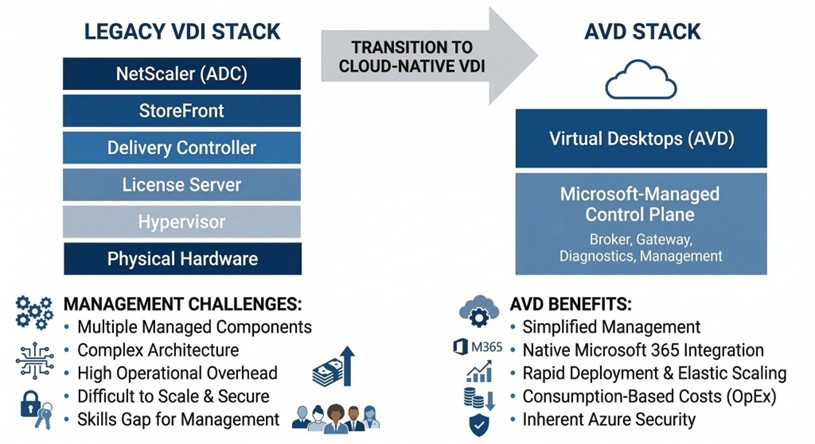
By collapsing these layers, your IT resources are freed from the cycle of patching and managing infrastructure, allowing them to focus on the desktops and applications that actually drive your business.
How does Microsoft Intune improve device management in an AVD environment?
Managing a workforce that uses both physical laptops and virtual desktops can often lead to management silos. Microsoft Intune bridges this gap, allowing you to manage every endpoint from a single, unified interface.
- Unified Endpoint Management: Instead of using different tools for physical and virtual machines, your IT team can deploy policies, applications, and security updates to everything at once. This consistency reduces the risk of human error and ensures a uniform experience for your employees.
- Zero Trust Security: Intune allows you to implement Conditional Access. This means the system checks the health of the device and the identity of the user before allowing them into the virtual desktop. If a device is unpatched or a login looks suspicious, access is blocked automatically.
- Simplified Policy Deployment: You can move away from complex, on-premises Group Policies (GPOs) and use modern, cloud-based configurations. This makes it much faster to onboard new employees or update security settings across the entire company.
To help you visualise the shift in management philosophy, the table below compares the traditional approach used in many Citrix or Horizon environments with the modern standard provided by Microsoft Intune.
Comparison of Legacy GPO Management vs. Modern Intune Management:
| Legacy GPO Management (Citrix/On-Prem) | Modern Intune Management (AVD) | |
| Network Requirement | Requires VPN or corporate network line of sight. | Cloud-native; works anywhere with an internet connection. |
| Device Visibility | Limited; often only updates when devices are “on-net”. | Real-time visibility of both physical and virtual endpoints. |
| Security Model | Perimeter-based (Trust everything inside the network). | Zero Trust (Verify every identity and device health status). |
| Update Speed | Can be slow; dependent on replication cycles. | Instant deployment of policies and security patches. |
| User Experience | Settings can be inconsistent across different devices. | Uniform experience across laptops, mobiles, and AVD. |
This transition to Intune ensures that your IT team spends less time troubleshooting connectivity issues and more time focused on high-value projects that drive your business forward.
What are the risks of staying with legacy VDI solutions?
While it may feel safer to stick with a familiar system, remaining on legacy platforms can create long-term strategic risks for your business.
- Technological Stagnation: Third-party providers often struggle to keep up with the rapid pace of Microsoft’s cloud updates. By staying on a legacy platform, you may find that new Windows features or security enhancements aren’t available to your users until months after they’ve been released.
- The Skills Gap: Finding and retaining engineers with deep expertise in complex legacy VDI environments is becoming increasingly difficult and expensive. Conversely, Azure skills are more widespread, making it easier to find the talent needed to support your business.
- Security Debt: Every extra layer of third-party software in your stack is another potential point of failure. Maintaining legacy gateways and controllers creates a larger attack surface that requires constant, manual patching.
How do Cloud Direct and Nerdio work together to improve your AVD experience?
Moving to the cloud doesn’t mean you have to go it alone. While Azure provides the foundation, achieving the best performance requires a combination of expert strategy and powerful automation. This is where the partnership between Cloud Direct and Nerdio becomes essential.
Cloud Direct acts as your strategic architect, designing a secure Azure environment that fits your specific business needs. However, managing a high-performance virtual desktop environment at scale can be complex. To solve this, Cloud Direct uses Nerdio Manager as the optimisation engine behind the scenes. Nerdio is a specialised management platform that automates the deployment and scaling of AVD, ensuring that the system is always running at peak efficiency without your team having to manage the technical minutiae.
How does Cloud Direct help with this transition?
Cloud Direct is an Azure Expert MSP (Managed Service Provider) with a proven track record of helping businesses navigate complex transitions. We don’t just provide a technical lift and shift; we provide a comprehensive service replacement strategy.
As your trusted guide, Cloud Direct takes the time to understand your business workflows to ensure that your new environment is built for productivity from day one. Crucially, we provide 24/7 managed support. This means that your virtual environment is monitored and maintained around the clock, providing you with peace of mind that your employees will always have access to the tools they need to stay productive, regardless of where they are working.
How does Nerdio support cost efficiency?
One of the biggest concerns for any business moving to the cloud is “bill shock”—the fear that costs will spiral if virtual machines are left running unnecessarily. Cloud Direct solves this by leveraging Nerdio’s powerful automation features.
Nerdio addresses cost efficiency through several key mechanisms:
- Intelligent Auto-Scaling: Nerdio automatically detects when users log off and powers down unused virtual machines. During the evening or weekends, your Azure footprint shrinks to the bare minimum, and as your team starts work in the morning, Nerdio pre-stages the desktops so they are ready the moment they are needed.
- Storage Optimisation: Even when a machine is turned off, the storage it uses costs money. Nerdio can automatically swap expensive high-performance disks for cheaper storage when a machine is shut down, potentially saving an additional 20-30% on storage costs.
- Clear Financial Visibility: Nerdio provides granular reporting that shows exactly who is using what and how much it costs. This allows Cloud Direct to provide you with accurate forecasting and ensure you are getting the highest possible return on your investment.
By combining the strategic expertise of Cloud Direct with the automation power of Nerdio, your business can move away from the limitations of Citrix or Horizon and into a modern, secure, and highly cost-effective digital workspace.
What’s Next
Find out more about how you could transition to AVD and if it’s the right decision for you by signing up to our upcoming webinar “Modernising VDI: The Practical Path to AVD With Nerdio & Cloud Direct” at 10:00am on the 29th of April.