


The concept of the Agent Ready Enterprise is more than just a buzzword; it represents a fundamental shift in how businesses operate. As we move beyond simple chatbots into an era of autonomous AI agents, your underlying infrastructure becomes your most critical asset.
What is an Agent Ready Enterprise?
An Agent Ready Enterprise is an organisation that has modernised its digital foundation to fully support and secure AI-driven automation. While legacy systems often act as bottlenecks, a modern environment allows AI agents to interact seamlessly with your data and applications to drive productivity.
- Infrastructure Maturity: Moving away from rigid, on-premises hardware to elastic, cloud-native services.
- Data Accessibility: Ensuring business data is hosted in a way that AI tools can access it securely without compromising privacy.
- Automation Integration: Having the ability to deploy Agentic workflows that can handle routine admin, scheduling, or data analysis.
How the foundation stack powers your business: To transition to an AI-led model, your infrastructure must be viewed as a cohesive stack where each layer supports the one above it, as shown here:
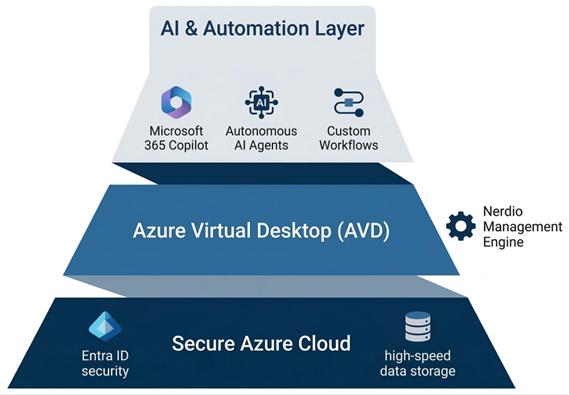
- The Secure Azure Cloud (Foundation): Everything starts with your data. By hosting your environment in Azure, you benefit from enterprise-grade security with Entra ID and high-speed storage, ensuring your AI agents have a secure, high-performance home to operate within.
- Azure Virtual Desktop (Delivery): This is the engine room where your employees interact with their tools. To prevent this layer from becoming a cost-sink, Nerdio Manager runs invisibly in the background, using automation to ensure the environment is always right-sized and cost-optimised.
- AI & Automation (Innovation): With the foundation and delivery layers stabilised, you can safely deploy Microsoft 365 Copilot, autonomous agents, and custom workflows. This is where the real business value is unlocked, as these tools can now securely access your data through the Azure Virtual Desktop (AVD) interface.
How does Azure Virtual Desktop support my AI journey?
Transitioning to AVD is the first step in aligning your workspace with the Microsoft AI ecosystem. Because AVD is a native service, it places your users and their tools in the exact same environment where Microsoft’s most advanced AI models live.
Can I access Copilot for Azure through AVD?
While AVD provides the virtualised interface, its greatest strength is its proximity to Microsoft’s broader AI tools. When your desktop runs in Azure, your IT team can use Copilot for Azure to manage infrastructure more effectively, while your employees benefit from a workspace designed to integrate with Microsoft 365 Copilot. This proximity reduces latency and ensures that AI-driven features perform reliably across the global network.
How does AVD ensure data sovereignty for AI?
Security is the biggest hurdle for AI adoption. By hosting your workspace in Azure, your business data remains within a protected, compliant boundary. When you deploy AI agents, they interact with your data inside your secure tenant rather than sending information out to public models. This ensures that your intellectual property and customer data remain under your control at all times.
Why is AVD considered a future-proof platform compared to legacy VDI?
Legacy VDI solutions were built for a different era of computing. While they have adapted over time, they often remain bolt-on solutions to the cloud, whereas AVD is built directly into the fabric of Azure.
Does Microsoft innovate faster than legacy VDI providers?
Microsoft operates on a rapid feature release cycle that third-party providers like Citrix or Horizon often struggle to match. New Windows features, security enhancements, and AI integrations are developed for the native Azure environment first. By choosing AVD, you avoid the innovation lag where you have to wait months for a third-party provider to release a compatible update for the latest version of Windows.
Is AVD better integrated with the Microsoft stack?
The synergy between AVD and the rest of the Microsoft Cloud—including Entra ID (formerly Azure AD), Intune, and Microsoft 365—is unmatched. This deep integration means that as Microsoft rolls out the next generation of Agentic features in Windows, your AVD environment is ready to support them from day one. You aren’t managing a complex web of third-party plugins; you are using a unified stack designed to work together.
| Legacy VDI (Citrix/Horizon) | Agent Ready AVD | |
| AI Integration | Limited by third-party middleware | Native access to Azure AI ecosystem |
| Update Velocity | Dependent on vendor compatibility | Immediate access to Windows updates |
| Data Boundary | Often spans multiple platforms | Unified within Microsoft Azure |
| Future Readiness | Focus on maintenance | Focus on innovation and AI |
How does Nerdio use AI to optimise cloud costs?
One of the primary benefits of an Agent Ready Enterprise is the ability to use automation to eliminate waste. This is where Nerdio acts as the powerful engine behind your AVD environment, using intelligent algorithms to manage your resources.
Nerdio Manager Copilot is an in-console AI tool with two capabilities, both powered by AI. It augments a LLM with Nerdio knowledge articles to answer admin queries and generate PowerShell scripts for Azure and Windows automation.
Nerdio Advisor analyses environments for cost and performance, recommending VM sizing, scheduling changes, and comparing AVD and Windows 365 costs, licences, and Cloud PC sizing before any resources are committed.
How does predictive auto-scaling reduce my bill?
Nerdio doesn’t just react to user logins; it uses intelligent patterns to predict when your team will start their day. AI-Powered Auto-scale Recommendations, introduced in version 6.5, analyse the deployment continuously and surface proactive configuration suggestions for efficiency, operating alongside rather than replacing the native AVD rule-based scaling engine.
Can AI-driven automation handle backend tasks?
Nerdio provides agentless automation through Scripted Action Groups and Scripted Sequences. Scripted Actions use Windows Scripts and Azure Runbooks to automate VM and Azure tasks, supporting scheduling, bulk execution, and creation of reusable action groups. Scripted Sequences deliver graphical, ordered task orchestration for Intune‑enrolled devices, including Windows 365 Cloud PCs, offering SCCM‑style task sequencing and step-by-step execution logs rather than the binary pass or fail status native Intune provides.
Why is an Azure Expert MSP essential for becoming Agent Ready?
The journey to an Agent Ready Enterprise involves more than just a technical migration; it requires a shift in strategy. Cloud Direct acts as your trusted guide, ensuring that your transition to AVD serves as a springboard for future growth.
How does Cloud Direct help me navigate the AI landscape?
Your journey toward a more automated future requires a strategic partner who understands the full lifecycle of cloud transformation. Cloud Direct supports you at every milestone of this evolution:
- Architecting the Transition: We manage the move from legacy VDI providers to Azure Virtual Desktop, ensuring your new environment is built on best practices for performance and cost-efficiency from day one.
- Building the Foundation: Once you are in the cloud, we focus on infrastructure maturity. This involves securing your data silos and refining your governance models so that your systems are technically primed to host intelligent, autonomous tools, preventing costly false starts.
- Identifying High-Impact AI: Rather than a one-size-fits-all approach, we act as your innovation consultants. We help you move beyond the hype to pinpoint exactly where AI Agents and Copilot integrations will solve your specific business challenges and accelerate your organisational growth.
How does Nerdio future-proof your investment?
By choosing AVD and Nerdio, your business is no longer stuck on a legacy platform. Instead, you are on a path of continuous improvement, supported by a platform that evolves as fast as the cloud itself.
- Co-Innovation & Early Access: Nerdio operates as more than just a vendor; they are a strategic co-engineering partner to Microsoft. Led by the former visionary behind Windows 365 and AVD, Nerdio receives early access to private previews of Azure features, often influencing the very APIs that power the platform. Their roadmap is uniquely customer-led, featuring a community-voting system where users directly shape the product, ensuring that the engine you rely on is built to solve your real-world challenges before they even reach the wider market.
- Scalable Innovation: As Azure introduces new Agentic capabilities, Nerdio provides the management layer you need to deploy them at scale across your entire workforce.
- Long-Term ROI: The combination of Cloud Direct’s strategy and Nerdio’s automation ensures that your IT environment is not just a cost centre, but a resilient platform for future innovation.
Transitioning from Citrix or Horizon to AVD is the definitive move for any business looking to lead in the age of AI. It removes the architectural weight of the past and replaces it with a secure, automated, and truly Agent Ready digital workspace.
Are you ready to build your foundation for the future?
Contact us below to talk to an expert about your AVD journey.
Written by Jonathan Moore, Azure Architect at Cloud Direct.
In our previous post, we explored why modern businesses are moving away from the “complexity tax” of legacy VDI providers. Once you understand the cost and performance benefits of a cloud-native stack, the next logical question is: how do you actually get there without disrupting your daily operations?
Transitioning from Citrix or Omnissa Horizon to Azure Virtual Desktop (AVD) is not a simple lift-and-shift migration. Instead, it is a service replacement. This means we aren’t just moving old problems to a new cloud; we are replacing a legacy way of working with a modern, high-performance platform. This shift serves as the critical bridge to becoming an Agent Ready Enterprise, where your infrastructure is primed to support the next generation of AI-driven automation.
What does a full production rollout of Azure Virtual Desktop look like?
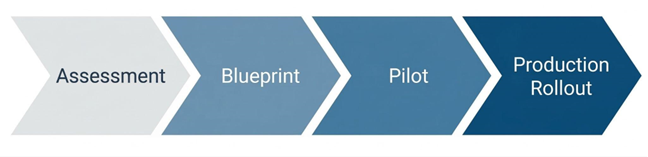
A successful move to AVD requires a structured approach that prioritises user experience and data integrity. By following a proven framework, you can decommission your legacy hardware with total confidence.
- Environment Assessment: Before a single file is moved, we conduct a comprehensive audit of your existing Citrix or Horizon setup. This identifies which applications are being used, how much processing power your users actually need, and where your data currently lives.
- The Blueprint Phase: Cloud Direct Architects will design your Azure Landing Zone. This is the foundation of your new environment, ensuring that networking, security, and identity management (via Microsoft Entra ID) are configured to enterprise standards from the start.
- Pilot Validation: We don’t move everyone at once. We start with a Pilot group—a subset of users who test the new environment. This allows us to ensure application parity, meaning your team can do everything they did before, only faster and more securely.
- Full Production Rollout: Once validated, we execute a structured replacement. Users are transitioned to the AVD platform in phases, ensuring that support teams are available to help with any day-one questions, resulting in minimal friction for the workforce.
How does Cloud Direct guide the rollout process?
Moving your entire desktop infrastructure can feel like a daunting technical hurdle. Cloud Direct acts as your strategic partner, translating complex Azure requirements into clear business outcomes.
What is a Service Replacement Strategy?
Rather than treating this as a one-off IT project, Cloud Direct manages the transition as a professional service. We focus on mitigating risk by ensuring your legacy environment and your new AVD environment can coexist during the transition. This ‘parallel running’ ensures that if any issues arise, your team remains productive on the old system while we fine-tune the new one.
How do you handle Application Modernisation?
One of the biggest hurdles in any VDI move is legacy software. Our experts advise on whether to virtualise these apps using modern tools like App Attach or transition them to cloud-native, SaaS alternatives. This ensures your new environment isn’t cluttered with outdated delivery methods.
Is there funding available for this transition?
As an Azure Expert MSP, Cloud Direct can help you navigate various Microsoft investment programmes. These initiatives are often available to help offset the initial costs of assessment and migration, making the move to AVD even more financially attractive for your business.
How does Nerdio simplify the rollout and management?
If Azure is the engine, Nerdio is the sophisticated dashboard that allows us to drive it efficiently. Cloud Direct leverages Nerdio Manager to automate the technical heavy lifting that usually makes VDI migrations slow and expensive.
- Rapid Image Management: In legacy systems, updating a Golden Image (the template for your desktops) could take hours. With Nerdio, Cloud Direct can create, test, and deploy updated desktop templates across your entire company with just a few clicks.
- User Profile Resilience: We use Nerdio to manage FSLogix, the technology that handles user profiles. This ensures that when a user logs in, their files, settings, and Outlook signatures are there instantly, regardless of which virtual machine they are assigned to.
- Direct Automated Deployment: Instead of building your environment piece by piece, Cloud Direct uses Nerdio to deploy fully functional host pools and session hosts directly into your Azure subscription. This automation eliminates human error and ensures your infrastructure is ready in days, not months.[H2] How does Nerdio enhance operational efficiency?
Once the rollout is complete, the focus shifts from getting it live to keeping it perfect. Nerdio provides Self-Healing capabilities that proactively maintain the health of your virtual desktop environment.
Can the system fix itself?
Nerdio’s automated troubleshooting can detect common session errors—like a hung desktop or a connectivity glitch—and resolve them automatically without a human ever needing to raise a support ticket. This Self-Healing approach drastically reduces downtime.
How do we monitor performance?
Through the Nerdio interface, Cloud Direct gains real-time insights into the actual user experience. We can see if a specific department is experiencing lag or if an application is consuming too many resources, allowing us to proactively tune the environment before your employees even notice a problem.
| Feature | Legacy VDI (Citrix/Horizon) | AVD with Nerdio & Cloud Direct |
| Updates | Manual, time-consuming patching | Native automated image updates or through integration with Intune image management |
| Scaling | Rigid; hardware must be always-on | Intelligent Auto-scaling (Pay-as-you-use) |
| Support | Reactive; wait for things to break | Proactive; Self-Healing & 24/7 Monitoring |
| Onboarding | Can take days for new hardware | Near-instant virtual provisioning |
How does Cloud Direct ensure long-term success?
The launch date is just the beginning of our partnership. Cloud Direct provides a continuous optimisation service to ensure your investment stays secure and performant as your business evolves.
Why is 24/7 Managed Excellence important?
Technology doesn’t sleep, and neither does our support. Cloud Direct can provide 24/7 managed support to ensure business continuity. Whether it’s a security patch that needs applying at 2 AM or a scaling adjustment for a new global team, our experts are always on hand.
What is a Strategic IT Roadmap?
The cloud moves fast. We don’t just set and forget your AVD environment. We meet with you regularly to discuss how new Azure features—particularly those involving AI and automation—can be integrated into your workspace. Then, we ensure your IT environment isn’t just a cost centre, but a platform for future growth.
What’s Next
Find out more about how you could transition to AVD and if it’s the right decision for you by signing up to our upcoming webinar “Modernising VDI: The Practical Path to AVD With Nerdio & Cloud Direct” at 10:00 am on the 29th of April 2026.
Written by Jonathan Moore, Azure Architect at Cloud Direct.
The world of remote work has changed significantly, and many businesses are finding that the virtual desktop solutions they relied on for years are no longer keeping pace. If you’re currently managing a legacy environment like Citrix or Horizon, you may be facing rising costs and increasing complexity. Switching to Azure Virtual Desktop (AVD) is often the most direct path to modernising your infrastructure while reducing overheads.
Why should my business consider moving from Citrix and Horizon to Azure Virtual Desktop?
For many organisations, the decision to move is driven by the need for a more agile, cost-effective platform. Azure Virtual Desktop is built specifically for the cloud, which offers several distinct advantages over traditional VDI (Virtual Desktop Infrastructure) providers.
- Cost Efficiency: Legacy Citrix and Horizon environments often require upfront investment in hardware or complex per-user licensing. AVD operates on a flexible, consumption-based model. You only pay for the cloud resources you actually use, which can significantly lower your total cost of ownership (TCO).
- Reduced Infrastructure Complexity: Legacy VDI typically requires a multi-layered stack, including NetScalers, StoreFronts, and Delivery Controllers. AVD simplifies this by providing a Microsoft-managed control plane. This means fewer components for your IT team to maintain, patch, and secure.
- The Best Microsoft 365 Experience: Because AVD is a native Microsoft service, it is uniquely optimised for applications like Teams and Outlook. Beyond performance, there is a major licensing advantage: most businesses already using Microsoft 365 (such as Business Premium or E3/E5 plans) already own the rights to run Windows 10 or 11 Enterprise. By switching to AVD, you can utilise “Windows 10/11 Multi-session” technology. This allows multiple users to share a single virtual machine simultaneously, drastically reducing your cloud footprint and eliminating the need for additional, expensive VDI or Remote Desktop Services (RDS) licenses.
While the cost and performance benefits are clear, the most significant shift is the reduction in architectural weight. Moving to AVD allows you to shed the burden of maintaining complex middleware and proprietary hardware layers.
The following diagram illustrates how transitioning to a cloud-native stack removes the “complexity tax” associated with legacy VDI, shifting the maintenance of the control plane entirely to Microsoft.
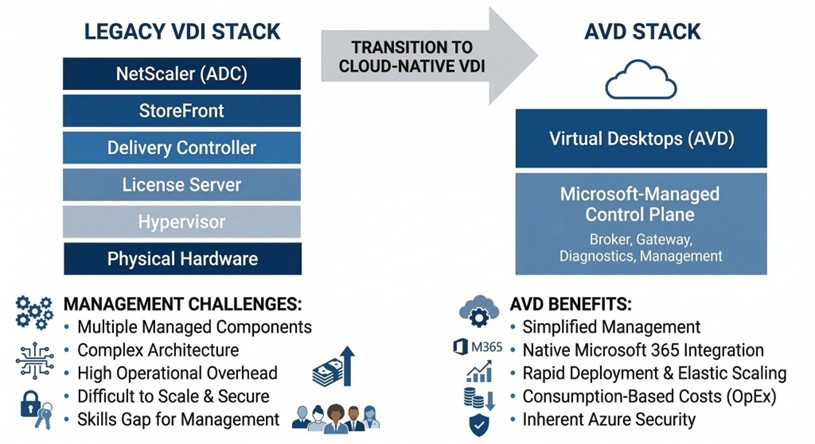
By collapsing these layers, your IT resources are freed from the cycle of patching and managing infrastructure, allowing them to focus on the desktops and applications that actually drive your business.
How does Microsoft Intune improve device management in an AVD environment?
Managing a workforce that uses both physical laptops and virtual desktops can often lead to management silos. Microsoft Intune bridges this gap, allowing you to manage every endpoint from a single, unified interface.
- Unified Endpoint Management: Instead of using different tools for physical and virtual machines, your IT team can deploy policies, applications, and security updates to everything at once. This consistency reduces the risk of human error and ensures a uniform experience for your employees.
- Zero Trust Security: Intune allows you to implement Conditional Access. This means the system checks the health of the device and the identity of the user before allowing them into the virtual desktop. If a device is unpatched or a login looks suspicious, access is blocked automatically.
- Simplified Policy Deployment: You can move away from complex, on-premises Group Policies (GPOs) and use modern, cloud-based configurations. This makes it much faster to onboard new employees or update security settings across the entire company.
To help you visualise the shift in management philosophy, the table below compares the traditional approach used in many Citrix or Horizon environments with the modern standard provided by Microsoft Intune.
Comparison of Legacy GPO Management vs. Modern Intune Management:
| Legacy GPO Management (Citrix/On-Prem) | Modern Intune Management (AVD) | |
| Network Requirement | Requires VPN or corporate network line of sight. | Cloud-native; works anywhere with an internet connection. |
| Device Visibility | Limited; often only updates when devices are “on-net”. | Real-time visibility of both physical and virtual endpoints. |
| Security Model | Perimeter-based (Trust everything inside the network). | Zero Trust (Verify every identity and device health status). |
| Update Speed | Can be slow; dependent on replication cycles. | Instant deployment of policies and security patches. |
| User Experience | Settings can be inconsistent across different devices. | Uniform experience across laptops, mobiles, and AVD. |
This transition to Intune ensures that your IT team spends less time troubleshooting connectivity issues and more time focused on high-value projects that drive your business forward.
What are the risks of staying with legacy VDI solutions?
While it may feel safer to stick with a familiar system, remaining on legacy platforms can create long-term strategic risks for your business.
- Technological Stagnation: Third-party providers often struggle to keep up with the rapid pace of Microsoft’s cloud updates. By staying on a legacy platform, you may find that new Windows features or security enhancements aren’t available to your users until months after they’ve been released.
- The Skills Gap: Finding and retaining engineers with deep expertise in complex legacy VDI environments is becoming increasingly difficult and expensive. Conversely, Azure skills are more widespread, making it easier to find the talent needed to support your business.
- Security Debt: Every extra layer of third-party software in your stack is another potential point of failure. Maintaining legacy gateways and controllers creates a larger attack surface that requires constant, manual patching.
How do Cloud Direct and Nerdio work together to improve your AVD experience?
Moving to the cloud doesn’t mean you have to go it alone. While Azure provides the foundation, achieving the best performance requires a combination of expert strategy and powerful automation. This is where the partnership between Cloud Direct and Nerdio becomes essential.
Cloud Direct acts as your strategic architect, designing a secure Azure environment that fits your specific business needs. However, managing a high-performance virtual desktop environment at scale can be complex. To solve this, Cloud Direct uses Nerdio Manager as the optimisation engine behind the scenes. Nerdio is a specialised management platform that automates the deployment and scaling of AVD, ensuring that the system is always running at peak efficiency without your team having to manage the technical minutiae.
How does Cloud Direct help with this transition?
Cloud Direct is an Azure Expert MSP (Managed Service Provider) with a proven track record of helping businesses navigate complex transitions. We don’t just provide a technical lift and shift; we provide a comprehensive service replacement strategy.
As your trusted guide, Cloud Direct takes the time to understand your business workflows to ensure that your new environment is built for productivity from day one. Crucially, we provide 24/7 managed support. This means that your virtual environment is monitored and maintained around the clock, providing you with peace of mind that your employees will always have access to the tools they need to stay productive, regardless of where they are working.
How does Nerdio support cost efficiency?
One of the biggest concerns for any business moving to the cloud is “bill shock”—the fear that costs will spiral if virtual machines are left running unnecessarily. Cloud Direct solves this by leveraging Nerdio’s powerful automation features.
Nerdio addresses cost efficiency through several key mechanisms:
- Intelligent Auto-Scaling: Nerdio automatically detects when users log off and powers down unused virtual machines. During the evening or weekends, your Azure footprint shrinks to the bare minimum, and as your team starts work in the morning, Nerdio pre-stages the desktops so they are ready the moment they are needed.
- Storage Optimisation: Even when a machine is turned off, the storage it uses costs money. Nerdio can automatically swap expensive high-performance disks for cheaper storage when a machine is shut down, potentially saving an additional 20-30% on storage costs.
- Clear Financial Visibility: Nerdio provides granular reporting that shows exactly who is using what and how much it costs. This allows Cloud Direct to provide you with accurate forecasting and ensure you are getting the highest possible return on your investment.
By combining the strategic expertise of Cloud Direct with the automation power of Nerdio, your business can move away from the limitations of Citrix or Horizon and into a modern, secure, and highly cost-effective digital workspace.
What’s Next
Find out more about how you could transition to AVD and if it’s the right decision for you by signing up to our upcoming webinar “Modernising VDI: The Practical Path to AVD With Nerdio & Cloud Direct” at 10:00am on the 29th of April.