


For nonprofits, data is deeply personal. It represents donors who place their trust in you, beneficiaries whose circumstances must be protected, and partners and regulators who expect the highest standards of care. As organisations explore AI tools like Microsoft Copilot, that responsibility intensifies.
AI’s real risk lies in what it can access.
AI exposes what you don’t know about your data
Most non-profits believe they have a reasonable grip on their data estate. In reality, governance gaps are common: legacy SharePoint sites, over‑shared folders, archived spreadsheets, and permissions that have been inherited rather than intentionally designed.
Microsoft Purview is designed to surface those “unknown unknowns”.
By automatically mapping data across Microsoft 365 and connected systems, Purview gives organisations a clear view of:
- What data exists
- Where sensitive information lives
- How it’s classified, shared, and retained
This visibility is often the first breakthrough. It allows organisations to move from assumption to understanding.
Building strong data governance without slowing teams down
Governance is often seen as restrictive, but when implemented well, it does the opposite. Microsoft Purview creates a consistent, automated governance layer that supports both security and productivity.
Through sensitivity labels, retention policies, and data loss prevention, Microsoft Purview ensures protection travels with the data itself, wherever it’s stored or shared. This gives teams the confidence to use information appropriately, rather than relying on workarounds like password‑protected files or manual checks.
For leadership teams and trustees, Purview also provides something increasingly essential: demonstrable evidence of due care. As expectations rise around GDPR enforcement and emerging AI standards, informal data practices are no longer enough.
Why Purview must come before AI tools like Copilot
Microsoft Copilot is remarkably effective at surfacing information. That’s precisely why strong data governance is a prerequisite.
Copilot respects user permissions, but many organisations suffer from permission sprawl. Files innocently set to “Everyone except external users” years ago can suddenly become highly visible the moment AI is introduced.
Purview provides the context Copilot needs. By ensuring data is properly classified and protected, organisations can confidently deploy AI knowing insights are drawn from trusted, well‑governed sources.
A practical path to adoption
Adoption of Microsoft Purview usually follows either a Purview-first or use-case-led approach. Introducing Purview-first, supports the overall governance and visibility across your entire data estate. The drawback is this approach requires greater upfront investment ahead of business outcomes being realised. A use-case-led approach can be utilised to gain easier buy-in from senior leadership as it involves integrating adoption with a prioritised AI project.
Our guide explores these approaches, and provides you with an easy to follow roadmap for Purview implementation.
Download the guide
If your organisation is exploring AI and wants a clearer understanding of how Microsoft Purview underpins safe, responsible innovation, our guide dives deeper into:
- Why Purview is foundational to AI readiness
- Common data risks nonprofits underestimate
- How Purview and Copilot work together
- A phased, realistic roadmap to implementation
Employee use of AI agents is inevitable. But for those in senior IT roles, the challenge is not whether to adopt AI, but how to do it safely and effectively. We examine the key issues and show how a well-structured assessment can accelerate AI readiness.
Do you see the strategic importance of AI, feel pressurised to ‘do something’, but remain unsure how to operationalise it safely and at scale? If so, you’re not alone.
Although IT hesitancy reflects a real and valid awareness of the risks and inherent ambiguities, the pressures to act will only increase.
Not a normal rollout
Part of the challenge is that AI isn’t just another technology rollout – in many ways it’s different:
- Employees can access and synthesise vast amounts of organisational data
- Non-developers can create their own automations and agents
- Outputs are dynamic, not deterministic, and
- Value comes from thousands of small improvements rather than one big system.
This changes the way we need to govern and manage the software, as well as the way employees use it – increasingly they will create and delegate work to it.
Why Agentic AI is daunting
Talking to IT leaders the same concerns come up repeatedly: data risks, governance needs, unclear readiness, and pressure to act.
There are several very real areas of uncertainty that can easily become barriers to action.
Security and data risks
Tools like Microsoft 365 Copilot have the capability to surface organisational data in new ways, raising questions around data accessibility and visibility:
- What can Copilot access?
- Will sensitive data leak?
- Is our permissions model strong enough?
Governance shortcomings
Unlike traditional IT systems, agentic AI brings with it non-deterministic outputs, employee-built agents, and dynamic workflows. This is prompting IT leaders to ask:
- Who owns these agents?
- What’s allowed and what’s not?
- How do we audit decisions?
Most existing governance models haven’t anticipated these sorts of questions.
The shift to ‘citizen AI development’
Tools like Microsoft Copilot Studio allow non-developers to build agents. While this creates huge opportunity, it lessens central control and it raises questions around how this should be handled.
Some have likened it to the early anxiety around Power Platform adoption, but this comparison risks underplaying the potentially far greater consequences.
Who is responsible for AI?
While AI technologies typically fall under IT’s remit, AI as a strategic initiative may not. Should it be driven by Digital, by the business, or shared? If so, how should ownership be structured? How should adoption be scaled?
ROI is hard to quantify
Where budgets are linked to ROI, at least initially, the returns can be hard to quantify. The benefits are likely to be widely dispersed, gains are incremental, and the real value comes from many small improvements.
With so many unanswered questions and no clear starting point, there’s a danger of inactivity.
Gaining the confidence to press ‘Go’
For many, the fundamental problem isn’t one of technology. Most organisations already have the foundations in place with Microsoft 365, SharePoint and Teams data, identity and access controls, and sound security and governance. While these may need building on, it’s not the technology that’s holding IT back: it’s a lack of clarity:
- Where are the risks?
- What is needed to safely proceed?
- What needs fixing first?
- How do we justify investment and timing?
This is where a structured readiness assessment matters.
How a Microsoft 365 Copilot Readiness Assessment will help
A well-designed Copilot readiness assessment will provide clarity and move you from uncertainty to informed action.
Done properly, it will deliver five critical outcomes:
- Reduced adoption risk
By identifying where data exposure, access controls or governance gaps exist, these can be proactively addressed.
- An objective, documented view of readiness
It provides an evidence-based assessment of Copilot readiness, to enable confident go/no-go or phased rollout decisions. It will also help to combat ill-considered demands to ‘just do it’.
- Prioritised, actionable recommendations
Not everything needs fixing, or fixing now. The assessment focuses effort on the areas that will have the greatest impact on risk reduction and value realisation.
- Alignment of IT, security, and the business
Through structured discovery and analysis, it creates a shared understanding, reducing stakeholder friction and accelerating decision-making.
- Clarity without an open-ended commitment
Delivered as a fixed-price, time-bound engagement with clear governance and sign-off, it gives meaningful outcomes without launching a large, undefined programme.
The risks of delay
A recent MIT report reveals that over 90% of employees are already using gateway AI tools like ChatGPT. Although only 40% of companies had purchased licenses.
Increasingly, employees will have friends that are progressing beyond this to use generative AI to improve their work.
The implication is clear: if you don’t provide approved tools, guidance, and safe environments, employees will explore external AI tools and build unmanaged solutions.
It’s critical that the organisation ensures AI use happens in the right way.
Regaining the initiative
Successful organisations aren’t treating AI as a single project, but as the introduction of a capability to be progressively developed and scaled.
That starts with:
- Understanding your current state
- Developing a clear view of what needs to be addressed
- Enabling early use cases, and
- Building confidence across the organisation.
A structured readiness assessment doesn’t just tell you where you are — it gives you a defensible, practical path forward.
And right now, that’s exactly what many IT leaders need.
Learn more about Cloud Direct’s Microsoft 365 Copilot Readiness Assessment.
Request a call with one of our experts using the form below, and find out how we can remove AI uncertainty and provide you with a clear route to adoption.
Written by Jonathan Moore, Azure Architect at Cloud Direct.
In our previous post, we explored why modern businesses are moving away from the “complexity tax” of legacy VDI providers. Once you understand the cost and performance benefits of a cloud-native stack, the next logical question is: how do you actually get there without disrupting your daily operations?
Transitioning from Citrix or Omnissa Horizon to Azure Virtual Desktop (AVD) is not a simple lift-and-shift migration. Instead, it is a service replacement. This means we aren’t just moving old problems to a new cloud; we are replacing a legacy way of working with a modern, high-performance platform. This shift serves as the critical bridge to becoming an Agent Ready Enterprise, where your infrastructure is primed to support the next generation of AI-driven automation.
What does a full production rollout of Azure Virtual Desktop look like?
A successful move to AVD requires a structured approach that prioritises user experience and data integrity. By following a proven framework, you can decommission your legacy hardware with total confidence.
- Environment Assessment: Before a single file is moved, we conduct a comprehensive audit of your existing Citrix or Horizon setup. This identifies which applications are being used, how much processing power your users actually need, and where your data currently lives.
- The Blueprint Phase: Cloud Direct Architects will design your Azure Landing Zone. This is the foundation of your new environment, ensuring that networking, security, and identity management (via Microsoft Entra ID) are configured to enterprise standards from the start.
- Pilot Validation: We don’t move everyone at once. We start with a Pilot group—a subset of users who test the new environment. This allows us to ensure application parity, meaning your team can do everything they did before, only faster and more securely.
- Full Production Rollout: Once validated, we execute a structured replacement. Users are transitioned to the AVD platform in phases, ensuring that support teams are available to help with any day-one questions, resulting in minimal friction for the workforce.
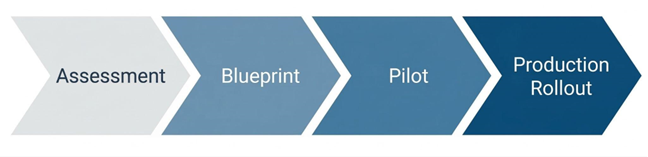
How does Cloud Direct guide the rollout process?
Moving your entire desktop infrastructure can feel like a daunting technical hurdle. Cloud Direct acts as your strategic partner, translating complex Azure requirements into clear business outcomes.
What is a Service Replacement Strategy?
Rather than treating this as a one-off IT project, Cloud Direct manages the transition as a professional service. We focus on mitigating risk by ensuring your legacy environment and your new AVD environment can coexist during the transition. This ‘parallel running’ ensures that if any issues arise, your team remains productive on the old system while we fine-tune the new one.
How do you handle Application Modernisation?
One of the biggest hurdles in any VDI move is legacy software. Our experts advise on whether to virtualise these apps using modern tools like App Attach or transition them to cloud-native, SaaS alternatives. This ensures your new environment isn’t cluttered with outdated delivery methods.
Is there funding available for this transition?
As an Azure Expert MSP, Cloud Direct can help you navigate various Microsoft investment programmes. These initiatives are often available to help offset the initial costs of assessment and migration, making the move to AVD even more financially attractive for your business.
How does Nerdio simplify the rollout and management?
If Azure is the engine, Nerdio is the sophisticated dashboard that allows us to drive it efficiently. Cloud Direct leverages Nerdio Manager to automate the technical heavy lifting that usually makes VDI migrations slow and expensive.
- Rapid Image Management: In legacy systems, updating a Golden Image (the template for your desktops) could take hours. With Nerdio, Cloud Direct can create, test, and deploy updated desktop templates across your entire company with just a few clicks.
- User Profile Resilience: We use Nerdio to manage FSLogix, the technology that handles user profiles. This ensures that when a user logs in, their files, settings, and Outlook signatures are there instantly, regardless of which virtual machine they are assigned to.
- Direct Automated Deployment: Instead of building your environment piece by piece, Cloud Direct uses Nerdio to deploy fully functional host pools and session hosts directly into your Azure subscription. This automation eliminates human error and ensures your infrastructure is ready in days, not months.[H2] How does Nerdio enhance operational efficiency?
Once the rollout is complete, the focus shifts from getting it live to keeping it perfect. Nerdio provides Self-Healing capabilities that proactively maintain the health of your virtual desktop environment.
Can the system fix itself?
Nerdio’s automated troubleshooting can detect common session errors—like a hung desktop or a connectivity glitch—and resolve them automatically without a human ever needing to raise a support ticket. This Self-Healing approach drastically reduces downtime.
How do we monitor performance?
Through the Nerdio interface, Cloud Direct gains real-time insights into the actual user experience. We can see if a specific department is experiencing lag or if an application is consuming too many resources, allowing us to proactively tune the environment before your employees even notice a problem.
| Feature | Legacy VDI (Citrix/Horizon) | AVD with Nerdio & Cloud Direct |
| Updates | Manual, time-consuming patching | Native automated image updates or through integration with Intune image management |
| Scaling | Rigid; hardware must be always-on | Intelligent Auto-scaling (Pay-as-you-use) |
| Support | Reactive; wait for things to break | Proactive; Self-Healing & 24/7 Monitoring |
| Onboarding | Can take days for new hardware | Near-instant virtual provisioning |
How does Cloud Direct ensure long-term success?
The launch date is just the beginning of our partnership. Cloud Direct provides a continuous optimisation service to ensure your investment stays secure and performant as your business evolves.
Why is 24/7 Managed Excellence important?
Technology doesn’t sleep, and neither does our support. Cloud Direct can provide 24/7 managed support to ensure business continuity. Whether it’s a security patch that needs applying at 2 AM or a scaling adjustment for a new global team, our experts are always on hand.
What is a Strategic IT Roadmap?
The cloud moves fast. We don’t just set and forget your AVD environment. We meet with you regularly to discuss how new Azure features—particularly those involving AI and automation—can be integrated into your workspace. Then, we ensure your IT environment isn’t just a cost centre, but a platform for future growth.
What’s Next
Find out more about how you could transition to AVD and if it’s the right decision for you by signing up to our upcoming webinar “Modernising VDI: The Practical Path to AVD With Nerdio & Cloud Direct” at 10:00 am on the 29th of April 2026.
AI agents are quickly becoming the digital teammates we never knew we needed. If you’re not sure where to get started, we’ve put together this A–Z Agent Guide to spark your inspiration and show just how versatile agents can be across roles, teams, and industries. From practical, high impact helpers to your personal agony aunts, we’ve got it all covered.
You haven’t begun using agents? No problem, we have recently written a blog on how to build your own. It includes key considerations to ensure you are building agents that are not only increasing your productivity, but that are compliant and grounded within your organisation’s policies.
Whether you’re just starting your AI journey or looking to scale your agent strategy, use this guide to discover what’s possible.
The AI Agent A-Z Index
A – Analyst Agent
Your always in-the-know agent. The Analyst Agent can pull data from across your systems, spot patterns, and serve up clear summaries so you can make decisions based on evidence, not instinct alone. This is a great one to have on hand when a senior leader asks for your latest project results.
B – Branding Agent
The guardian of your brand. Whether you want to ensure your personal brand stays consistent or get through company brand reviews with less feedback, this agent reviews copy and visuals for tone and style, suggesting tweaks so every asset is aligned.
C – Career Coach Agent
Your personal development partner. It can help you map skills to roles, suggest training paths, and provide tailored guidance to help you excel. Use this agent when preparing for performance reviews and potentially secure your next promotion.
D – Data Visualiser Agent
The spreadsheet specialist sidekick. It turns complex datasets into intuitive charts, dashboards, and infographics that stakeholders can understand at a glance.
E – Executive Summary Agent
The TL;DR star. This agent turns long reports, meeting notes, or research papers into concise, high‑impact summaries tailored for decision‑makers. Whether you would like to gain insights from an industry report in a hurry or need to condense information for a company presentation, this agent has your back.
F – Financial Forecaster Agent
Your numbers navigator. This agent builds and updates financial models, forecasts revenue and costs, and highlights variances so finance and business leaders stay aligned.
G – Governance Agent
The rules-and-guardrails specialist. It monitors how agents and tools are being used, checks activity against your policies, and can alert you when something looks offside.
H – HR Management Agent
A digital HR partner for employees and managers. It can answer policy questions, help you find useful employee documents, and guide managers through tricky employee processes.
I – Inventory Management Agent
Your real-time stock scout. It tracks inventory levels, predicts reorder points, and can even draft purchase orders to prevent stockouts or over-ordering. If you manage the merchandise cupboard or employee devices, this agent will give you the availability lowdown in an instant.
J – Justification Agent
Your persuasion partner. When you’re preparing business cases, this agent pulls relevant data, benchmarks, and risks into a clear rationale you can use to impress and quickly gain buy-in from business leaders. You will never go into a meeting unprepared again.
K – Keyword Agent
Your SEO and search whisperer. It generates keyword lists, clusters terms by intent, and suggests optimised copy so your content gets found at the right time by the right people.
L – Language Agent
A multilingual wordsmith. It translates, localises, and rephrases content while keeping your tone of voice consistent across regions and audiences. Your content will never get lost in translation with this agent.
M – Market Reporter Agent
Your always-on market analyst. It scans news, reports, and competitor activity, then summarises implications so you stay ahead of shifts in your industry and sector.
N – Negotiation Coach Agent
A pocket-size negotiation trainer. It helps you plan negotiation strategies, role-play conversations, and suggest talking points and trade-offs before you step into the room.
O – Onboarding Agent
The friendly first-week buddy. The HR or recruiting team can create this agent to help ensure new starters have everything they need to succeed from the beginning. It can walk new employees through key tools, people, and processes, answering common questions.
P – Prompt Coach Agent
Your prompt architect. It teaches you and your teams how to ask better questions and refine prompts, so every agent you use understands you better and performs better. It can also save you time as you’ll receive a more appropriate response faster, rather than trying to get the right response with multiple prompts.
Q – Quality Control Agent
The detail checker. If you’ve got an important presentation coming up and need to ensure no faults can be picked up, this is the agent for you. It reviews content, data, and documents for accuracy, consistency, and compliance with your standards making sure nothing slips.
R – Researcher Agent
A tireless desk researcher. It gathers information from internal and external sources, organises it into structured notes, and highlights key insights and gaps. The good news for Microsoft 365 Copilot users, is the Copilot Research Agent is already configured and ready to use.
S – Survey Agent
Your feedback collector. It designs surveys, suggests questions, analyses responses, and summarises sentiment so you can quickly act on what customers or employees are telling you.
T – Trend Spotter Agent
Your opportunity scout. What’s in vogue? This is the agent that knows. It monitors behaviours, content, and performance over time to spot emerging trends. This can help you get ahead by moving from reactive to proactive.
U – UX Agent
Your user-experience expert. It reviews online journeys, suggests improvements, and summarises user feedback to help teams design smoother, more intuitive experiences for both current customers and new prospects.
V – Vendor Directory Agent
The supplier-savvy one. It maintains an up-to-date view of vendors, contracts, and performance metrics, and can recommend the best-fit supplier for any given need.
W – Writer Agent
Your copy partner. From emails and social posts to proposals and blog drafts, it helps you get from blank page to first draft in minutes. Top tip: when setting up this agent make sure to provide it with a tone of voice using previous materials you have created so that it sounds more like you.
X – Xtra Pair of Hands Agent
A catch-all helper for the everyday grind. From filing notes and summarising meetings to chasing actions and tidying documents, this agent picks up the small tasks that eat up your day. It can even just be a sounding board for when you’re unsure. If there is one agent to rely on, this would be it.
Y – Year-in-Review Agent
Your annual storyteller. It pulls together performance metrics, milestones, customer quotes, and highlights into polished “year in review” summaries for leadership, board, or all-hands meetings.
Z – Zero-Inbox Agent
The inbox declutterer. It categorises, summarises, and drafts replies so you can tame email overload and get closer to that mythical “Inbox Zero”.
In Summary
Hopefully this A–Z Agent Guide has sparked your imagination and shown just how many ways AI agents can support and elevate the work you do. We hope this has inspired your thinking about agents, but don’t feel like you need to use them all at once. Often, just one thoughtfully chosen agent can make a meaningful difference across a team or workflow.
Ready to take the next step?
If you’d like to understand how to implement AI agents effectively across your organisation, from ensuring you have the right data infrastructure in place to identifying high‑value use cases, our experts are here to help. Reach out to the team using the form below.
Or to find out more about our AI agent offering, check out our Copilot Landing Zone Accelerator.
Written by Jonathan Moore, Azure Architect at Cloud Direct.
The world of remote work has changed significantly, and many businesses are finding that the virtual desktop solutions they relied on for years are no longer keeping pace. If you’re currently managing a legacy environment like Citrix or Horizon, you may be facing rising costs and increasing complexity. Switching to Azure Virtual Desktop (AVD) is often the most direct path to modernising your infrastructure while reducing overheads.
Why should my business consider moving from Citrix and Horizon to Azure Virtual Desktop?
For many organisations, the decision to move is driven by the need for a more agile, cost-effective platform. Azure Virtual Desktop is built specifically for the cloud, which offers several distinct advantages over traditional VDI (Virtual Desktop Infrastructure) providers.
- Cost Efficiency: Legacy Citrix and Horizon environments often require upfront investment in hardware or complex per-user licensing. AVD operates on a flexible, consumption-based model. You only pay for the cloud resources you actually use, which can significantly lower your total cost of ownership (TCO).
- Reduced Infrastructure Complexity: Legacy VDI typically requires a multi-layered stack, including NetScalers, StoreFronts, and Delivery Controllers. AVD simplifies this by providing a Microsoft-managed control plane. This means fewer components for your IT team to maintain, patch, and secure.
- The Best Microsoft 365 Experience: Because AVD is a native Microsoft service, it is uniquely optimised for applications like Teams and Outlook. Beyond performance, there is a major licensing advantage: most businesses already using Microsoft 365 (such as Business Premium or E3/E5 plans) already own the rights to run Windows 10 or 11 Enterprise. By switching to AVD, you can utilise “Windows 10/11 Multi-session” technology. This allows multiple users to share a single virtual machine simultaneously, drastically reducing your cloud footprint and eliminating the need for additional, expensive VDI or Remote Desktop Services (RDS) licenses.
While the cost and performance benefits are clear, the most significant shift is the reduction in architectural weight. Moving to AVD allows you to shed the burden of maintaining complex middleware and proprietary hardware layers.
The following diagram illustrates how transitioning to a cloud-native stack removes the “complexity tax” associated with legacy VDI, shifting the maintenance of the control plane entirely to Microsoft.
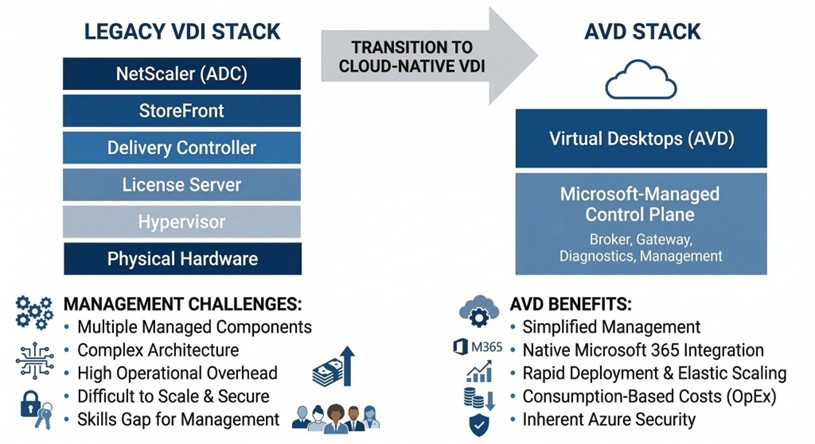
By collapsing these layers, your IT resources are freed from the cycle of patching and managing infrastructure, allowing them to focus on the desktops and applications that actually drive your business.
How does Microsoft Intune improve device management in an AVD environment?
Managing a workforce that uses both physical laptops and virtual desktops can often lead to management silos. Microsoft Intune bridges this gap, allowing you to manage every endpoint from a single, unified interface.
- Unified Endpoint Management: Instead of using different tools for physical and virtual machines, your IT team can deploy policies, applications, and security updates to everything at once. This consistency reduces the risk of human error and ensures a uniform experience for your employees.
- Zero Trust Security: Intune allows you to implement Conditional Access. This means the system checks the health of the device and the identity of the user before allowing them into the virtual desktop. If a device is unpatched or a login looks suspicious, access is blocked automatically.
- Simplified Policy Deployment: You can move away from complex, on-premises Group Policies (GPOs) and use modern, cloud-based configurations. This makes it much faster to onboard new employees or update security settings across the entire company.
To help you visualise the shift in management philosophy, the table below compares the traditional approach used in many Citrix or Horizon environments with the modern standard provided by Microsoft Intune.
Comparison of Legacy GPO Management vs. Modern Intune Management:
| Legacy GPO Management (Citrix/On-Prem) | Modern Intune Management (AVD) | |
| Network Requirement | Requires VPN or corporate network line of sight. | Cloud-native; works anywhere with an internet connection. |
| Device Visibility | Limited; often only updates when devices are “on-net”. | Real-time visibility of both physical and virtual endpoints. |
| Security Model | Perimeter-based (Trust everything inside the network). | Zero Trust (Verify every identity and device health status). |
| Update Speed | Can be slow; dependent on replication cycles. | Instant deployment of policies and security patches. |
| User Experience | Settings can be inconsistent across different devices. | Uniform experience across laptops, mobiles, and AVD. |
This transition to Intune ensures that your IT team spends less time troubleshooting connectivity issues and more time focused on high-value projects that drive your business forward.
What are the risks of staying with legacy VDI solutions?
While it may feel safer to stick with a familiar system, remaining on legacy platforms can create long-term strategic risks for your business.
- Technological Stagnation: Third-party providers often struggle to keep up with the rapid pace of Microsoft’s cloud updates. By staying on a legacy platform, you may find that new Windows features or security enhancements aren’t available to your users until months after they’ve been released.
- The Skills Gap: Finding and retaining engineers with deep expertise in complex legacy VDI environments is becoming increasingly difficult and expensive. Conversely, Azure skills are more widespread, making it easier to find the talent needed to support your business.
- Security Debt: Every extra layer of third-party software in your stack is another potential point of failure. Maintaining legacy gateways and controllers creates a larger attack surface that requires constant, manual patching.
How do Cloud Direct and Nerdio work together to improve your AVD experience?
Moving to the cloud doesn’t mean you have to go it alone. While Azure provides the foundation, achieving the best performance requires a combination of expert strategy and powerful automation. This is where the partnership between Cloud Direct and Nerdio becomes essential.
Cloud Direct acts as your strategic architect, designing a secure Azure environment that fits your specific business needs. However, managing a high-performance virtual desktop environment at scale can be complex. To solve this, Cloud Direct uses Nerdio Manager as the optimisation engine behind the scenes. Nerdio is a specialised management platform that automates the deployment and scaling of AVD, ensuring that the system is always running at peak efficiency without your team having to manage the technical minutiae.
How does Cloud Direct help with this transition?
Cloud Direct is an Azure Expert MSP (Managed Service Provider) with a proven track record of helping businesses navigate complex transitions. We don’t just provide a technical lift and shift; we provide a comprehensive service replacement strategy.
As your trusted guide, Cloud Direct takes the time to understand your business workflows to ensure that your new environment is built for productivity from day one. Crucially, we provide 24/7 managed support. This means that your virtual environment is monitored and maintained around the clock, providing you with peace of mind that your employees will always have access to the tools they need to stay productive, regardless of where they are working.
How does Nerdio support cost efficiency?
One of the biggest concerns for any business moving to the cloud is “bill shock”—the fear that costs will spiral if virtual machines are left running unnecessarily. Cloud Direct solves this by leveraging Nerdio’s powerful automation features.
Nerdio addresses cost efficiency through several key mechanisms:
- Intelligent Auto-Scaling: Nerdio automatically detects when users log off and powers down unused virtual machines. During the evening or weekends, your Azure footprint shrinks to the bare minimum, and as your team starts work in the morning, Nerdio pre-stages the desktops so they are ready the moment they are needed.
- Storage Optimisation: Even when a machine is turned off, the storage it uses costs money. Nerdio can automatically swap expensive high-performance disks for cheaper storage when a machine is shut down, potentially saving an additional 20-30% on storage costs.
- Clear Financial Visibility: Nerdio provides granular reporting that shows exactly who is using what and how much it costs. This allows Cloud Direct to provide you with accurate forecasting and ensure you are getting the highest possible return on your investment.
By combining the strategic expertise of Cloud Direct with the automation power of Nerdio, your business can move away from the limitations of Citrix or Horizon and into a modern, secure, and highly cost-effective digital workspace.
What’s Next
Find out more about how you could transition to AVD and if it’s the right decision for you by signing up to our upcoming webinar “Modernising VDI: The Practical Path to AVD With Nerdio & Cloud Direct” at 10:00am on the 29th of April.
Written by Robin Dadswell, Principal Consultant
When I’m talking to customers one subject is coming up repeatedly. Microsoft Sentinel – and there’s a lot of confusion. Is it being retired? Is it being absorbed into Defender? Do we need new licenses? I want to explain what’s happening, when, and what it means for you.
But before we get into the detail let’s start with some clarity. Microsoft Sentinel is not being retired. Its Security Information and Event Management (SIEM) and Security Orchestration, Automation, and Response (SOAR) capabilities remain fully supported. What is changing is where and how it is managed: Sentinel is moving from the Azure portal into the Microsoft Defender portal as part of Microsoft’s broader ‘unified security operations’ strategy.
For IT teams, SOC analysts, architects and governance leads, here’s what that means both operationally and technically.
Microsoft Sentinel and Defender: in a nutshell
First a quick explanation – please skip ahead to What is and isn’t changing if you’re already familiar with Sentinel and Defender.
Microsoft Defender is Microsoft’s broad threat protection platform. It’s a family of products with each focusing on different aspects of your environment. Such as Defender for Endpoint (laptops, servers), Identity (Active Directory), Cloud (cloud workloads), Office 365 (email and collaboration), and Cloud Apps (SaaS).
Defender sits close to the asset and actively flags or blocks threats. It’s protective and preventative.
Whereas Microsoft Sentinel is a Security Information and Event Management (SIEM) and Security Orchestration, Automation, and Response (SOAR) platform. It works across your environment taking data from Microsoft Defender, firewalls, identity providers, third-party security tools, and cloud platforms (e.g. Azure, and AWS). It collects security logs, correlates signals, detects suspicious patterns, generates incidents for investigation, and automates response workflows.
What is and isn’t changing in the Sentinel move
The major change is the management experience. Sentinel will be exclusively managed through the Microsoft Defender portal – with the Azure Portal being retired.
The aim is to provide a unified security operations experience with a single pane of glass for both SIEM and Extended Detection and Response (XDR). It ensures a consistent user interface for SIEM and XDR with native, cross domain, correlation of incident timeline and evidence.
What is NOT changing:
- Sentinel’s core SIEM functionality remains
- Azure Log Analytics will remain the underlying data platform
- KQL (Kusto Query Language) analytics rules continue to operate
- Sentinel and Defender Access Controls
- Automation playbooks continue to function
- Sentinel licensing remains separate from Defender (see later).
Timelines
- New Sentinel workspaces are already, automatically onboarded to the Defender portal
- July 2026 (a date you may have heard) was the target date for retiring the Azure portal
- 31 March 2027 is the extended deadline for when Sentinel will cease to be supported in the Azure portal.
What IS changing
Underneath the surface there are some noteworthy changes affecting correlation, alert logic, and data schemas. Let’s look at each of these in a bit more detail.
Correlation is more cohesive
Historically, Sentinel has relied on KQL-driven analytics rules, scheduled queries and Fusion detection. Whereas Defender performed its own correlation within Microsoft 365 security.
In the unified Defender portal alerts from Sentinel and Defender XDR both feed into a shared incident model. Sentinel’s legacy Fusion engine is disabled as part of the move to the Defender Portal at which point correlation is processed via the Defender XDR logic, this unifies incident creation in the same manner as other Defender Alerts enabling a single logic flow for all alert generations.
What does not change:
- Custom KQL detections will still run
- Log-based analytics will remain intact
- Workspace-level data architecture remains.
What does change:
- Incident grouping logic is expected to evolve
- Alerts may appear more consolidated
- Multi-signal correlation becomes more tightly integrated.
For most, this will be an enhancement. But you should check alert tuning and correlation during transition.
Unified dynamic alerts and incidents
Previously Defender products generated alerts, which Sentinel grouped into incidents. Now, Defender XDR generates the incidents with Sentinel analytics alerts feeding into the same incident – and correlation can occur before an analyst sees the case.
In practice, this could mean that incidents are differently grouped, that alert-to-incident mapping shifts, and that there’s less noise with better cross-product stitching.
While these aren’t disruptive changes, it’s worth making some checks after transition:
- Validate incident population behaviour
- Confirm escalation workflows still align
- Review automation triggers.
Table and data schema: evolution, not revolution
For table and data schema it’s more a case of incremental alignment, than structural change.
Rest assured that Sentinel’s data backbone remains Azure Log Analytics. Neither are tables, custom logs, and KQL queries disappearing. But Microsoft is gradually harmonising schemas between Sentinel log tables, Defender Advanced Hunting, and unified incident entities. This may produce greater normalisation of entity mapping, reduced duplication across alert tables, and closer alignment between hunting queries and SIEM queries.
So, things may not be exactly as you expect. Pay close attention to what is happening and validate schema references during the transition.
Why is Microsoft doing this?
The move reflects what’s happening across the industry, with security vendors consolidating SIEM and XDR into unified SecOps platforms.
Effective threat detection is increasingly reliant on visibility of identity signals, endpoint telemetry, cloud workloads, email, network logs, and behavioural analytics.
Microsoft is aligning its security offerings to provide:
- One portal
- One incident queue
- Integrated correlation and
- Shared investigation workflows.
Strategically, it strengthens Microsoft’s position as a full-spectrum security provider, enabling organisations to utilise a single pane of glass for SecOps activities.
Licensing is still separate
One of the biggest misconceptions is that Sentinel is being folded into a new Defender licence. This is not the case:
- Sentinel’s (ingestion-based) licensing remains separate
- Defender licensing remains separate
- Portal consolidation does NOT mean licence consolidation.
However, some threat intelligence features are being folded into Defender so it’s worth reviewing licensing, especially for those with Microsoft E5/A5 subscriptions.
What you need to do to migrate Sentinel
While this isn’t an emergency migration, it would be foolish to do nothing – these are changes that need managing properly.
Recommended actions:
- Plan to transition in good time
- Check your licensing (especially if on a E5/A5 subscription)
- Review RBAC alignment between Azure and Defender
- Test incident grouping behaviour in the unified portal
- Validate custom KQL queries and workbooks
- Update documentation and runbooks.
Handled correctly, you can have a smooth transition.
Consider also, whether this is an opportunity to formally review your configuration and settings against best practice.
In short
Sentinel isn’t disappearing and Defender isn’t ‘taking over’ – Microsoft is unifying its security stack.
If you’re already invested in Microsoft security this is an evolution that will improve future operations. For others, it reflects both the SIEM market’s consolidation around broader security platforms and Microsoft’s commitment to remaining relevant to your SecOps needs.
Find out how Cloud Direct can help you optimise Defender and Sentinel with a security assessment. Request a call with me through the form below.
We’re entering a new phase of AI use, in which employees will increasingly build their own AI agents and workflow assistants. Take technology investment group Prosus for example, whose Global Head of AI states that 90 per cent of their 4000 AI Agents have been built by staff members.
DIY AI can have an enormous impact. Consider the productivity gains from each employee building small agents that save an hour or two per week.
But before everyone starts building their own agents and your organisation soon becomes the AI Wild West…
- The organisation needs some sensible controls in place,
- Employees need access to approved tools, and
- The knowledge and inspiration to use them.
Inaction won’t stop your teams developing their own agents, but it will put your business at risk. We outline the steps to take to get started.
Start by agreeing the agent parameters
Your employees are already experimenting with DIY agents, so setting ground rules should be a priority. This isn’t about stifling innovation, but ensuring that people don’t inadvertently create security, compliance, or data governance risks.
Create a simple, short ‘Responsible AI Agent Policy’ that clearly defines what employees can and cannot do. The goal is data protection and regulatory compliance.
This is likely to allow the creation of internal productivity agents, workflow automations, knowledge assistants, and data summarisation. But also, to forbid potential data and governance breaches.
Restrict:
- Uploading of confidential data into unapproved tools
- Use of external AI services that sit outside the company tenancy
- Agents that interact with customer data (without approval)
Support this with a simple approval process, with the goal of ensuring you have oversight of things that have wider impact. So, for own-use, personal productivity agents no approval may be required. Where the agent is to be more widely used, for example by other team members on a shared workflow, require manager approval. Meanwhile, if the impact is likely to be cross-department or customer facing, IT or governance approval should be required.
This should prevent chaos without blocking safe experimentation.
Review data governance
Alongside this, it’s important that the organisation has the right data governance tools in place.
No one should be able to create an agent that can access data that they aren’t allowed to see, so use Microsoft Purview to review and, if necessary, rectify:
- Data classifications
- Use of sensitive information labels
- Data loss prevention (DLP) policies
Provide user-friendly AI tools
Perhaps the greatest risk is employees quietly using unapproved AI tools.
Part of the solution is to provide ready access to approved tools, along with a safe sandboxed environment for experimentation, before they go elsewhere.
Typically, this means using:
- Microsoft 365 Copilot – this is the AI assistant all licensed employees can use, supported by Copilot Chat for non-licensed employees
- Microsoft Copilot Studio – the separately licensed platform that can be used to build AI agents and
- Microsoft Power Automate – for automation
This will help to ensure that:
- Data stays inside your Microsoft tenant
- Security policies are applied
- Access controls are enforced
- Audit logs are available
While there are other tools available, working within the Microsoft AI stack will enable you to make the most of your M365 foundation. This may not be everybody’s first choice, however, so adding in a security layer with tools from Microsoft Purview is crucial to ensure employees don’t stray from the approval platform.
Microsoft 365 Copilot and Copilot Studio, and how they’re licensed
Microsoft 365 Copilot is the AI capability embedded inside Microsoft 365 apps, such as Word, Excel, Outlook, PowerPoint, and Teams. But it is not embedded within your Microsoft 365 subscription and requires a separate, paid, add-on licence. This enables organisations to deploy Copilot to specific users, test AI adoption, and control costs.
Microsoft 365 Copilot enables employees to:
- Summarise documents
- Draft emails
- Analyse spreadsheets
- Summarise meetings
- Answer questions using company data
Copilot Studio is a development environment for creating AI agents, which can:
- Answer questions from company knowledge bases
- Automate workflows
- Interact with systems
- Perform multi-step tasks
These can be deployed in Microsoft Teams, Microsoft 365 Copilot chat, and SharePoint. By buying Microsoft 365 Copilot you automatically get these ‘basic’ Copilot Studio capabilities for internal use.
However, a separate Copilot Studio licence, or Copilot Credits, are required to:
- Publish agents to websites
- Create customer-facing bots
- Allow external users to interact with agents
- Run large-scale autonomous agents
Copilot Studio follows a usage-based subscription model. This operates tenant-wide with capacity either purchased through credit capacity packs or pay-as-you-go billing, in the form of Copilot Credits.
Training on AI agents
Once the governance and tools are in place the focus shifts to education and inspiration.
Employees rarely build useful tools until they understand the possibilities. As with any new initiative, people will range from the enthusiastic to the resistant – and many will need to see coworker’s successes before they want to get involved.
As a result, some organisations will take a phased approach to training. Start with a cohort of early adopters, perhaps self-selected, before working through other groups.
An AI training and enablement programme might include:
- Internal workshops
This could include explanation of AI agents, how to build simple agents, and security and governance considerations. Seeing real examples helps unlock ideas, so provide practical examples. Such as meeting summarisation, policy Q&A assistants, sales proposal drafting agents, and service desk ticket triaging.
- Starter toolkits
Remove the ‘blank page’ problem by giving employees:
- Pre-built agent templates
- Example prompts
- Sample Power Automate flows
- Documentation on best practices
- Encouraging experimentation
It’s important to support this with a culture of experimentation, so consider recognition for successful agents, innovation competitions and even ‘AI Agent hack days’.
A practical five-step framework for employees
Provide employees with a process they can follow, like the following.
1. Identify a real issue
The best agents simplify things that consistently take time. This might be summarising meetings, or triaging requests/complaints, or searching for policies.
2. Start small
Build simple agents first, like a document summariser. As experience builds so too can complexity.
3. Be data confident
Agents are only as good as the data they’re working with, so encourage employees to:
- Take responsibility for data quality
- Use verified internal sources (eg knowledge bases, and SharePoint libraries)
- Avoid unapproved external sources
- Not to use sensitive data without permission
If building the right data culture is becoming one of your roadblocks to agents we’ve written a practical guide to building a data culture which can help.
4. Give agents clear parameters
Agents should know:
- What data they use
- What they can and cannot do
- When human review is required
For example, ‘this Agent provides draft responses, which should be reviewed before being sent externally.’
This aids both human, in helping to prevent over-trusting AI output, and Agent.
5. Iterate
Agent output improves through iteration and learning. Realistically the first version will not be perfect so look for improvements: collect feedback, look for errors, and enhance prompts and logic.
Provide a set of simple rules that support security and compliance needs
Few people read, or remember, long policy documents so provide employees with a set of AI safety rules they can follow. For example:
- Don’t expose sensitive data outside approved systems.
- Agents should only access data you are authorised to see.
- You’re responsible for your agent’s output.
- AI output must be reviewed before external use.
- Automation interacting with systems requires approval.
Engineering success
The biggest risk is not employees building AI agents, but them doing so insecurely with unauthorised tools.
Successful organisations are moving quickly to get ahead of this. They are:
- Ensuring that the right governance and security is in place
- Providing the right tools
- Enabling their use with training
- Building a culture of responsible experimentation.
Cloud Direct can help you build a secure and governed foundation to implement AI agents within your enterprise. Learn more about Cloud Direct’s:
Or request a call with a subject matter expert using the form below.
Table of contents
By Paul Sells, CTO, Cloud Direct
Artificial Intelligence is already reshaping how organisations operate, and the shift towards the agentic era is only accelerating that change. But the real transformation isn’t just technical it’s human: new skills, new ways of working, and the confidence to collaborate with agents day-to-day.
I felt that pressure early on. Teams were already running experiments, customers were seeking guidance we hadn’t yet standardised, and Microsoft was advancing rapidly into agent-led transformation. We needed a unified engine that could build capability across our people, govern risk, and convert experimentation into repeatable value.
The solution was to build our AI Centre of Excellence: a structure designed to help us operate as a Frontier Firm before we ever advised customers to do the same.
Our AI CoE focuses on four core priorities:
- Governance and Safety: Making sure every AI initiative is responsible, secure, and compliant.
- Value Identification: Prioritising AI investments based on measurable business impact – not hype.
- Agentic Operating Model: Shifting the company towards human-led, agent-operated workflows.
- Blueprints and Reusability: Turning successful internal patterns into customer-ready accelerators.
Foundations that make experimentation safe (and easy)
Governance only works if it accelerates delivery rather than slowing it down. Alongside policy, we established practical “landing zones” for AI work: approved tooling and environments, identity and access patterns, data classification and handling rules, logging and audit expectations, and a lightweight route from prototype to production. The goal was simple, make the right thing the easy thing, so teams can test ideas quickly without compromising security, privacy, or trust.
Our agent-ready transformation
Early momentum matters in any transformation, and we were intentional about the projects we selected to kickstart ours. We knew we needed to focus on initiatives that were real, visible, and achievable. These early projects were intended to teach us quickly what genuinely worked across different teams.
Agent project selection
Our first projects were selected based on defined attributes:
- High visibility – to build confidence across the organisation
- Diverse tooling – to accelerate our understanding of what works
- Cross-functional – to encourage collaboration over traditional business silos
- Genuine business and customer needs – to ensure relevance and impact.
To keep momentum grounded in outcomes that matter, each use case had a simple measurement plan from day one, cycle time reduction, fewer handoffs, improved first-time resolution, and ultimately colleague and customer experience. Even where benefits were initially directional, agreeing how we’d track impact helped us prioritise what to scale.
These use cases included a Sales Administration Agent, a Customer Service Chatbot, an Alert Triage Agent, and several focused Copilot‑based agents. Each one addressed an actual operational need and helped us learn what “good” really looked like.
No moonshots. Just real, impactful projects.
AI project highlight: Inside the Alert Triage Agent
Business problem
We built this agent to tackle a challenge most operational teams know all too well: alert fatigue. Engineers were spending too much time gathering context, correlating logs, and determining next steps. Meanwhile queues continued to grow at pace, and incidents bounced between teams delaying their resolution. The investigation work was important but repetitive, and it slowed down meaningful response.
Approach
Our solution was an agent that automatically enriched each incoming alert with the telemetry and history responders needed. It analysed the likely cause, suggested recommended actions, and delivered a concise summary directly to our response platform.
Impact
The early signal was strong: triage became more consistent, incidents required fewer handoffs, and responders started investigations with clearer context. While we’re still maturing the metrics, the directional benefit is obvious, engineers spending less time hunting for information and more time solving problems.
What we learnt
One of the biggest hurdles we faced early on was data consistency. Alert payloads were varied from source to severity. This is where structured normalisation and resilient parsing became essential to ensure that messy data could be handled accurately and returned usefully. Once engineers saw the quality and trustworthiness of the agent’s summaries, adoption increased and the team leant into the workflow change.
This learning now shows up directly in how we guide customers: we start with data foundations and operating rhythms before we start building agents. In practice that means helping teams normalise the signals they already have, define what “good” looks like, and put guardrails around access and actions, so agent outputs are trusted, auditable, and adoptable.
Unexpected moments of the agent transformation
Roadblocks
Like any ambitious programme, we hit friction points, including:
- Data Foundations slowed down early agent experiments. We overcame this by tightening governance, data classification, and access boundaries.
- Cross team coordination was difficult until the COE created a clear operating model for roles, ownership, and escalation.
- Tooling maturity shifted weekly as we gained more experience. We leaned into customer zero iteration, expecting churn rather than resisting it.
Exceeded expectations
We also encountered some welcome surprises throughout the transformation:
- The appetite for agentic work across the business was much greater than expected. As people saw agents successfully perform tasks, teams started proactively identifying opportunities.
- Value of small prototypes, interestingly, some of our biggest wins came from small, low‑fidelity demos. These simple demos unlocked executive alignment far more effectively than lengthy documentation ever could.
Enabling people to manage agents
One of the most important realisations in our journey was that becoming a Frontier Firm is primarily an exercise in behavioural change and not a technical one. People needed to learn how to manage, refine, and collaborate with agents. To support this, we championed micro‑learning, practical experimentation, and a storytelling‑led approach that helped demystify agents for the entire organisation, not just technical teams.
Deploying Microsoft 365 Copilot sped up this cultural shift, moving employees from passive users to active designers of their own agents. Throughout all this, Responsible AI remained central. Embedding judgement, ethics, and data protection from the beginning ensured that innovation never compromised trust. Together, these efforts created a sense of psychological safety where teams felt empowered to experiment.
Governing adoption
As experiments increased, we needed to stay focused without adding extra bureaucracy. We created an adoption guardrail framework aligned with our AI responsible use policy to achieve this goal. This framework included:
- Clear use case criteria
- Data and security checks
- Measurable success metrics
- Governance checkpoints
- A cadence for reviewing value and adjusting scope
This keeps innovation high but keeps risk tightly controlled.
Advice for fellow CTOs
For fellow CTOs beginning their own journey, I’d distil the approach into a few reusable principles:
- Align on the operating model, not the tools. Agentic AI changes how work gets done; without executive buy-in and shared ownership, progress will slow.
- Build an empowered AI CoE. Treat it as a change catalyst that raises capability, sets guardrails, and turns prototypes into repeatable patterns.
- Design for the path to production. Avoid “pilot purgatory” by taking one use case end-to-end, using it as the proving ground for governance, telemetry, and adoption.
The future will be shaped by organisations that reorganise themselves around AI, turning agentic capability into competitive advantage and converting experimentation into business value. Our AI CoE, our early hero projects, and the cultural shift we’re driving are preparing Cloud Direct for this new era and the patterns we’ve proven internally are exactly what we now take to customers as practical, adoptable blueprints.
If you’d like to join us, explore our Frontier Impact Studio – a two-day deign-led workshop that helps organisations build AI right by identifying high‑value use cases, educating and aligning leaders, and turning AI ambition into an actionable roadmap.
As data estates continue to grow in complexity, the burden on IT teams to deliver accurate, timely insights is heavier than ever. Many organisations whose data environments have grown organically over years are experiencing data sprawl, infrastructure inefficiencies and limited interoperability. The question now becomes how to evolve into something more unified, scalable, and future ready.
That’s exactly why we were eager to deliver an interactive Fabric Analyst in a Day workshop, in partnership with Microsoft. This workshop provided data analysts, BI specialists and technical decision makers with a guided, hands-on introduction to Microsoft Fabric, grounded in real practice rather than high-level theory.
Following our most recent workshop we caught up with our course leaders and technical consultants, Andy Jones and Kabita Thapa, to discover the key insights from day.
What is Microsoft Fabric?
For many attendees, Fabric was something they had heard of but never had the opportunity to properly explore. As Andy Jones explained during the session, Fabric brings together what used to be multiple, separate Azure and Power BI components into one cohesive platform.
Traditionally, delivering an analytics project meant stitching together different services and platforms, each with its own configuration, deployment steps, security model, and costs. Fabric replaces this complexity with a single, integrated environment where:
- Data Factory
- Data Engineering
- Data Science
- Data Warehouse
- Real‑Time Intelligence
- Power BI reporting
- And Databases
…all live in one place.
This integrated experience ensures your whole data team, from data analysts to senior data engineers have the capabilities they need. The result is a more cohesive and efficient way to unlock business value from data.
Hands‑on learning in Fabric: The advantages of practical application
A key consideration for the day was participants wanting real experience in Fabric, not just another slide deck. Many had been working in Power BI or other analytics tools for years but had never stepped into the broader Fabric environment.
That’s why the hands‑on labs were so powerful.
Attendees moved through each stage of the analytics lifecycle throughout the day, from ingestion to transformation to visualisation. At each stage practical tasks provided the opportunity for attendees to explore the platform independently using synthetic data to replicate how they might use the tool in the real-world. Kabita and Andy were able to guide attendees one-on-one to build confidence and answer any questions.
One participant, who had previously relied heavily on Excel for reporting and visualisation, remarked how refreshing it was to experiment with Fabric ahead of their organisation rolling it out. Providing them the essential insight into how it can be used to evolve their reporting into a scalable, governed model.
Key Fabric benefits highlighted
1. A single place for all your data: introducing OneLake
The OneDrive for your data, introducing OneLake – Fabric’s central data hub. OneLake brings all organisational data into one governed location rather than scattering it across services and storage accounts. This resonated strongly with attendees during the workshop, and reflects one of Fabric’s most compelling benefits: fewer moving part means more control.
2. Built‑In AI for Faster Insight
Attendees were excited to hear about Copilot in Fabric, where AI assistance is embedded directly in the platform. From transforming data to narrating visuals to suggesting insights, AI is infused throughout the Fabric platform.
3. Practical Skills That Apply Across Roles
Whether you’re a Power BI analyst, a data scientist, or an IT professional responsible for governance and security, Fabric offers benefits that map naturally to different job roles. It also empowers a data culture across the business, with seamless integration from data to visualisation.
Common Microsoft Fabric Misconceptions
A recurring myth uncovered in the workshop is that adopting Microsoft Fabric means rebuilding everything or starting from scratch. Andy addressed this directly:
“In reality, attendees saw how Fabric can complement and extend existing Microsoft data investments while simplifying the overall architecture.”
Fabric works with, not against, your existing Microsoft investments. Teams can modernise at their own pace without wholesale migration.
Another misconception is treating Fabric as a set of separate features. As both Andy and Kabita emphasised, the real value comes from the interconnectedness of the platform, not individual components.
Why Attendees Found the Day Valuable
- They gained exposure to parts of the Microsoft data stack they’d never used before
- They could troubleshoot in real time with two expert instructors
- They left with clarity on how Fabric fits into their organisation’s analytics maturity
- They experienced the end‑to‑end journey of a modern analytics workflow
Feedback from attendees:
Allowing a VM (Virtual Machine) environment so we can effectively trail the tool in a protected environment was really good
The content was really detailed and useful to understand Microsoft Fabric and the trainers were really proactive and helpful.
Course leaders were very knowledgeable and helpful if attendees had any issues with the labs
What’s Next? Pathways following the Fabric Analyst in a Day Workshop
All attendees received a certificate for completing the workshop, but what’s next on their Fabric journey. Depending on their own roles there are many paths that they can take, including:
- Exploring Fabric’s free trial capabilities
- Diving deeper into the workloads most relevant to their role
- Working towards Microsoft Fabric certifications, such as Fabric Analytics Engineer Associate and Fabric Data Engineer Associate.
This workshop is the start of a clear route to certification that can make learning Fabric feel more concrete and something attendees could integrate into their professional development goals.
If you would like to attend a future Fabric Analyst in a Day workshop or want to discuss how Microsoft Fabric can better enable your organisation for innovation. Reach out to our experts using the form below.
Infrastructure delivery is progressively moving to a cloud-native model. However, uncertainties caused by VMware licensing changes are adding a new urgency to strategic decision making. We consider the challenges in moving to a cloud-native infrastructure and the role that Azure VMware Solution might play in the journey.
For more than two decades, enterprise IT has been built around the data centre. For much of that time the default computing model has been server virtualisation, typically with VMware vSphere. This abstracted the physical hardware to improve utilisation and created a stable, controllable environment. Infrastructure teams optimised for uptime, capacity planning, and cost efficiency.
And it’s a model that has worked very well… but the focus is shifting.
Competitive pressures now demand faster application delivery, greater elasticity, API-driven integration, and continuous iteration. The objective is no longer simply ‘efficiency’, it’s business agility. Which means cloud platforms, platform services, API-driven architecture, containers, and DevOps operating models.
However, many organisations can’t simply switch to cloud native.
Cloud Native challenges
While a cloud-native architecture promises resilience, scalability and speed, organisations need to first overcome several challenges.
- Reliance on legacy applications
If key systems are monolithic, tightly coupled to specific OS versions, and/or dependent on infrastructure-level configurations, they can’t quickly or easily be refactored.
- Skills gap
Typically, existing staff don’t have the skills or the working culture to support a cloud native approach. They’ll need time to become skilled with infrastructure as code, continuous integration, development and deployment (CI/CD) pipelines, and new security models, as well as to adapt to a product-centric delivery culture.
- Risk
Core systems, such as ERP and finance, can’t tolerate disruption – especially in regulated environments. ‘Big bang’ changes are inherently riskier, and it may be a level of risk that isn’t acceptable to your senior leadership team.
- Commercial realities
Speed of change may also be limited by hardware investment cycles or data centre contracts, multi-year licensing commitments, and data residency requirements.
Hybrid by necessity: the transitional phase
Where a rapid move to Cloud Native isn’t practical, a more measured, incremental transition is possible.
Organisations can adopt a hybrid model and separate infrastructure migration from application modernisation, moving workloads off ageing infrastructure and stabilising first before evolving.
It is important to distinguish here between cloud location and your cloud operating model. Running workloads in a public cloud doesn’t automatically make them Cloud Native, but it can create the conditions for modernisation.
Which is where Azure VMware Solution (AVS) can help.
What is Azure VMware Solution?
You can think of AVS as a half-way house on your journey from a data centre centric to cloud-native infrastructure.
AVS gives you a fully managed VMware environment running natively within Microsoft Azure. It provides a dedicated, private cloud infrastructure built on the familiar VMware stack — vSphere, vSAN and NSX — delivered as a Microsoft service. Operationally, it looks and behaves like the VMware environment many organisations already run.
Crucially, workloads can be migrated with minimal or no re-architecture. Existing tools, processes and skillsets remain relevant.
In simple terms: AVS allows organisations to relocate their VMware estate into Azure without rewriting applications.
AVS as a strategic bridge
Azure VMware Solution is not an end state, but it provides an easy to manage route to Cloud Native.
1. Reducing infrastructure risk
AVS enables workloads to be quickly moved into Azure, reducing your reliance on physical infrastructure without introducing immediate application risk. It separates the infrastructure decision from the application decision. This is especially important for organisations facing data centre exits, hardware refresh cycles, or cost pressures.
2. Buying time for modernisation
By lifting and shifting VMware workloads into Azure, you can then assess applications individually. Some may be retired, others may be re-platformed, and a smaller subset may justify full re-architecture. The key is sequencing. Infrastructure migration first, application transformation second.
3. Supporting skills transition
AVS also buys you the time and space to make a controlled transition, allowing your infrastructure team to continue to operate in a familiar way, while gradually integrating Azure-native services and developing new, cloud-native skillsets.
4. Enabling gradual integration with Azure services
Once workloads reside within Azure, they can begin consuming native services such as backup, disaster recovery (DR), security tooling, networking, analytics, and eventually platform services.
AVS becomes more than a hosting platform: it becomes a staging post for transformation.
When AVS makes sense and when it doesn’t
AVS is particularly compelling where:
- There’s an infrastructure deadline: data centre contract renewal or hardware refresh
- There’s a sizeable VMware dependency
- VMware licensing changes have impacted budgets and altered economics
- Application refactoring would take years
- Risk tolerance is low
- There are regulatory or resilience drivers.
It is less compelling where:
- Applications are already containerised
- Cloud-native delivery capabilities are mature
- Greenfield platforms are being built from scratch.
Discover what’s right for you
While an immediate cloud-native transformation is an attractive notion, practical challenges may dictate otherwise. Many organisations will pragmatically follow a path from virtualised data centre to hybrid infrastructure, cloud-hosted VMware, incremental re-platforming, and targeted cloud-native adoption.
AVS can play a deliberate role in that journey, as an enabling platform that reduces risk, protects operational continuity, and creates breathing space for transformation.
But, like any architectural decision, individual circumstances matter.
What’s next
Further your knowledge by registering to attend ‘Navigating the path from AVS to Cloud Native’ on Monday 23 March at The Shard, London. At this punchy, half-day briefing you’ll hear:
- Microsoft’s Ron Goedhart explaining The Foundation for Content Modernisation
- Aspen Insurance’s Head of Cloud, Julianne Franz outline learnings from their cloud-native journey
- Microsoft’s Nelson Pereira describing the value you can drive with Data Factory
- Cloud Direct’s Jonathan Moore outline the help that can accelerate your journey
Unable to attend? Request an introductory call with a subject matter expert using the form below, and see how Cloud Direct can help you successfully prepare for cloud-native infrastructure.
There is often a healthy dose of scepticism when we talk about changing how you consume cloud services. During our recent webinar, it became clear that while many IT leaders may be considering how they can gain a better CSP service, a few common myths are still acting as “cloud anchors,” holding businesses back from making a move.
Let’s pull back the curtain on these concerns and look at the reality of evolving your Azure relationship.
Myth vs. Reality: Your CSP Questions Answered
Myth 1: “Moving will cause significant downtime.”
In most cases, switching is a backend billing transition. Your virtual machines, databases, and applications keep running exactly as they are. There is no migration of data, just a change in who manages the invoice.
Myth 2: “I’ll lose control of my data.”
You remain the owner of your data and your Azure environment. The right partner simply provides a layer of expert management and governance on top. You still hold the keys, a partner will just help you drive more efficiently.
Myth 3: “It’s expensive to switch providers.”
There is typically no cost from Microsoft or a new partner to transition your billing. In fact, with our CSP+ the move is designed to unlock immediate cost savings that weren’t being captured before, and in time help you gain additional savings from cloud optimisation.
Myth 4: “I’m locked into a restrictive contract.”
Modern CSP agreements are built for agility. Unlike traditional rigid enterprise commitments, CSP+ offers more flexibility to scale your resources up or down as your business requirements change.
Breaking Down the Barriers
1. Will our relationship with Microsoft change?
Not in the way you might fear. You aren’t leaving Microsoft; you are simply choosing a more personalised way to consume their technology. You still benefit from the Microsoft infrastructure that you are familiar with, but you gain a dedicated partner who knows your specific environment inside out. Think of it as having a direct line to Microsoft, with a translator and an advocate standing next to you.
2. How easy is it to actually switch?
Once we establish a reseller relationship in your Partner Center, the process is largely administrative. We handle the heavy lifting of the transition, ensuring that your existing configurations and resource groups remain intact.
3. What about my current provider?
We often see concerns about breaking existing agreements. Most modern cloud arrangements are designed to be portable. We can review your current setup to ensure a clean handover, often identifying ways to exit legacy lock-in scenarios that are no longer serving your best interests.
4. Who really owns the environment?
You do and you should feel in more control not less with the right partner. You retain your Entra ID (formerly Azure AD) tenant and all associated permissions. The role of a great CSP partner is to provide additional support to help you run the environment smoothly. Providing the proactive monitoring, and the technical guidance that helps you stay ahead of the curve. Total transparency is a cornerstone of the CSP+ model.
Ready to unlock more from Azure?
By dispelling these myths, we can focus on what really matters: giving you full control and visibility of your operations with expert guidance to deliver for your organisation.
Watch our webinar to discover how CSP+ can benefit your business.
Written by Dan Knott, Data and AI Practice Lead
Technology alone won’t transform your organisation. If it did, every business with a reporting tool, a data warehouse or an AI pilot would already be an industry leader.
You can’t buy a data culture. And that’s exactly where most organisations go wrong.
They expect that a platform, like Microsoft Fabric (powerful as it is), will magically create alignment, consistency, and better decision making. But real cultural change doesn’t come in a box. It comes from people: how they work, how they think, and how they use data to drive the business forward.
In this follow-up to our Blueprint of a Great Data Culture, I’ll delve into the practical steps IT leaders can take to embed data into the fabric of their organisation and highlight the common pitfalls that stall so many initiatives.
The 3 Key Mistakes That Hold Businesses Back
Many organisations that think they’re becoming data driven, but in reality, never quite get there. There are a few common pitfalls that I’ve seen time and time again.
- Treating data culture as a technical project: Data culture isn’t a reporting rollout, a BI project, or an AI pilot. Those are outputs. Culture should be embedded in the way of working.
- Missing business involvement from the start: Building a data culture will not be possible unless everyone in the business is bought in. Without cross department input, teams are not invested and it can feel like another unnecessary process.
- ‘This is how we’ve always done it’ mentality: Gutfeel decisions. Spreadsheets saved on desktops. Siloed versions of the truth. Culture change means letting go of old habits, and that can’t happen without intentional support.
Practical Steps to implement a strong data culture
Creating a data culture begins long before platforms and dashboards. IT leaders must shape and secure a business-wide mandate for change. Here’s how:
Step 1: Start with Leadership and Vision
Senior leaders must be the ones driving and backing the cultural shift. Leadership support empowers IT teams by enabling them to work seamlessly without resistance. They also encourage the company-wide adoption that is critical for success.
Key actions to take:
Build a shared vision with the C-suite
- Run a workshop with key business leaders to help align data initiatives with business goals. Consider cost reduction, customer growth, compliance and operational efficiency.
Translate the vision into a business-backed roadmap
- Build a structured roadmap that demonstrates key milestones, from quick wins to long-term business outcomes. Each milestone should be measured and tracked to a KPI to ensure successful review.
Secure executive sponsorship
- Dedicated exec sponsor(s) should champion the change publicly in various forums to reinforce expectations as well as model the intended behaviours you want employees to adopt. They should also ensure that there are adequate resources allocated to the initiative.
Step 2: Establish a Single Source of Truth
Every organisation struggles with spreadsheet chaos. It’s easy for different teams to manipulate the same numbers in different ways, potentially coming to wrong conclusions. Most critically, having a trustworthy data platform lays the groundwork for AI readiness. If the data isn’t accurate and trustworthy, neither will the AI be. It’s that simple.
Key actions to take:
Identify and prioritise core data domains
- Start with areas where inconsistent data causes the most friction. This could include customer master data, finance/forecasting, marketing attribution and service delivery metrics. Then run a data audit to understand where the data lives, who owns it, how many versions exist, and how it’s currently used (and misused).
Design a governed, accessible architecture
- This typically includes implementing a unified data platform such as Microsoft Fabric, defining ownership and ingestion processes, as well as controlling access where necessary. There should also be a built-in data quality and validation processes. But governance doesn’t have to be heavy-handed. You need to start with core principles, not long policy documents.
Clean the data before surfacing it
Before exposing dashboards, you should…
- Fix critical data quality issues
- Validate key metrics with business users
- Document known limitations
- Test data accuracy with “friendly sceptics” in the business
Step 3: Build Data Literacy Across the Business
A sophisticated data platform is meaningless if people don’t know how to use it, or don’t share the same language. Data literacy isn’t about teaching everyone Python or SQL. It’s about ensuring people can understand the metrics, interpret the data, and apply insights in their role.
Key actions to take:
Create a business glossary
Start with essential, high-impact terms such as:
- What does “Gross Margin” mean here?
- When does an Opportunity become Qualified?
Co-create definitions with each business function. Host them in a central, easy-to-access place.
Run role specific training
Avoid generic “Power BI training for everyone,” And instead design learning journeys by role:
- Exec team: reading dashboards, challenging assumptions
- Sales: understanding pipeline metrics
- Marketing: attribution logic, campaign performance
- Finance: forecasting and scenario modelling
- IT: governance, access, troubleshooting, lineage
You should also make data literacy part of your company’s induction process. This makes data driven behaviour a default, not a bonus.
Encourage “data ambassadors”
Identify individuals who naturally ask good questions and understand the tools. These are people who can influence their peers and support with questions.
Step 4: Embed Data into Everyday Behaviour
A culture only forms when new behaviours become habit. It needs to be embedded in employees’ regular ways of working to be effective.
Key actions to take:
Integrate data into existing rituals
Rather than creating new processes:
- Use dashboards for monthly performance reviews
- Review KPIs at weekly team meetings
- Incorporate data into quarterly planning
- Make reports the default starting point for decision making
Standardise on agreed tools and dashboards
- Nothing kills culture like fragmentation. Ensure your entire organisation is aligned by making it clear which dashboards are “the single source of truth” and decommission redundant spreadsheets and shadow systems.
Use Power BI and Fabric to democratise access
- Give teams self-serve analytics where appropriate, but with standardised definitions, pre-built data models, and simple, clear visualisations. Self-serve only works when the foundation is governed.
Step 5: Start Small, Celebrate Wins, and Iterate
Cultures shift gradually. Start small, and celebrate where it is going well.
Choose small, visible use cases first
Good examples:
- Reducing forecast discrepancies between Sales and Finance
- Improving campaign reporting accuracy in Marketing
- Reducing manual spreadsheet reconciliation in Operations
Quick wins build belief.
Create a feedback loop
You need that feedback loop… a great data culture never stands still.
Implement:
- Monthly data council meetings
- Dashboards tracking data quality
- Suggestion channels
- Regular retrospectives after report launches
Publicly celebrate success stories
People adopt what they see being rewarded. You should showcase wins including: Who used data to solve a problem, Where a decision changed because of insight and what the key outcome was.
Iterate continuously
Your data culture is a living system, not a project:
- Update definitions as the business evolves
- Add new use cases
- Improve data models
- Retire reports that no longer serve a purpose
- Continually refine governance
Culture compounds through iteration.
Ready to strengthen your data culture?
If you’re looking to build a data culture that drives decisions, unlocks AI readiness, and aligns your entire organisation, we can help you. Cloud Direct works with leaders who want to break through old ways of working. To build something stronger, smarter, and more sustainable. Reach out to us using the form below.
If you’re searching for more information to help plan your AI journey, our data and AI playbook can help to guide you.
Every year, Microsoft retires a new wave of products as it accelerates its cloud-first and AI-powered roadmap. For IT leaders, these changes can directly impact security, budget planning, operational continuity, and the ability to adopt the latest Microsoft innovations.
2026, in particular, is a year of major inflection points. Several widely deployed Microsoft platforms move into final support phases or are superseded by modern cloud equivalents. At the same time, Microsoft is combining parts of its security ecosystem. Most notably unifying Sentinel (SIEM) and Defender XDR–led operations under a single operational model.
This guide highlights the key product changes coming in 2026, so that you can prepare for how these may affect your organisation.
Why Microsoft End of Life in 2026 Matters for IT Leaders
End of Support isn’t just a date in a spreadsheet. It has real-world implications:
1. An increase in security risk
Unsupported systems become immediate targets for attackers. No patches, no fixes mean just vulnerabilities waiting to be exploited. In today’s landscape, this is no longer acceptable risk; it is a board level issue.
2. Blockers to modernisation and AI adoption
Legacy operating systems and server platforms cannot support Microsoft’s modern technologies such as AI services like Copilot. Staying on outdated systems means you cannot use the capabilities Microsoft is investing in the most. Therefore, limiting the innovation of your organisation.
3. Rising operational cost and technical debt
Legacy infrastructure becomes increasingly expensive to maintain, whether due to bolt on security solutions, extended support costs, or complex workarounds needed to keep ageing apps running.
2026’s Most Impactful End of Support Milestones
Mark your calendars. These are the product changes you need to know.
Windows 10
Deadline: 2026 marks the end of Year 1 ESU
While the primary Windows 10 end of support (EOS) date landed in 2025, many organisations will rely on Extended Security Updates (ESUs) through 2026. Crucially, 2026 is Year 1 of ESU, which is the lowest cost year before fees escalate significantly.
Remaining on Windows 10 means organisations shoulder increasing risk and cost. It also limits access to new capabilities delivered only on Windows 11, including Copilot and Intune management features.
For IT leaders, 2026 is the final window to:
- Complete fleet migration to Windows 11
- Retire non-compliant hardware
- Evaluate Windows 365 for legacy application continuity
- Refresh endpoint standards and Zero Trust policy enforcement
Windows Server 2016
Deadline: EOS 12 January 2027. 2026 is the final full year to migrate
Windows Server 2016 moves into its last full year of support in 2026, ahead of its hard EOS on January 12, 2027. Despite its age, it remains heavily deployed across midmarket and enterprise environments, often underpinning identity, file services, and key business applications.
Outdated servers introduce material risk into the environment. Particularly when used for Domain Controllers or critical application workloads. As a result, 2026 becomes the decisive year for planning and executing migrations.
Recommended priorities include:
- Assessing which workloads can be rehosted or modernised in Azure
- Upgrading or redesigning domain controller architecture
- Planning dependency remediation for older line of business apps
SQL Server 2016
Deadline: EOL on July 14, 2026
SQL Server 2016 remains common across operational reporting systems, ERP backends, and custom applications. Its hard deadline of 14 July 2026 means organisations must accelerate planning now, particularly where refactoring or cloud migration is required.
Migrating from SQL 2016 opens the door to:
- Azure SQL Managed Instance
- Azure SQL Database PaaS
- SQL Server 2022 (for on-prem regulatory or isolation requirements)
- A more modern data platform aligned to Azure, Fabric, and AI initiatives
SharePoint Server 2016
Deadline: EOL on July 14, 2026
On premises SharePoint is still widely used in organisations with complex intranet structures, document retention requirements, or customised workflows. These organisations face rising operational risk if they are not quick to react.
Migrating to Microsoft 365 brings significant benefits. Including more secure collaboration, modern intranet capabilities via Viva Connections, Power Platform based workflow automation, and reduced infrastructure overhead.
Office LTSC 2021
Deadline: EOL on October 13, 2026
This is important for organisations that deliberately avoided cloud subscriptions. Office LTSC 2021 was often purchased as the “safe”, perpetual alternative to Microsoft 365. But its end of support on 13 October 2026 forces a strategic decision:
- Move to Microsoft 365 Apps for Enterprise
- Or accept major compatibility, security, and integration limitations
More importantly, Office LTSC will not benefit from the rapid innovation cycle. Meaning your organisation will miss out on the latest AI and collaboration offerings that are central to Microsoft’s ecosystem.
Security Modernisation: Sentinel to Defender Portal Consolidation
This isn’t a product retirement, but it is a major operational shift.
New sunset date: 31 March 2027
Microsoft has extended the retirement date of the classic Log Analytics based Sentinel portal in favour of the unified Defender security portal, from 1 July 2026 to 31 March 2027. This allows customers to additional time to seamlessly migrate.
This change means:
- Investigation, hunting, and response become Defender centric
- Sentinel continues as a SIEM, but its UI moves into Defender
- SOC teams must retrain on new workflows
- Tooling consolidation may reduce duplicated platforms
This aligns with Microsoft’s broader strategy: unified SIEM and XDR experiences under Defender, reducing complexity and improving correlation across identity, endpoint, network, and cloud workloads.
Conclusion: 2026 Is the Year to Reduce Risk and Remove Roadblocks
The Microsoft products hitting end of support, or undergoing major strategic repositioning in 2026 represent some of the most widely deployed technologies in corporate IT.
Addressing them means reducing security risk, unlocking AI capabilities, and freeing your organisation from legacy technical debt.
Acting on these changes in 2026 will set the foundation for a more innovative future for your organisation.
Not sure where to begin? Reach out to one of our experts using the form below. Tell us the technology you are concerned about and we will be in touch to discuss a solution right for you.
Are you getting the full value from the Microsoft 365 licenses you’re already paying for?
Licensing for Microsoft 365 (M365) is no longer just a question of cost control. It’s a strategic lever for business productivity. As the suite of Microsoft offerings evolves, so too must the approach organisations take to managing their licensing. We don’t need to tell you that getting this right impacts the capabilities your teams have at their fingertips. Not to mention the ability to scale and secure your business with confidence.
Beyond the Price Tag: Why Licensing Matters
Many organisations focus solely on licensing as a cost to be minimised. While cost efficiency is important, the true value of smart licensing management goes far deeper. It’s about reducing complexity, avoiding shadow IT and most importantly ensuring every user has the tools they need to do their best work.
Misaligned or fragmented licensing can lead to significant challenges, specifically:
- Under-licensing: Where users lack access to key features, resulting in productivity gaps, workarounds, and compliance risks.
- Over-licensing: Where organisations pay for features and services their users never touch.
- License sprawl: Having multiple SKUs scattered across the environment, leading to administrative headaches and missed opportunities for bundling.
Mapping Needs to Capabilities: The Power of the Right License
Not all users are created equal. An executive, a developer, and a frontline worker each have distinct needs and workflows. Microsoft has responded by offering a portfolio of flexible, feature-rich licenses such as Microsoft 365 E3, E5, and Business Premium (BP). By aligning licenses to actual user requirements, you can strike the ideal balance between cost and capability.
- M365 E3 delivers a comprehensive suite for knowledge workers, with core Office apps, cloud storage, advanced security, and device management.
- M365 E5 layers on advanced security, compliance, analytics, and voice capabilities. These are particularly critical for heavily regulated industries or those facing sophisticated cyber threats.
- Business Premium is tailored for small and medium-sized organisations, offering robust productivity, security, and device management features for up to 300 users.
Simplifying with Bundles: Consolidating SKUs for Maximum Value
One of the most overlooked opportunities in licensing management is SKU consolidation. Instead of managing a patchwork of add-ons and standalone products, you can often bundle multiple solutions into a single, cohesive license. For example, E3 and E5 licenses include a broad range of capabilities under a unified subscription.
This consolidation brings several advantages:
- Simplified administration: Fewer SKUs mean less time tracking entitlements, reconciling renewals, or troubleshooting issues related to access rights.
- Streamlined support: With core services under a common umbrella, support and escalation paths become simpler and more effective.
- Better user experience: Users benefit from a seamless, integrated ecosystem, reducing friction and enabling collaboration.
- Cost efficiency: Bundles often deliver more features for less compared to purchasing standalone products piecemeal.
Therefore, it’s essential to regularly audit your licensing estate and identify opportunities to migrate fragmented products to consolidated E3, E5, or Business Premium licenses.
Unlocking Advanced Capabilities: E5 Security and Compliance for Business Premium
Historically, smaller organisations using Microsoft 365 Business Premium were limited in their access to advanced security and compliance tools. However, Microsoft has changed the game: E5 Security and E5 Compliance add-ons are now available for Business Premium users.
What does this mean in practice?
- Advanced Threat Protection: Gain cutting-edge security features, like Microsoft Defender for Endpoint, identity protection, and automated investigation and response. Elevating your defence posture without migrating to enterprise SKUs.
- Comprehensive Compliance: Access to features like Insider Risk Management, Advanced eDiscovery, and Information Protection, to meet stringent regulatory requirements and proactively manage data risks.
- Flexible Scaling: As your business grows, you can seamlessly layer these add-ons atop Business Premium, ensuring your security and compliance capabilities scale in step with your ambitions.
This expansion of E5 features to BP closes the once-yawning gap between SME and enterprise security and compliance.
Best Practices for Effective M365 Licensing Management
To truly maximise the benefits of licensing, consider these steps:
- Assess User Needs Frequently: Conduct regular reviews to match licenses to evolving user roles and business strategies.
- Audit and Optimise: Identify inactive licenses, unused features, and areas for consolidation. Never pay for more than you need.
- Leverage Self-Service Tools: Use the Microsoft 365 Admin Centre and third-party analytics to gain insights and automate reporting.
- Stay Informed: Microsoft’s licensing portfolio changes rapidly. Keep up to date to ensure you’re not missing new capabilities.
- Engage with Partners: Certified MSPs and licensing specialists can help you navigate complexity, unlock hidden value, and ensure compliance.
Conclusion: Modern Licensing as a Strategic Enabler
Effective Microsoft 365 licensing is the key to unlocking productivity and innovation across your organisation. By consolidating SKUs, mapping licenses to real-world user needs, and leveraging new add-ons, businesses of all sizes can build a foundation that’s future-proof. With the right approach, M365 licensing becomes a strategic asset, driving growth, resilience, and seamless digital transformation.
Reach out to the team by filling in the form below to discuss your licensing requirements.
Introduction
Cloud adoption promises agility to build innovation in your IT Infrastructure. And while this is possible, for many organisations, the reality doesn’t match the vision. Costs spiral, security concerns grow, and IT teams become overwhelmed. Why does this happen?
The answer is simple: you need a clear Cloud Operating Model (COM) to navigate successfully to your desired destination.
Life without a COM
- Costs rise as self-service provisioning gets out of control.
- Security becomes harder to maintain as the attack surface expands.
- IT teams drown in user queries instead of driving innovation.
If this sounds familiar, it’s time to rethink your approach.
What is a Cloud Operating Model?
Microsoft defines a Cloud Operating Model as:
“The collection of processes and procedures that define how you want to operate technology in the cloud.”
In other words, it’s your blueprint for managing the operational shift from on-premises IT to cloud-based systems. It covers everything from governance and security to technology management and cultural change. As one of the longest-standing Azure Expert Managed Service Providers, we’ve based our approach to Cloud Operating Models on Microsoft’s proven best practices and tools.
The Five Pillars of a Cloud Operating Model
A strong COM isn’t one-size-fits-all, but successful models share common attributes. Here are the five pillars to consider:
- 24×7 Operations
Successful transformations depend on people, not technology. When you’re in the cloud, the skills your IT teams need will change dramatically. Operations shifting to 24/7 availability amplify this further as employees need to be equipped to deal with any manor of issues at any time. - Technology and Management
Cloud adoption introduces scalability and flexibility, but also complexity. You’ll need new processes and tools for monitoring usage, managing virtual machines, and extracting insights from analytics. This will ensure your environment remains optimised and delivering maximum ROI for your business. - Strategy and Governance
Governance, security, and compliance are non-negotiable when implementing your cloud strategy. When you shift to the cloud your network parameter expands far beyond traditional firewalls, therefore, the treat landscape increases. Adopting frameworks like Zero Trust, and leveraging tools such as Microsoft Defender can help keep your data safe and controlled. - Transition and Change Adoption
Moving to the cloud successfully should be a cultural shift. Slow and mundane processes will become a thing of the past. Adoption means faster development cycles, new financial models (OpEx vs CapEx), and incorporating cloud native practices to quickly meet customer needs. However, it’s vital to manage this new pace of change effectively to be successful. - Account and Relationship Management
Ongoing optimisation and stakeholder engagement ensure your cloud services deliver value. Regular reviews and proactive relationship management help maintain alignment with evolving business priorities.
Next Steps
Ready to dive deeper?
Read the full guide to discover how to build a Cloud Operating Model tailored to your business.