


In today’s data-driven world, businesses across various industries face the challenge of managing, integrating, and analysing vast amounts of information efficiently and securely. Fail to do so, and you fall behind.
With Microsoft Fabric, you unlock the full potential of your data and join industry-leading companies in making the most of its transformative data management capabilities. Your teams will benefit from a comprehensive, integrated solution that is easy to understand, onboard, create, and operate, and create a seamless data management platform that allows for smoother collaboration, greater productivity, and enhanced innovation across departments.
Sounds great, doesn’t it? That’s because it is, but there’s a lot more to learn in order to get the ball rolling.
Firstly, what is Microsoft Fabric?
Microsoft Fabric stands as a comprehensive solution tailored for data integration, data engineering, real-time analytics, data science, and business intelligence, all while maintaining stringent data privacy and security protocols.
Fabric simplifies the entire data workflow by combining several powerful tools –Data Factory, Synapse Analytics, Data Explorer, and Power BI –into a unified, cloud-based platform. This integration allows for seamless data movement, robust data engineering, and advanced analytics, all within a single, user-friendly interface.
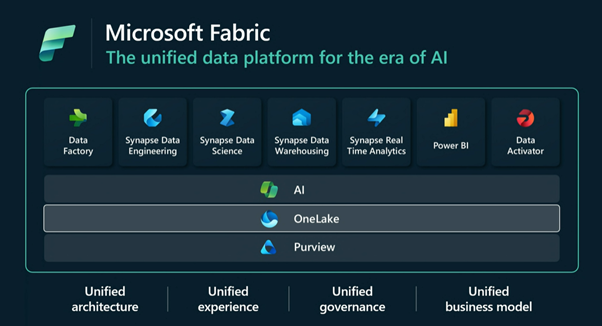
Exploring Microsoft Fabric Features
Fabric is packed to the rafters with features than unlock innovation and empower your organisation. We’ve hand-picked those that we have seen be particularly impactful, but there’s load more to learn about on Microsoft’s website.
Streamline Your Data Solutions
With Fabric, there is no longer a need to piece together multiple datasets, analytics, and BI solutions to get the business insights you require. This unified Software as a Service (SaaS) platform offers a single source of truth for all your data and analytics, offering secure and democratised insights. Utilising this powerful, open, and scalable solution will accelerate your time to value through effective cost management and spend optimisation, giving you the biggest bang for your buck.
Copilot integration
Fabric and Copilot go hand-in-hand, leveraging the power of AI to enhance data workflows across its suite of tools. This integration provides users with advanced capabilities for data processing, analytics, and visualisation, making data management more intuitive and efficient.
A Unified Experience
By integrating Data Factory, Synapse Analytics, Data Explorer, and Power BI into a seamless, cloud-based experience, Fabric provides a single pane of glass for data management. The open and governed Data Lakehouse foundation provides a cost-effective, performance-optimised fabric for business intelligence, machine learning, and AI workloads at any scale. It is the ideal foundation for migrating and modernising existing analytics solutions, whether these are data appliances or traditional data warehouses.
For New and Growing Analytics Customers
Fabric’s SaaS environment facilitates the rapid deployment of a complete end-to-end analytics engine from scratch. With its built-in security and governance capabilities, you can rest assured that your data and insights are well protected, even when you accelerate the creation or expansion of your analytics estate. Fabric allows you to get up to speed quickly, to keep pace with your competitors.
For Existing Synapse Customers
The next evolution of Synapse is here – as part of Fabric. Enjoy the limitless scale and benefits of Synapse in an easier-to-use SaaS solution, while adopting new capabilities that enhance your entire analytics approach. With the addition of Power BI, you can democratise the ability to uncover insights and create interactive reports across your organisation, empowering everyone to make more data-driven decisions in their everyday work.
For Existing Power BI Customers
Lastly, Fabric gives you access to powerful data tools and services like Azure Synapse within the familiar Power BI user experience. Unify these tools with your disparate data sources in the same environment to establish a single source of truth for all data, driving the ability for everyone to uncover more accurate and consistent insights. Additionally, the built-in security and governance capabilities ensure your data is protected, eliminating the security concerns associated with a patchwork analytics estate.
How can Fabric be used for your industry?
No matter what sector you work in, Fabric has the ability to transform your work.
Heathcare sector
The healthcare industry is riddled with complex data challenges, as it handles massive amounts of highly sensitive and highly regulated information.
As part of the NHS’s digital transformation plan, Electronic Heath Records (EHR) have become critical to medical professionals. EHRs show patients’ vital information, lab results and observation notes, and are a powerful tool for medical professionals as they can quickly diagnose those who are high risks for certain conditions, such as sepsis.
Fabric allows for an improved patient experience by giving healthcare organisations immediate access to structured and unstructured medical data in OneLake, laying a foundation that enables healthcare professionals to run analytics to identify patient needs in real-time.They can also leverage real-world data collected by clinical drug trials, using machine learning and artificial intelligence coupled with large sets of genomic and population data to gain new insights into drug efficacy. Healthcare providers will also be empowered to collaborate more closely by being able to securely share and access patient data and insights.
Finance and Insurance sector
The Financial Services Industry is heavily regulated, making the security of Microsoft products particularly valuable. Microsoft Fabric provides FSI professionals with secure, governed access to customer portfolio and market data, which allows them to enhance customer lifetime value and loyalty by offering a comprehensive view of a customer’s financial situation, facilitating targeted upselling and cross-selling of products and services tailored to the needs of individual clients.
For insurance firms, Microsoft Fabric supports improved risk assessment through analytical models on aggregated data. Insurance specialists can gain improved insights by integrating internal and external data, enabling them to offer customised solutions to their clients.
Overall, FSI organisations can leverage Fabric to ensure regulatory compliance, enhance customer experiences, and identify new revenue opportunities. It’s an FSI game-changer.
Public sector
For most government agencies, data is scattered from pillar to post. It cannot be accessed digitally, and it is not easily digestible. That all changes with Microsoft Fabric, where customers will be able to collect and store data in one single cloud location.
Government agencies will now be able to combine research and data across the public health sector and use machine learning and artificial intelligence to identify health risks and trends., leverage data to drive improved urban planning by offering better services and experiences, and stream data from IoT sensors and public utilities/transportation machinery can be ingested in OneLake with IoT Hub, for real-time analysis.
Retail Sector
Retailers face their own set of unique challenges when it comes to data. They often struggle with closing the gap between online and physical stores, integrating data in a meaningful way, and efficiently managing supply chains. With Microsoft Fabric, they can leverage real-time data to inform their merchandising strategy, leveraging customer data to learn what target audiences value and curating personalised shopping experiences.
Retailers can also optimise digital spend by creating models that identify who and where to target buyers based on data trends, while tracking store activity by ingesting real-time data from in-store sensors and cameras will identify even more in-person areas for optimisation.
Lastly, and most likely top-of-mind for many retailers, is being empowered to deliver an intelligent supply chain. By using data to anticipate customer demand on a local and global scale, retailers can get the right product, at the right price, to the right customer, at the right time – closing the gap between demand and fulfilment.
Manufacturing
The manufacturing sector generates vast amounts of data from sensors, machinery, enterprise systems, and human interactions. However, much of this data remains isolated, unstructured, and underutilised, restricting the potential for leveraging data-driven insights and fostering innovation.
Microsoft Fabric enhances manufacturing operations by integrating data from various sources into its unified platform, enabling real-time analytics and insights that allows manufacturers to monitor production processes continuously, optimise schedules, and perform predictive maintenance to reduce downtime and improve product quality. Advanced AI-driven tools facilitate better decision-making and operational efficiency, leading to cost reduction and increased productivity, and the cloud-based infrastructure of Fabric ensures scalability and flexibility, adapting to changing production needs and supporting long-term growth.
So, what’s next?
Many businesses are eager to revolutionise their data management and deploy Microsoft Fabric – but it’s important to understand how each solution can be tailored to your specific business needs before taking the leap.
We have an interactive workshop designed for you to understand exactly how you can adopt Fabric. Led by our Cloud Evangelist, Leon Godwin, this workshop is a two-way open discussion where you can build your business case and learn what your next steps should be.
Register your interest here, and let’s get your data journey started.
If you’re asking us, Microsoft Azure is the best cloud platform in the world. Sure, maybe as an Azure Expert MSP and one of Microsoft closest partners we’re biased, but no platform is better suited to successful, innovative, and expanding organisations than Azure.
It has more availability zones in more regions than any of its competitors, and its seamless integration with the much wider family of Microsoft products is a huge benefit to businesses.
But we aren’t blind to the fact that there are situations and scenarios that might require a slightly different approach. Whether it’s maintaining an on-premises datacentre as part of your IT landscape or you benefit from running a multi-cloud environment, Azure might not always be the perfect fit – but that doesn’t mean you should miss out on all of its advantages… and that’s where Azure Arc comes in.
So, what is Azure Arc?
Azure Arc is a family of services that enables you to extend the Azure management plane to any infrastructure – whether it’s on-premises, in other clouds, or at the edge. This means you can manage a diverse set of resources – be it servers, Kubernetes clusters, or databases – from a single, unified platform.
It puts your operations, management, security and governance capabilities under one pane of glass. Arc allows your Azure environment to interact with your AWS, Google Cloud or VMware estates seamlessly, creates a pathway between your cloud and on-premises platforms, and simplifies the management and maintenance of your entire IT ecosystem.
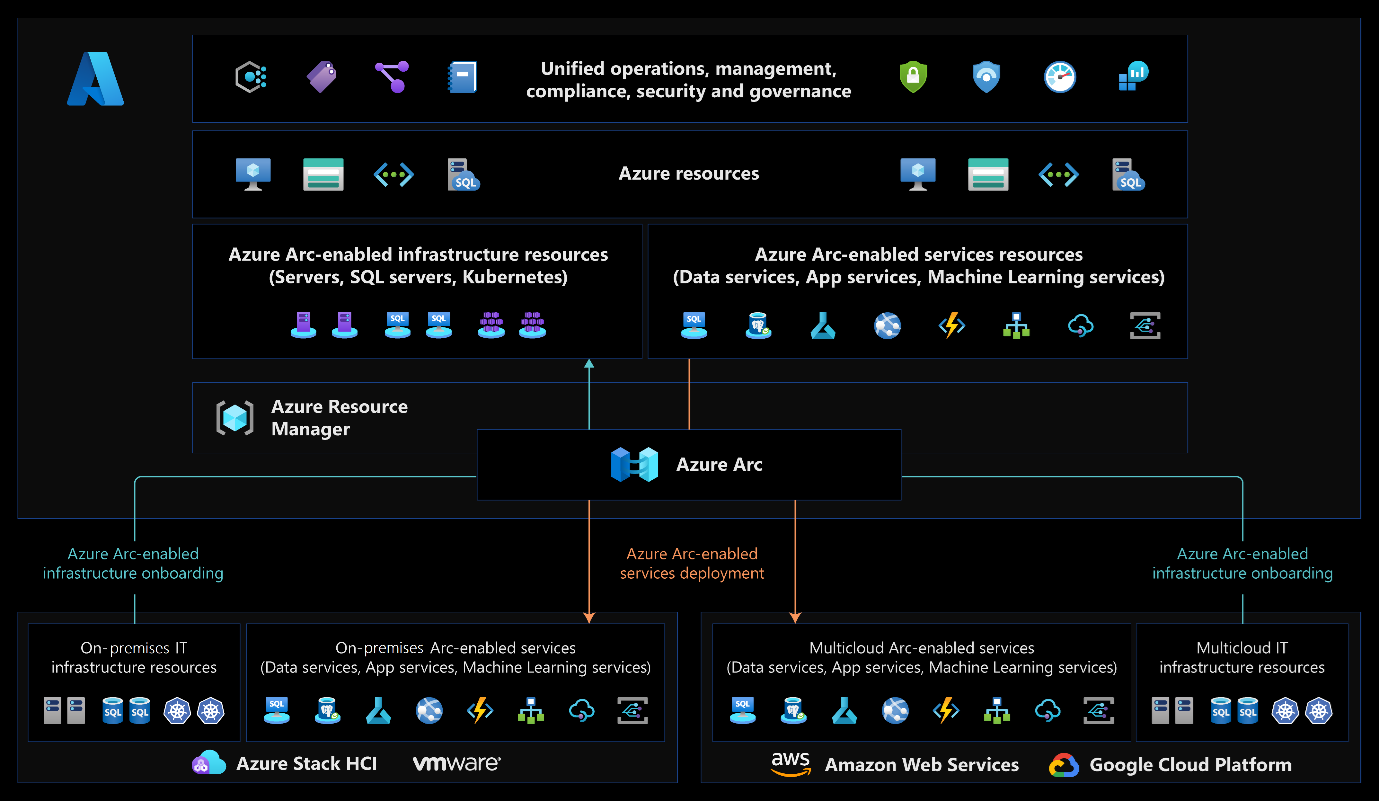
And it doesn’t stop there. Azure Arc-enabled services open up a whole host additional scenarios that include developing your containerised applications in the cloud, leveraging your on-premises Kubernetes clusters as custom locations, and using GitOps to push your applications out to wherever you need them. Microsoft has also enabled a number of containerised PaaS services to be deployed to these custom locations, including data services, app services, and machine learning.
It opens up a world of opportunity for your business and its IT ecosystem.
Benefits of Azure Arc
Now in full, this is a long list. We’ve tried to keep it short and snappy here, but there’s loads more to learn about on Microsoft’s website.
Unified Management
Managing a sprawling IT environment can be a nightmare. With Azure Arc, you get a single pane of glass to oversee your virtual machines, SQL servers, Kubernetes clusters, and vSphere/Hyper-V private clouds, wherever they are. This centralised management means you don’t need to juggle multiple consoles or worry about disparate systems.
Whether your resources are on-premises or in different clouds, Azure Arc brings them under one roof. This not only simplifies operations but also makes it easier to enforce policies and monitor performance.
Consistency and Compliance
Maintaining consistency and compliance across various environments can be challenging, especially with ever-evolving regulation. The governance features in Azure have helped numerous customers to become compliant and Azure Arc extends that capability to ensure that your governance and security is more consistent.
It allows you to apply and enforce policies across all your resources using Azure Policy to give you a central view of your governance posture, highlighting the resources that need remediation, and giving you additional tools to help ensure your estate is fully compliant.
Cost Efficiency
Managing costs is a top priority for any organisation. Azure Arc helps you optimise resource allocation and utilise Azure’s cost management tools to achieve significant savings.
By extending Azure’s robust cost management and optimisation features to your entire environment, you know that you’re getting the most out of your existing investments while taking full advantage of cloud capabilities, and helping your team to address the skills gap as you accelerate your innovation journey. This hybrid cost model can be especially beneficial for companies looking to balance performance and budget.
Use Cases
Let’s apply some Azure Arc use cases to a few fictional organisations to put things into context.
Hybrid Cloud Monitoring
- Scenario: Eric Entertainment, a large multinational enterprise with a mix of on-premises and cloud-based applications, wants to monitor its diverse and sprawling cloud environment.
- Solution: Using Azure Arc, Eric Entertainment can manage its entire infrastructure seamlessly. By using Azure Monitoring across its whole estate, the protection of Microsoft Defender for Cloud and Microsoft Sentinel will reach even further, and keep the organisation safe in the face of a growing, and increasingly complex, threat landscape.
Achieve compliancy across your estate
- Scenario: The Department for Hedgehogs needs to prove its compliance with UK OFFICIAL and ISO 27001 across the whole estate.
- Solution: The organisation can extend Azure Policy’s compliance reporting across the entire infrastructure estate with Azure Arc They will gain visibility of virtual machines that are non-compliant with standard Guest Configuration policies within the UK OFFICIAL and ISO 27001 policy initiatives, and be able to consolidate tooling and processes for a uniform approach.
Automate at scale
- Scenario: Spikey Shoes, an international footwear manufacturer, has IT systems spread across multiple head office and factory locations and wants to innovate quickly.
- Solution: Azure Arc simplifies operations and gives the organisation new tools to help manage its estate. You can use Azure Update Management v2 for your patching, or Azure Arc as the vehicle to manage your Extended Support Update licences. Azure virtual machine extensions will enable you to run scripting at scale, apply declarative configurations, centralise certificates and secrets, and more, while you use Windows Admin Centre and SSH to manage your Windows and Linux machines wherever they are, without exposing them to the internet.
Disaster Recovery and Backup
- Scenario: Homes4Hedgehogs, a national charity, is seeking robust disaster recovery solutions to ensure operational continuity in case of unforeseen disruptions.
- Solution: Azure Arc allows for seamless integration with Azure’s backup and disaster recovery services, which ensures data protection and business continuity, even in the face of disaster. For instance, by using Azure Site Recovery in conjunction with Azure Arc, the organisation can replicate on-premises workloads in Azure, ensuring that critical applications and data are always available, even if the primary datacentre experiences an outage.
How to Get Started with Azure Arc
It might all sound rather complex, but getting started with Azure Arc is easier than you might think. Here are a few steps to help you begin:
1. Assess your environment: Start by evaluating your current infrastructure. Identify the resources you want to manage with Azure Arc – such as servers, Kubernetes clusters, or databases.
2. Connect Your Resources: Use the Azure portal to connect your resources to Azure Arc. This involves installing the Azure Arc agent on your servers and registering your Kubernetes clusters.
3. Apply Policies and Configurations: Leverage Azure Policy to apply configurations and enforce compliance across all your connected resources. This ensures that your entire environment adheres to the same standards.
4. Monitor and Manage: Use Azure Monitor to keep an eye on the performance and health of your resources. Azure Arc provides a centralised view, making it easier to detect and address issues promptly.
5. Scale and Optimise: Take advantage of Azure’s scalability and optimisation tools to manage costs and resources efficiently. Azure Arc allows you to scale your infrastructure based on demand, ensuring that you’re always prepared for any workload.
Azure Arc is a game-changer for organisations looking to streamline their IT operations, ensure consistency, and harness the full power of the cloud. Whether you’re managing hybrid environments, edge computing, or optimising DevOps processes, Azure Arc’s got your back.
With a unified management platform, by enhancing compliance, and offering flexibility and scalability, Azure Arc empowers you and your business to achieve more.
Want to learn more from the experts? You can level up your IT infrastructure by partnering with a successful, experienced cloud managed service provider like Cloud Direct. To find out more about how we can help you, let’s chat.
Organisations within the NHS are facing growing public uncertainty around the safety of their data. Results from a recent survey on public attitudes to data in the NHS show that four out of five patients worry that NHS IT systems may be vulnerable to cyber-attacks. Just recently, a ‘large volume’ of data was stolen from NHS Dumfries and Galloway and published on the dark web. Acts like these are increasing across NHS and social care organisations in the UK and show no signs of slowing down.
With increased remote working and Bring Your Own Device policies implemented in the NHS since the onset of COVID-19, security protection has faltered – and organisations must find a turning point.
It’s critical that the NHS and social care organisations win back the trust of the public and guarantee that patient data is in safe hands. With the publication of its Cyber Security Strategy to 2030, the government has identified the need for increased training and continued self-assessment through the Data Security and Protection Toolkit, but that doesn’t just happen. It’s time for health and social care organisations to take a proactive approach to cybersecurity resilience before threats become a reality.
Why are NHS organisations increasingly targeted?
The NHS is a behemoth. It is the UK’s largest employer, with more than 1.3 million full-time staff. This alone makes it a high-value target for cybercriminals, but the personal and confidential nature of the data it holds also plays a key role.
An organisation this large can be extremely difficult to keep secure, but why is that?
Resource Constraints
- It’s a common belief that the NHS is underfunded, and these financial implications can impact the NHS’s ability to invest in robust cybersecurity infrastructure.
- With the NHS facing one of the worst staffing crises in its history, the number of trained personnel is getting scarcer across all departments, and the ability to retain cybersecurity experts is difficult due to competition from other sectors.
Inefficient Infrastructure
- The NHS is made up of thousands of hospitals, GP surgeries, clinics and administrative units, each with its own IT systems
- These inconsistencies in infrastructure, legacy systems, and lack of standardisation can make it harder for organisations to implement cohesive security measures
- The ability to upgrade and secure such a diverse landscape can pose a significant challenge to IT and Security leaders
Easy target for cybercriminals
- The NHS holds vast amounts of sensitive patient data that can be sold, making it an attractive target for cyberattacks
- Ransomware attacks, data theft, and indiscriminate malware campaigns are specifically created to target healthcare institutions and their infrastructure
- The consequences of successful attacks can disrupt patient care, compromise privacy and damage the reputation of the NHS
To help address these challenges, the NHS and the Department of Health and Social Care have developed a comprehensive cybersecurity strategy, which aims to enhance resilience, improve information sharing and protect valuable patient data. What can you do to get on board and rethink your cybersecurity strategy?
Introducing the Microsoft Security Toolkit
If you’re looking to start improving your security posture and stay safe from threats, now is the time. Microsoft has invested over $20 billion in its security offerings to help organisations stay safe.
Developing a comprehensive set of security tools that are already being integrated into some NHS organisations through a landmark deal with Microsoft in 2023. These include…
- Microsoft Defender
- Microsoft Sentinel
- Microsoft Purview
- Copilot for Security
You have probably used, or at least heard of, some of these products, but ones like Copilot for Security and Purview may be new to you – let’s take a deeper dive into each one and understand how these Microsoft Cloud Security tools can benefit your NHS organisation.
Microsoft Defender
The Microsoft Defender suite is a collection of products that will really bolster your security standing. Different versions of Defender, such as for Cloud, Cloud Applications and Microsoft 365 are designed to keep all areas of your organisation protected. The most popular among NHS organisations is Microsoft Defender for Endpoint.
Defender for Endpoint is a detection and response, enterprise endpoint security platform that is designed to prevent, detect, investigate, and respond to real-time advanced threats. It improves overall cyber security capabilities, and NHS organisations stand to benefit from enhanced Cyber Security Operations Centre (CSOC) services, which further improves cyber security protection for the NHS.
The platform gathers network telemetry from devices like laptops, PCs, servers and phones, and send it to Microsoft Cloud services to detect potential cybersecurity threats, before acting to prevent the spread of these threats across the network. Defender alerts local system managers and the CSOC to potential security incidents, offering a real-time, organisation-wide view down to individual devices. This allows the CSOC to quickly coordinate responses, minimising disruption to clinical services.
Microsoft Sentinel
Microsoft Sentinel is a Security Information and Event Management platform that gives NHS organisations the visibility to see and stop threats across the entire organisation. Built on the cloud, it offers intelligent security analytics that can help health and social care organisations stay ahead of sophisticated threats.
Sentinel offers key benefits for NHS organisations by centralising network monitoring and providing real-time visibility and threat detection. This 24/7 transparency helps protect sensitive patient data and ensures operational continuity with scalable, cloud-based architecture, reducing costs and integrating data from various sources for a comprehensive security view. Sentinel minimises false positives, proactively identifies threats, and automates routine tasks, freeing up IT staff for more complex challenges. Its deep investigation tools help NHS organisations understand and address the root causes of security incidents, enhancing their overall cybersecurity posture.
Microsoft Purview
Microsoft Purview is a comprehensive data governance and compliance solution that helps organisations manage and protect their data across various environments, including on-premises, multi-cloud, and SaaS applications. It offers capabilities such as data discovery, classification, and lineage tracking to ensure data is managed and utilised effectively while maintaining compliance with regulatory requirements.
For a health organisation using Purview, you can benefit from detailed visibility into data usage and access, lowering the risk of data breaches and ensuring that only authorised personnel can access critical data. By tracking data flow and improving data quality with lineage and lifecycle management, Purview streamlines data management and helps mitigate risks by identifying and addressing data issues early, preventing potential problems. Automating governance tasks with Purview also allows IT staff to focus on strategic initiatives, improving overall operational efficiency.
Copilot for Security
Copilot for Security, launched on 1st April 2024, is a feature integrated into Microsoft’s security solutions, leveraging advanced AI and machine learning to assist security teams in identifying, responding to, and mitigating threats. Built on the foundation of Microsoft’s comprehensive security platforms, Copilot for Security aims to enhance the efficiency and effectiveness of security operations.
For NHS organisations, it can enhance the ability to protect sensitive data, ensure compliance with regulatory standards, and improve overall security posture. By automating routine security tasks and providing advanced threat detection capabilities, it allows IT and security teams to focus on more critical and strategic aspects of their operations. The AI model can also continually learn from new threats and security incidents, improving its capabilities and making sure your NHS organisation is more secure.
Want to learn more about Copilot for Security? Here’s a quick introduction.
What’s next?
As we know, data security is always a top priority for NHS organisations, and we don’t want your organisation to fall victim to a cyberattack. Every year, health and social care organisations that have access to NHS Patient Data and Systems should complete a Data Security and Protection Toolkit self-assessment, to benchmark itself against the National Data Guardian’s 10 data security standards.
To make sure you exceed these standards, be proactive and make sure you are continually reviewing your cyber security strategy. Make sure you have the latest and innovative cloud cybersecurity tools integrated within your IT systems that align with your security strategy and goals.
Now that you know about the cloud security tools available to help your NHS organisation stay secure, you can start to explore options, like partnering with a Cloud Managed Service Provider. By working with a CMSP, you unlock unrivalled, around-the-clock, in-depth expertise and guidance.
An Azure Expert MSP, like Cloud Direct, can also gain you access to Microsoft funding pots that other partners can’t, which could unlock exciting opportunities for your NHS organisation to de-risk and accelerate your security performance.
Cloud Direct offers funded assessments and workshops that link to the Microsoft Security Toolkit, so if you’re interested in exploring these options then get in touch with a member of our team and find out how you can add a little sparkle to your security journey.
Public sector organisations are feeling the pinch. They’re facing uncertain futures and, clampdowns across all areas of spending, which is putting a strain on resources and affecting the services they provide for their communities.
With stricter budget controls, many public sector IT leaders fear spending on new technology. But, as a result, they are missing out on opportunities that, in this day and age, they simply can’t afford to pass up on. Tied with ever-evolving cybersecurity threats towards the public sector, the risk of doing nothing is growing. But you’re probably thinking, what has this got to do with cloud technology?
With the fear of spending, the increase in security threats and let’s not forget, the increasing costs of on-premises infrastructure like VMWare, a balance needs to be found. The answer to all these issues? Cloud technology. Let’s dive into Cloud Economics 101 so that you can understand the benefits, costs and principles of cloud technology to help you find that balance.
What is cloud economics?
Simply put, cloud economics is the process of understanding the costs involved with ownership of cloud technology, the benefits of cloud technology over on-premises infrastructure, and ongoing cost optimisation strategies that will maximise your cloud return on investment. As a public sector IT leader, it can be tempting to hop straight into a digital transformation journey and assume the costs and benefits involved, but it’s not usually quite so black and white.
So why is it important to consider cloud economics?
- It can help you align your cloud investment with business goals, which will help you budget and invest efficiently and make sure you are supporting your goals, like security compliance or streamlined operations.
- You can assess where you should start to enhance innovation by looking at the financial effects of different cloud services and can innovate within a cost-effective framework that empowers innovation.
- Public sector organisations can optimise their cloud spending and cloud resources, meaning you can start to find savings in cloud costs with services you may not be using, allowing you to reallocate resources to other cloud areas that can foster growth.
- A thorough cloud economics analysis helps make a business case for migrating from on-premises infrastructure to the cloud. A cost-benefit analysis can help you:
- Curate a clear business case, including how to measure performance over time
- Compare the risks and rewards associated with the cloud vs on-premises
- Decide whether you want to move all components to the cloud, or only migrate some applications to the cloud
Overall, cloud economics is about understanding the financial implications of cloud adoption and optimising resource utilisation to achieve business objectives effectively and efficiently. There are a few areas of cloud economics to take a closer look at…
Total Cost of Ownership
When it comes to cloud technology, the total cost of ownership (TCO) covers the costs incurred with adopting and operating cloud technology. Getting an accurate TCO for the cloud means evaluating the price differences between on-premises and cloud solutions, as well as the tangible benefits of each, to help you come to a decision.
For a public sector organisation, IT costing is imperative and undertaking a sound TCO of your cloud solutions can make sure you are adopting technology that aligns with your objectives and budget constraints.
Cloud solutions like Microsoft Azure enable public sector organisations to conduct comparative TCO analyses between different deployment options, such as on-premises infrastructure and cloud solutions. Azure’s TCO Calculator allows public sector organisations to input their current infrastructure costs and usage patterns and compare them with the projected costs of deploying equivalent workloads in Azure. This can help public sector organisations make informed decisions about the most cost-effective deployment options based on their specific requirements and budget constraints.
Overall, the goal is to achieve a lower TCO compared to on-premises infrastructure, but it can also be about justifying a higher TCO by making sure the tangible benefits of cloud solutions are listed as well.
CapEx vs OpEx
Many public sector organisations are still paying for traditional on-premises IT infrastructure that requires upfront investment in hardware, software licenses and data centre facilities. Public sector organisations may face continued challenges in securing funding for capital expenditures, especially when budgets are limited, and on-premises infrastructure costs are rising.
With the cloud, spending is often shifted from a Capital Expenditure (CapEx) model to Operational Expenditure (OpEx), meaning public sector organisations will pay for the cloud services on a recurring basis, typically monthly or annually, rather than in lump sums. This pay-as-you-go model aligns expenses with actual usage, providing greater financial flexibility and predictability. By moving to an OpEx model of spending, public sector organisations can redirect funds towards other strategic initiatives, such as improving service delivery, enhancing citizen engagement, or investing in innovation.
OpEx-based cloud pricing also enables public sector organisations to better align IT spending with revenue streams and operational budgets. This flexibility allows public sector organisations to respond more effectively to budget constraints, economic fluctuations and unforeseen events without sacrificing service quality or performance.
Pay-as-you-go model
Shifting to an OpEx model unlocks the ability to operate on a pay-as-you-go model or subscription-based pricing model, meaning that you end up only paying for the resources that you need.
For many public sector organisations that have limited budgets and are under pressure to optimise their spending while still delivering essential public services, a pay-as-you-model, much like Microsoft Azure’s, eliminates the need for large upfront investments in the future. This means it can help you to better manage your finances by avoiding over-provisioning of resources typically seen with legacy on-premises set-ups.
Let’s also not forget the scalability and flexibility of cloud technology. For example, Azure’s pay-as-you-go model enables public sector organisations to scale their resources up and down depending on expected or unexpected demand. By leveraging this pay-as-you-go model, public sector organisations benefit from cost savings, increased cloud agility and scalability, while avoiding any unnecessary financial constraints that can come with on-premises infrastructure.
Cost optimisation
Cloud economics also involves optimising your cloud costs by selecting the right mix of cloud services and pricing options. By leveraging cost optimisation strategies and tools, public sector organisations can effectively manage their cloud expenses and maximise the value of their cloud investments.
Within Microsoft Azure, there are several tools and services that can help you identify cost-saving opportunities.
- Azure offers a wide range of virtual machine (VM) types and sizes, allowing public sector organisations to match their workloads to the most cost-effective and performance-optimised configurations. Azure Advisor provides recommendations for rightsizing VMs based on historical data usage, helping public sector organisations identify over-provisioned or under-utilised instances and rightsize them to minimise costs while maintaining
- Azure Cost Management and Billing provides insights into spending patterns and identifies opportunities for optimisation, such as consolidating underutilised resources, optimising storage usage, or leveraging serverless computer services like Azure Functions. It can also monitor and optimise cloud spending continuously, allowing public sector organisations to set budgets, configure alerts for cost overruns, and implement policies to enforce cost-saving measures.
- Azure Hybrid Benefit enables public sector organisations to apply existing on-premises Windows Server or SQL Server licenses to Azure VMs. This significantly reduces costs as you’ll be leveraging your on-premises investments in the cloud.
Cloud cost optimisation is important for public sector organisations to ensure efficient use of resources, maintain financial accountability, improve operational efficiency, support innovation, manage risks and contribute to sustainability efforts. These benefits collectively enhance the organisation’s ability to serve the public effectively.
Value-based pricing
When looking at cloud economics, you need to go beyond just focusing on the costs and look at what value the cloud can bring to your public sector organisation. You should assess what strategic benefits you will gain with cloud adoption, such as its scalability and how it can help streamline operations and empower innovation.
Let’s take a look at how Microsoft Azure can offer value…
- Azure’s cloud services allow public sector organisations to adjust their infrastructure based on real-time needs. This flexibility supports the rapid development and deployment of new services or the scaling of existing ones without the delays associated with on-premises procurement and set-up
- Azure offers access to a wide range of innovative technologies like its Azure AI Studio and Azure Machine Learning. With these technologies at your fingertips, you can empower innovation and enhance your public services
- Azure’s robust analytics platforms, like Synapse Analytics and Power BI, can allow public sector organisations to make more data-driven decisions. For example, we often hear of smart city initiatives using data analytics to optimise traffic management, reduce energy consumption and improve public safety
- Azure supports various collaboration tools and platforms, such as Microsoft Teams and SharePoint, which can help facilitate improved communication and coordination between stakeholders and groups within public sector organisations.
The values which Azure provides are limitless, but we wanted to demonstrate a few examples to show the effect of value-based pricing as part of cloud economics. By focusing on these values, public sector organisations not only reduce costs but also gain strategic advantages through enhanced agility, innovation and operational efficiency. These benefits ultimately translate into improved public services and better resource management.
So, we’ve gone through some of the key principles of cloud economics, but what’s next?
Many public sector organisations will have to create strategic business cases and follow strict guidelines when it comes to adopting new technology. There is no one-size-fits-all approach to public sector organisations, but we do know the final decision doesn’t just come down to the IT team.
Quite often in public sector organisations, we see wider project teams making these big decisions. Led by the IT team, project teams are made of key stakeholders, like board directors, financial leaders, legal, and end users such as other departments and agencies within your organisation. By considering all of these principles and assessing cloud economics, you can help create a strong business case and demonstrate the financial implications and benefits of cloud adoption for your public sector organisation to each of these parties.
By thoroughly assessing these cloud economic principles, you greatly increase the chances of getting your organisation’s stakeholders on board and quell any fears that they have about the costs involved in a cloud migration.
What’s next?
Understanding the costs involved with a cloud migration project can be complex, but you don’t have to do this alone. By engaging with a Cloud Managed Service Provider that has all the appropriate Microsoft Azure accreditations, together you can identify the value of an Azure adoption and lay the right foundations for a successful migration project.
We offer Microsoft Solution Assessments which can help with cost modelling, target state planning, and discovering how much Microsoft funding you are eligible for. These assessments will also help you develop a clear Azure migration roadmap and business case that you can use to demonstrate the costs and value to your public sector stakeholders. Get in touch, and let’s get going.
There’s no denying that the retail landscape is fiercely competitive, with exceptional customer experience often deciding who comes out on top. One way to get ahead – and stay ahead – of the competition is by embracing cutting-edge cloud technologies like Microsoft Azure. With its suite of cloud and innovative services, Azure offers an extensive list of benefits for retailers that can enhance their customer experience, and we’ve picked out six of the best.
Scalability and Flexibility
One of the foremost challenges retailers face is being able to manage fluctuating demand, especially during peak trading seasons or promotional events. With Azure, retailers have access to unparalleled scalability that can help them dynamically scale their infrastructure up or down based on demand. Whether it’s handling a sudden surge in website traffic or ramping up power for data analysis, Azure ensures retailers have the resources they need, exactly when they need them the most.
But what has this got to do with the customer experience? Well, with this level of flexibility and scalability, you and your customers can trust that you won’t have to worry about any IT infrastructure constraints that hinder your services – which keeps your customers happy!
Data-driven Insights
Data, data, data – you might be getting tired of hearing about it, but we can’t stress how important it is to your business! As a retailer, you have vast amounts of customer data at your fingertips, so don’t let it go to waste.
Knowing where to start with your data can be daunting, but this is where Azure’s advanced analytics capabilities come in. Azure offers a suite of tools, including Azure Machine Learning and Azure Synapse Analytics, that gives retailers the ability to gain valuable insights into customer preferences, behaviour patterns and trends. Armed with this knowledge, you can personalise marketing efforts, optimise inventory management and anticipate customer needs, enhancing the overall shopping experience.
Omnichannel Integration
Today, customers expect a seamless shopping experience across multiple channels – whether they’re online, in-store, on a mobile device or the app. Microsoft Azure facilitates omnichannel integration by providing a unified platform for retailers to manage their digital presence, allowing you to integrate e-commerce platforms, mobile apps, point-of-sale systems and CRM tools to ensure consistency and coherence across all touchpoints. An omnichannel approach enables retailers to deliver a cohesive and personalised experience to customers, whichever way they choose to interact with your company.
Security and Compliance
We live in an era where sophisticated cyber attacks are increasing and regulatory requirements are getting much stricter, meaning enhanced security measures and compliance are of paramount importance for retailers. Azure offers industry-leading security features and compliance certifications, providing retailers with peace of mind when it comes to protecting sensitive customer data.
From advanced threat detection and a zero trust approach to encryption and identity management, Azure helps to protect retail applications and infrastructure from all anglespossible cyber attacks. Furthermore, Azure’s compliance with standards such as GDPR means retailers remain compliant with regulatory mandates, reducing the risk of fines and reputational harm. A secure retail envrionemtn ultimately leads to gaining, and maintain, the trust of your customers.
Access to the Microsoft Ecosystem
It’s no secret that an Azure migration gives retailers access to a wider range of innovative Microsoft tools and services, like Dynamics 365 and Office 365, which empower retailers to streamline business processes from inventory management to customer service. For example, you can leverage Azure AI’s capabilities to power chatbots within Dynamics 365 Customer Service, giving customers instant support and a better overall experience.
And let’s not forget that all important data. Azure’s interoperability with familiar tools like Microsoft Power BI allows retailers to visualise and analyse data easily, driving informed decision-making for your business.
Unrivalled Innovation
Microsoft’s commitment to innovation and its future-ready capabilities make it an excellent choice for retailers that are aiming to enhance their customer experience. Azure is a continually evolving platform, with new features, services and improvements that retailers can leverage to unleash innovation unveiled all the time.
For example, some retailers are already using its AI and Machine Learning abilities tools to analyse customer data, predict trends and personalise customer interactions. Many are also using these innovative tools for demand forecasting, helping retailers to predict demand accurately, and optimising inventory management so that their customers are always happy. The possibilities are endless.
It’s clear that Microsoft Azure is the way forward for retailers who want to innovate, grow and improve their customer experience. Now you’ve learnt a little more about its advanced scalability, omnichannel integration and security, you can grow your retail business with data-driven insights and its unrivalled innovative AI tools, and add sparkle to your retail business by delivering personalised and secure experiences that keep your customers coming back for more!
What can you do next?
We know that Microsoft Cloud and its advanced tools and capabilities will be crucial to the long-term success of your retail organisation. As a leading UK Microsoft Solutions Partner and Azure Expert Managed Service Provider, we can assist you in your digital transformation journey.
Whether you’re at the forefront of innovation or just starting out on your digital transformation journey, our experts are here to help you make the most of technology – so let’s talk.
While you’re here, check out our Microsoft Cloud Bootcamp for Retailers webinar. In this two-part on-demand series, hear from Leon Godwin, Cloud Evangelist, about the seven steps you can take to transform your customer experience.
If we asked a large group of people what the most important department of a business if, the responses would vary. Many would say the senior leadership team, whose direction and management guides the business forward. Some would say the finance department, making sure the money keeps moving and that people get paid. Maybe it’s sales, for bringing the money in in the first place?
We’re here to make the case for the IT department – the backbone of any modern business.
We might be biased, but the case is a compelling one. Gone are the days of basement-dwelling IT teams telling people to turn it off and back on again (even if those days never really existed in the first place) and instead we are in an age whereby technology shapes and impacts each and every part of the business. From transforming the business with a forward-thinking artificial intelligence strategy, to maintaining an accessible and effective cloud environment, IT teams of today have a profound impact on how each part of the business operates day in, day out.
It is therefore important that you, as a figurehead in the IT department, understand the impact you are having on everybody else and the work they are doing. Starting a new job can be daunting, but by building relationships with your internal stakeholders early on, you set yourself up for success.
To help get you started, we’ve set out a list of key people to speak to, and what to speak to them about.
Human Resources
Your HR department plays a pivotal role in the success of your organisation by attracting, retaining, and developing its employees. With the best people on-board, all pulling the same direction, a business best positions itself to achieve its goals, so the importance of the HR team cannot be overstated.
They can, however, be empowered. The relationship between HR and IT is clear, and covers everything from applicant tracking and testing systems during the hiring process to e-learning platforms and employee wellbeing software during the course of their employment. You’ll also work closely on onboarding new employees and ensuring they have access to the right technology and data, managing remote working policies, and offboarding employees.
In your position as an IT decision maker, you have a direct link to the success of the HR team and, as a result, the success of the business. Whether it’s ensuring that AI is introduced ethically and effectively into your HR processes, or the team wants to be able to conduct accurate sentiment analysis by investigating and unpicking its data, a helpful and impactful HR team relies on technology, so building and maintaining this relationship is a must.
Speak to… the Head of HR, HR Director, or HR Manager. Find out who is in charge of the people aspect of your business, and book in a meeting. Sit down with a cuppa and understand what technologies they are already using, the challenges they are facing, and how your can work together to create an even greater, happier, and more successful workforce.
Operations
The efficiency of your operations can be the difference between the world’s most successful business, and a failing one. Jeff Bezos built the Amazon empire on the foundation of ruthless operational efficiency.
Now, building the world’s biggest ecommerce platform might not be your goal, but the lessons and takeaways are there. By optimising productivity, reducing costs, and improving the quality of your products or services all at once, your business will be best positioned to succeed – and the effective use of technology holds the key.
This might start with Enterprise resource planning systems that pull together a range of operational functions to provide operations leaders with the information and insight they need to highlight, analyse, and tackle inefficiencies, and ensure they remain agile, responsive, and resilient in today’s ever-changing business landscape. You may then look at adopting an effective DevOps methodology, and creating a process that enables constant innovation and development within your organisation. Ultimately, it could then escalate to considering the data and artificial intelligence platforms that can transform operations teams by enabling everything from predictive machine maintenance to automated inventory management systems.
Effective technology usage fuels improved performance, productivity, and efficiency, and you’re in the position to help your Operations team achieve that.
Speak to… the Chief Operations Officer or Head of Operations. They will have the best insight into how their department is currently using technology and will be willing to listen to how your policies and plans can drive further efficiencies and greater productivity within their team.
Sales and Marketing
Your sales and marketing teams are the ones responsible for driving revenue growth. It’s their job to build awareness, grow pipelines, and convert customers, and in a modern business world they are increasingly powered by data. They generate tonnes of the stuff – everything from information on social media followers and website users to insights on customer intent and sales performance.
Your data strategies will therefore play a key role in the work of your Sales and Marketing teams. They will rely on your security and governance policies, require constant access to the data they generate, and need to be able to unpack that information, pull it apart, and act on it.
They also represent your organisation to its customer base. They are brand advocates and have an element of control over how your business is perceived. Poor data governance and patchy IT practices are quick to hit the headlines and have a significant impact on the trust people have in your brand. Maintaining a close relationship with those who are speaking directly to your customer base is, therefore, crucial.
Speak to… the Heads of Sales and Marketing. Each will be experiencing their own pain points when it comes to technology, so individual meetings will also be beneficial, but sitting down with them together will also provide insight and allow to you identify potential efficiencies that will create smoother, more seamless processes in this part of the business.
Finance
Whether you’re building the bottom line in the interest of shareholders, or you’re a non-profit trying to serve its local community, money matters. The finance department is the backbone of almost any organisation, and is responsible for making payments, tracking performance and, most importantly in your case, setting budgets.
Finance is analytical by nature – it is, quite literally, a numbers game. IT and finance can, therefore, form a perfect partnership and lean heavily on one another in their respective best interests. A healthy IT budget makes your life easier, while effective technology processes and innovative analytics tools stand to benefit their work.
But securing that budget relies on a healthy relationship between you on your financial controller. It’s wise to keep them involved in your project plans from the get-go, so that you can demonstrate the value and potential of your ideas, the understand the business value they provide, and get them bought in from the outset. Improved efficiencies, enhanced productivity and an empowered workforce are all music to a CFO’s ears because they drive business performance.
Speak to… the Chief Financial Officer or Head of Finance. Having a strong relationship with these roles is an absolute must for an IT leader. Not only do they ultimately hold the purse strings, but it is in their best interests to identify and implement the most effective and efficient processes to bolster the organisation’s bottom line. You are the employee that will help them unlock those efficiencies, both in the finance department and across the business.
Senior Leadership Team
In today’s world, businesses are built on technology. Whether your organisation was founded a century ago or started in a bedroom late last week, technology is everywhere you look, in every process that is undertaken, in every room of the office. Your IT strategy is no longer a standalone piece of work – it should be entwined in your wider business strategy, and play a key role in directing the organisation forward.
That’s why you’ve been hired – to shape the way in which technology is used across the business, and help it reach its goals.
So, who better to speak to than the people setting those goals, and driving that performance? Whether you’re part of a small team or a multinational organisation, understanding the driving force behind it will paint the picture for how technology can play its part. It might be that the goal is to implement automated processes to drive efficiencies, or it might be to bolster the business’ security standing. The best way to find out is straight from the horse’s mouth.
Speak to… the CEO, Owner, or Managing Director. Sit down with whoever is ultimately in charge of your business. As the key decision maker in the business, who has control of its vision and direction, your input will have a direct impact on them and, therefore, the business as a whole. If you start singing from the same hymn sheet now, you’ll help your business and its senior leadership team meet their goals quicker.
So, who does your work as an IT leader impact? It’s everybody, and we’ve only scratched the surface. The changes you make and the policies you enforce will also affect administration teams, your business’ research and development, your legal or PR departments… the list really is endless.
Your department is the catalyst for change, so it’s really important that, in the first few days and weeks of your new role, you meet with leaders in these departments to understand their experiences and challenges and discover ways in which your role as an IT leader can make a positive impact. Then – and only then – will you set yourself up for long-term success within your organisation.
It’s time to renovate your garden. You’re fed up with the view from your kitchen window as you look outdoors and see a space that passes as usable for the odd barbecue or to kick a ball around in, but you know it isn’t everything it could be. You’ve got a rusty table for two, the fence didn’t survive the last storm, and the weeds are winning the war over your border plants. It’s only taken a couple of summers to get to this point since you last spent hours out there tidying the place up.
You’ve decided it’s time to act. So, do you do it all over again in the hope of achieving a different, longer-lasting outcome? Or do you get the specialists to transform your garden and then maintain its picturesque yet practical state?
If you’re asking for our advice, it’s a no brainer. By bringing in the experts you’ll transform your space in less time, get more for your money, and end up with a garden that looks its best and continues to serve its purpose year after year after year.
Though, we aren’t gardeners. We are service providers though, and there are similarities. Rather than transforming your garden, let’s look at the same scenario through the lens of transforming your IT estate – after all, there may be a few weeds in there, too.
Let’s put a Cloud Managed Service Provider (CMSP) in the place of the gardeners, and look and the differences they’ll make in your cloud journey.
The obvious impacts…
There are a few benefits of working with an expert CMSP that are immediately apparent. An experienced Provider will be backed by years, if not decades, of insight, knowledge, and know-how that you simply won’t be able to compete with, no matter how much research you do.
That experience will be on-hand and available to your business around the clock, whenever you need it, and is backed up by other areas of expertise that you may not need right now, but could benefit from in the near future. That unlocks a level of scalability for your business that you simply don’t have with in-house resourcing.
And while yes, this level of expertise comes at a cost, one of the most eye-catching benefits of an effective CMSP is in the value and cost savings that they can deliver. By optimising the products you use and the services you receive, as well as unlocking otherwise inaccessible funding packages from technology providers like Microsoft, CMSPs are often a much more cost-effective way of accessing the skills and insights you need, especially in comparison to the amount of time, effort and capital that would need to be invested in-house to achieve a result that even came close.
…and the less obvious
Beyond the round-the-clock support and assistance, access to additional skills/resources, cost savings, improved scalability, enhanced security and compliance, and increased reliability, there are a whole host of benefits that aren’t quite so apparent.
Firstly, there’s the unrivalled insight into new technologies. In a world that is constantly evolving, having a CMSP that is up-to-date and informed on your industry’s latest trends and technologies is crucial. A good CMSP will provide that; a great CMSP will have close ties with technology providers, like Microsoft, and provide early insight and access to new features and upcoming changes to ensure you stay at the forefront of innovation.
They’ll also bring cross-industry experience to the table, as well as an expansive network of partners and providers to help you deliver on your cloud strategy. They’ll know the best security providers, or the connectivity providers that are best suited to your business, and have existing relationships with them that can be leveraged to negotiate deals and discounts. After all, it’s often who you know, rather than what you know.
Lastly, having an outsider’s perspective can prove invaluable. You’ve been looking out at the same garden – sorry, IT estate – all day every day, so the chances of you identifying the biggest areas of concern is slim. You’ll see what you’ve always seen. This is also beneficial in dealing with disputes between internal stakeholders, which can often lead to delays, inefficiencies, and suboptimal outcomes.
Not only will a good CMSP provide that outsider perspective, but they’ll bring that viewpoint into your organisation with a view to upskill your existing team and share its insights and learnings. This creates a two-way relationship between provider and customer that serves to benefit everyone.
Creating the perfect garden
We’ve come along way from our convoluted garden analogy, but we’re standing by it. In order for your garden, or your IT estate, to be shipshape, to flourish, and to best serve its purpose, you need an expert on hand. By engaging with a CMSP, adding your business context to those conversations, and undertaking bespoke assessments and workshops, you’ll soon realise that they are your greatest and most valuable resource. Nothing else comes close.
Just like that you can wave goodbye to your grimy garden, and instead look out into a space that is bustling with wildlife, bursting with colour, and brimming with possibilities for the seasons that lay ahead.
This IT utopia sounds a little too good to be true, doesn’t it? Well, we’re here to show you it isn’t. As one of Microsoft’s leading partners, and an Azure Expert Managed Service Provider, Cloud Direct can provide the resource your organisation needs to revolutionise its IT estate and achieve everything we’ve outlined.
Get in touch with a member of the team and we can help put everything we’ve outlined into the context of your business, and help you explore the value of a great CMSP.
When we attended Microsoft’s Global Nonprofit Leaders Summit earlier this year, we came away filled with energy and excitement having witnessed the innovative work that is taking place in the nonprofit sector, and what Microsoft has in store in the near future.
But for many UK nonprofits, making the 10,000-mile round-trip to Seattle just wasn’t feasible. Eager for you not to miss out, however, we teamed up with mhance – as the only two UK organisations to sponsor the event – and with Microsoft to host a UK Nonprofit Leaders event on the 28 March, to bring you everything you might’ve missed from Seattle. Bringing together IT leaders from a range of charities across the UK, we spent the morning talking about all things Microsoft AI, and how non-profits can start leading the way in using AI for good.
If you weren’t able to make it to Seattle, or to our event in Reading, then we’ve created this rundown of key highlights so that you don’t miss a trick.
Key highlights from our Reading event
We opened with David Leigh and Ha Cole, from Microsoft’s Tech for Social Impact team, who started by highlighting how technology is moving at such a fast pace that, for nonprofits, it’s starting to raise challenges and intensify existing inequalities.
In comes AI, which can start to address some of these growing challenges and inequalities. David showed us that Microsoft is investing heavily in AI technology and says nonprofits are increasingly becoming one of the largest adopters of AI as a force for good.
But AI adoption doesn’t come without its challenges. Ha demonstrated that nonprofit employees are ready to embrace AI, with 70 per cent willing to delegate work to AI, while three in five say a lack of innovation from leaders is a concern of theirs.
We quickly covered what cognitive tasks nonprofit employees want to use AI for, which include:
- Summarising meetings and action items
- More creative work
- Analytical work
- Planning and managing their day
- Repetitive admin tasks
Some nonprofits have already started using AI, with one example showing how Microsoft Copilot can be used to create summaries of missed meetings, saving an average of 32 minutes per meeting – time that can be spent on more important tasks.
But what is holding nonprofits back?
- 52 per cent lack skilled workers in AI
- 28 per cent are worried about the cost of AI
- 28 per cent are concerned about data or IP loss due to improper AI use
- 26 per cent lack any form of AI governance or risk management
With a well-developed AI strategy and upskilling in workers’ AI knowledge, nonprofits can start to overcome these challenges.
Transformative Leadership in the Age of AI
Up next was Jonathan Chevallier, CEO of Charity Digital, who was there to talk about how you can be an effective IT leader in the age of AI.
Straight off the bat, Jonathan referenced the 2023 Charity Digital Skills Report to highlight some key stats around leadership and team support for nonprofits that are adopting AI:
- 51 per cent of respondents stated that their organisation was providing no AI training and support
- 43 per cent would like their leaders to develop and embed a good digital strategy
- 6 per cent of respondents felt that there is sufficient AI upskilling support available to the sector
It was evident that AI is a recurring theme for nonprofits across the sector. Its power can work wonders for a nonprofit, but many don’t know how to get started or how to support their teams in leveraging AI responsibly.
Jonathan also went through the facets of developing an AI strategy, and how to become a great AI leader. He mentioned that for a strong AI-focused digital transformation journey, you need to align these three main strategies:
Business strategy
A plan of action that outlines what an organisation needs to do to strengthen their performance and achieve their desired goals and outcomes.
Digital strategy
A plan of action that outlines how an organisation will leverage digital technologies and channels to fulfil its objectives.
IT strategy
A plan of action that outlines how an organisation will use its IT resources, systems, and infrastructure to achieve its goals.
Jonathan closed with his top three traits that make a good AI leader:
- They focus on empowering and supporting their team with AI technology
- Decisions on AI are made collaboratively within the team
- They help their team develop AI skills and capabilities
Charity Digital have some useful resources that can help nonprofits get started, including this AI checklist for nonprofit IT leaders which is free for you to use.
Empowering your fundraising journey through AI
Next up, we had a great demonstration from James Glover at mhance, about Journeys and Propensity Modelling within Microsoft’s Customer Insights, and how it can be used to enhance fundraising efforts with AI.
James showed how you can start to analyse your donor journeys and predict their behaviour and preferences. We were shown how, with Customer Insights, you can map out and analyse the end-to-end journey that a donor takes and understand their interactions across various touchpoints, such as emails and website visits.
By segmenting your donors based on behaviours and preferences, you can tailor your communications and engagement strategies. James demonstrated that, with the help of AI, you can proactively identify those donors who are more likely to donate and focus your efforts on engaging with them.
With AI in Customer Insights, you can also predict donor behaviour and understand which ones are more likely to contribute and to engage with your campaigns. Many nonprofits are trying to find new ways to improve their donor retention rates, so it was a notable highlight for the room to see James demonstrate how AI-powered insights can help optimise campaign performance to increase donor engagement and retention.
Seven Step Roadmap to AI
We know that AI can help you make better decisions and improve efficiencies within nonprofits, but you have to start with a plan before diving straight into it – and it all starts in the cloud.
Up next was Cloud Direct’s Principal Cloud Evangelist Leon Godwin, who brought to life our seven-step roadmap to adopting artificial intelligence. Here’s a quick rundown of those seven steps.
Step 1 – Migrate to Azure
To meaningfully embrace AI, your data must be accessible in real time, and migrating to Azure will allow for this kind of accessibility. Start with creating a business case, and set out why cloud migration is right for you and how it can help with your AI strategy.
Step 2 – Controlling cloud costs
An Azure cost optimisation report will establish what your cloud spend is, and whether you are spending too little or too much. The Azure model means you only pay for the tools you need, so you must consider what you’re paying for and what you need in order to lay the foundations for AI.
Step 3 – Security and performance review
Undergoing a security review will help you understand and identify threats that are relevant to you. You’ll also want to review performance to ensure your cloud environment continues to deliver what you need it to. Tools like Azure Monitor and Advisor will allow you to keep a close eye on your environment and ensure it is equipped to handle your AI tools.
Step 4 – Modernising your applications
What services are you using? Can they be found on Azure? If so, this ensures you are paying for up-to-date tools that are designed with data accessibility, scalability, and security in mind, as and when you need them. Doing this before AI adoption means you remove many of the barriers ahead of you, making you more operationally efficient and giving you a greater degree of agility.
Step 5 – Making data accessible
Data powers AI and if it isn’t modernised or accessible then your AI will be running on inaccurate and unstructured information. Make sure your data has been collected, organised, cleaned, and stored properly before you introduce any element of automation or AI.
Step 6 – Gaining insights from data analytics
At this stage, your data will be in good shape for AI to start delving into. These insights will provide a foundational understanding of your business’s pain points, inform future decisions and choices, and enable you to accurately and effectively allocate resources. You can also use Power BI at this stage to make insights from your data clearer, which is particularly important when it comes to explaining the reason behind your AI decisions to your team and leadership.
Step 7 – Create an AI policy
AI is complex and constantly evolving. There needs to be an element of control around how you and your employees use AI, so you should adopt concise policy documents before rolling it out to keep everyone on the same page and using it responsibly. Once your strategy is in place, and your data and apps are ready, you can begin to work with AI, confident that you are well-prepared and primed for success.
What you need to know before using Microsoft Copilot?
Last up to present was Stuart McSkimming, an experienced charity CIO and now Deputy Chair of Charity IT Leaders. We were very excited to have him on board to give some insight about his time trialling Microsoft Copilot and offer advice for nonprofits that want to start using it.
It was no surprise to see that when Stuart polled the audience, nearly all of the attendees did not think their nonprofit were experts at AI, and that the vast majority had only limited experience in using a handful of AI products.
“The differentiator between success and failure was how people used and embedded the technology in their day-to-day work,” he said.
Stuart learnt a lot through trial and error with Microsoft Copilot at a charity – meaning you don’t have to! He shared his top considerations before embarking on an AI project:
- AI Skills Training for your team – do you need to form an AI board?
- Find use cases – can they help to inform a business case?
- Start small – get a handful of Copilot licences and start to explore in a small team.
- AI Policy – create a policy that outlines how and why you’re using AI.
- Celebrate your successes when using AI.
- Develop AI champions in your team.
- Produce an AI roadmap for the next 12 months.
- Consider your AI readiness with the seven steps.
- Get help! Don’t be afraid to speak to a Microsoft partner, like Cloud Direct or mhance.
There’s a lot to consider here from Stuart, but his key takeaway was making sure you get your IT infrastructure and data into a position that is ready for AI before you embark on your journey. Don’t set off with a planned route.
What can you do next?
At Cloud Direct, we understand that using data and AI can play a crucial role in the success of your nonprofit. As a leading UK Microsoft Solutions Partner and Azure Expert Managed Service Provider, we can assist you in your digital transformation journey and provide access to Microsoft nonprofit resources and funding.
From Azure migration to building a sound data strategy and implementing key Microsoft AI services such as OpenAI, Copilot, Power BI and more, our experts can help kickstart your data and AI journey in the cloud. Get in touch today to find out more, or book a free 1:1 Data and AI Innovation Workshop for a tailored assessment of your AI potential.
Whether you’ve just moved to Azure, or have been operating in the cloud for a few years, staying secure is a top priority. According to a recent Cloud Security Report by Cybersecurity Insiders, ’95 per cent of organisations are moderately to extremely concerned about cloud security, while another IBM report states that the global average cost of a data breach was $4.45 million US dollars. It is, therefore, the perfect time to get on top of your security needs in the cloud.
Microsoft Cloud is as vast as it is complex, so it can at first seem tricky to figure out what to do next to stay secure on your cloud journey. If you’re reading this, then that probably means you’ve already decided to start the next chapter of your cloud journey. Learning from experts in the field is a great next step, so you’re in the right place – we hold five of the six Azure and M365 Microsoft Solutions Partner certifications, as well as being an Azure Expert Managed Service Provider. So, without further ado, here’s our advice our advice on staying secure.
Zero Trust
Adopting a Zero Trust policy is a fantastic first step when looking to become secure in the cloud. A Zero Trust policy treats all devices as a threat until they are verified, regardless of connection, ownership, or previous access permissions. Nothing is getting access to your network unless you allow it to. This is often used to buffer more traditional security practices, such as using strong and unique passwords, and is even more effective when combined with multi-factor authentication.
Implementing a Zero Trust policy requires a bit more than just adopting new technologies. It means changing your culture and training your employees as well. According to the World Economic Forum, 95 per cent of all cybersecurity issues can be traced to human error, and adopting a Zero Trust policy that combines the factors above means that someone accidentally revealing a password or leaving a device behind is no longer as much of a major threat.
Zero Trust comes with three guiding principles. There is the previously mentioned verify explicitly, the practice of always authenticating and authorising data points. There’s least privileged access, which is a system where you set the boundaries so that everyone gets access to exactly what they need to complete their job function and nothing more than that. Finally, assume breach, which is the foundation of Zero Trust and assumes that all devices and anomalies are a threat and treats them as such until verified as otherwise.
Microsoft Sentinel
Sentinel is a cloud-native Security Information and Event Management (SIEM) solution, that monitors signals and data from all applications, services, infrastructure, networks, and users within your estate, regardless of whether it is hosted on-premise, in Azure, or with another cloud service. It provides a bird’s eye view of everything.
Because Sentinel is cloud-native it is fully scalable, which allows you to reduce cost during times of low activity and scale to meet demand during times of high traffic. It provides full flexibility for fluctuating workloads.
Sentinel also uses advanced analytics and machine learning to proactively detect threats, and will even respond to them itself in real time. If someone’s trying to access your network outside of your agreed region, Sentinel will automatically hold the device in quarantine and deny access until you allow the device in.
Microsoft Defender suite
The Microsoft Defender suite is a collection of products that will really bolster your security standing.Defender blocks around 70 billion email and identity threats each year, while Defender for Cloud reduced security breaches to cloud workloads by up to 25 per cent.
- Defender for Cloud allows you to protect your specific Azure workloads.
- Defender for Cloud Applications keeps you secure down to the coding level, enabling smoother deployments.
- Defender for Endpoints helps you monitor and keep safe end users on your network.
- Defender for Microsoft 365 allows you to defend your modern work data.
Defender’s cloud-based products are designed to keep all areas of your business protected, from your Azure workloads to more targeted areas like DevOps environments that need protection from the top level down to the coding level. It even provides threat protection across multi-cloud environments, including Azure, AWS, and on-premise environments.
Copilot for Security
This one is perfect for those who are further along in their cloud journey and are ready to make the most of AI. It pairs fantastically with the previously mentioned products, but it shouldn’t be thought of as a standalone solution, but rather as a string to the bow of cybersecurity professionals.
When paired with products like Sentinel and Defender, Copilot for Security really sparkles. Studies show that security analysts who used Security for Copilot with Sentinel were 44% more accurate across all tasks, which demonstrates the impact it can have when it’s in the right hands.
We’re only scratching the surface of what Copilot for Security is capable of here. Trained on 78 trillion security signals, it delivers information about threat actors, indicators of compromise, and vulnerabilities in an instant – empowering your cybersecurity staff and your organisation. If you’re looking to learn more about Copilot for security then we wrote another blog earlier this month for you to check out.
Cloud Operating Model
Security products are all well and good when looking to stay secure in the cloud, but a solid foundation and a security blueprint are vital for long-term success. A Cloud Operating Model is a set of principles, practices, and processes designed to help you govern, manage, and protect your cloud estate.
As we’ve mentioned, 95 percent of all cyber security incidents can be traced to human error, but a Cloud Operating Model will identify the roles and responsibilities that allow you to hold members of your organisation accountable for security errors. It also lays the groundwork for upskilling your security team and providing improvements that will benefit your business in the long term.
If you have been thinking about implementing a Cloud Operating Model but don’t know where to start, we’ve outlined seven considerations you should have for your Cloud Operating Model on our Learning Hub.
Working with a Managed Service Provider
The biggest issue with cybersecurity in general is staffing. It’s an industry that is strained, and finding the right personnel is both a difficult and often long process, so this is where partnering with a Cloud Managed Service Provider can be key.
The idea of outsourcing work can often put businesses off, but a Managed Service Provider can fill the gap of existing vacancies and has a range of other benefits too, from cost-effectiveness and in-depth expertise to around-the-clock availability.
We understand that using a fully managed service isn’t for everyone, but there are of course other ways to work with a Managed Service Provider. If you work with an Azure Expert MSP – like Cloud Direct, for example – then they might be able to gain you access to Microsoft funding pots that other partners don’t, which could unlock exciting opportunities for your business and allow you to de-risk and accelerate your security and future cloud projects.
If you’re interested in learning more about some of the lesser-known benefits of partnering with a Cloud Managed Service Provider, then our CTO Paul Sells has got you covered.
What’s next in your security journey?
Now that you know how to stay secure in the cloud, what’s next? It’s all well and good having the information but what you do with it is key, Cloud Direct offers funded assessments and workshops that link to the aforementioned Sentinel, Defender, and Zero trust, if you’re interested in exploring any of these options then get in touch with a member of our team and find out how you can add some sparkle to your cloud journey.
In today’s data-driven world, businesses must harness the power of their data effectively to stay competitive, innovative, and one step ahead. Data is your organisation’s most valuable asset, and it can unlock new opportunities, create efficiencies, and allow you to create continual operational improvements… but only when it is used, and managed, effectively.
The only way to do that is to create and enforce a robust, comprehensive data strategy – only then will you unlock its full potential, and drive success for your team.
But how do you get there? There are five considerations that are critical to the creation of an effective data strategy.
Modern Analytics Platform
A modern, cloud-native analytics platform enables you to collect, collate and clean your data so that it can be unpicked and analysed to, ultimately, drive smarter decision making.
A modern analytics platform forms the backbone of any successful data strategy. It brings together various data sources, tools, and technologies to enable seamless data processing, analysis, and visualisation. When you go about building a modern analytics platform for your business, there are a few Azure technologies you can leverage.
Azure Synapse, which brings together Enterprise SQL data warehousing and big data services.
Azure Databricks, a fast, easy, and collaborative Apache Spark-based big data analytics service which is designed for data science and data engineering.
Microsoft Fabric, which launched in May 2023, is an AI-powered analytics platform that unites your data and an array of services, enabling you to get more value from your data than ever before.
Leveraging these will enable you to future-proof your infrastructure and ensure you have the required agility when handling evolving data requirements.
Data Governance and Security
Data governance and security are incredibly important in safeguarding sensitive information and ensuring regulatory compliance. By establishing robust policies, procedures, and controls to govern data access, usage, and sharing across your organisation, you can have confidence in your data’s quality, accessibility, and effectiveness. Implement encryption, authentication, and access controls to protect data from unauthorised access and cyber threats and conduct regular audits and compliance assessments to help maintain data integrity and mitigate risks which, in turn, will foster trust among stakeholders and customers.
When looking to improve your data governance and security, it’s important you consider:
- Ownership of data – who is responsible for your data and its management?
- Data catalogue – where, and how, is your data stored?
- Data lineage – can you track your data’s journey and trace it back to source?
- Data classification – is your data organised effectively, and therefore accessible and searchable?
Data Quality
Data quality is the foundation of reliable insights and informed decision-making. Investing in data quality management processes, to identify and rectify inaccuracies, inconsistencies, and incompleteness in your datasets, is the only way to guarantee your decisions are informed correctly. You can also leverage data profiling, cleansing, and validation techniques to ensure data accuracy, completeness, consistency, and timeliness.
By prioritising data quality, you can enhance the credibility and usability of your analytics outputs to drive better business outcomes and fuel strategic initiatives. When you have data that you can trust, you and your team will gain confidence in the business decisions you are making off the back of those data insights – which should ultimately drive the business forward.
Data Modelling
Dashboards serve as visual representations of key performance indicators (KPIs) and make the insights derived from data analysis much more digestible. To maximise the effectiveness of your dashboards, there are five data models worth considering:
- Descriptive: Summarise historical data trends and patterns to provide context and understanding of past performance.
- Real-time: Monitor and visualise data in real-time to enable immediate action and response to changing conditions.
- Diagnostic: Identify root causes and correlations within data to troubleshoot issues and optimise processes.
- Predictive: Forecast future trends and outcomes based on historical data patterns and predictive analytics models.
- Prescriptive: Recommend actionable insights and strategies to achieve desired outcomes and address business challenges effectively.
Each data model has its purpose, and applying the correct one will empower stakeholders with actionable insights at various levels of the organisation, facilitating data-driven decision-making and performance monitoring. This is where tools like Microsoft Power BI really come into their own.
Generative AI
Generative AI, powered by advanced machine learning algorithms, enables the creation of new, synthetic data based on existing datasets. By leveraging generative AI techniques such as generative adversarial networks and variational auto-encoders, businesses can augment their existing data assets and generate synthetic data for training AI models. This not only addresses data scarcity and privacy concerns, but also enhances model performance and generalisation capabilities. Whether it’s generating realistic images, text, or other data types, generative AI opens up new possibilities for innovation and experimentation in any number of ways.
The main concern that businesses face is how to responsibly manage AI. Microsoft is one of the industry leaders in empowering businesses to leverage AI responsibly and have been investing billions of dollars into their technology to ensure businesses are equipped to do so. They’ve produced guideline on how to empower responsible AI practices, which is well worth the read.
Building a successful data strategy requires careful consideration of a wide range of factors, from infrastructure and governance to quality, analytics, and AI, but by prioritising these considerations and embracing emerging technologies and best practices, businesses can unlock the full potential of their datasets and drive sustainable growth – all while building a competitive advantage over others the market.
To help you understand how you can unlock the power of your data, we are running fully-funded Data & AI workshops to apply these learnings to your specific business context.
Sound good? Let’s talk.
In March, we had the opportunity to host a number of technology leaders from the Financial Services and Insurance sectors at our breakfast briefing at The Gherkin, where the London skyline served as a beautiful backdrop for a morning of insightful talks and engaging conversation.
To discuss what the future holds for digital transformation and artificial intelligence within the FSI space, we were joined by BankClarity’s Aidan McAvinue, and Yasser Toson and Nadya Aneva from Microsoft, who provided insights into the experiences they’ve had, what Microsoft technologies can help you achieve, and how Microsoft’s partner ecosystem can help you get there.
Key highlights
Henry Bird, our host for the morning, began the session by running us through the morning’s agenda, and explaining how we work hand-in-hand with Microsoft.
Over the last 20 years, Cloud Direct has developed its relationship with Microsoft, establishing itself as on of the fastest growing partners in the UK and positioning itself within the top 0.5 per cent of global partners. What does that mean? It means our customers benefit from exclusive perks like direct access to advanced Microsoft support, funding opportunities, and detailed solution assessments and analysis.
“We do one thing really well, and that is helping our customers innovate, leverage technology stacks and operate them effectively and efficiently.”
Aidan McAvinue, CEO of Bank Clarity
Following Henry’s introduction, BankClarity CEO Aidan McAvinue shared his personal approach to AI and the experience his business has had working with Cloud Direct and Microsoft. Aidan’s tractor-based analogy of how John Deere embraced AI and machine learning to set itself apart from competitor Massey Ferguson really resonated with the room.
“Too many businesses are sitting waiting for something to happen. Especially at C-Suite level, business leaders really need to step up and start to embrace these technologies and the infrastructure around them as quickly as possible.”
Aidan closed by throwing down the gauntlet to Microsoft and its partners – like Cloud Direct – by asking for greater clarity and accessibility to the Azure toolkits that might be relevant and useful to his business. BankClarity has dedicated teams of developers who are “always tinkering”, says Aidan, while the apps and tools are already hosted within Azure, and should be much more accessible.
Yasser Toson, Azure Core Specialist at Microsoft
Up next was Yasser Toson, Microsoft’s Azure Core Specialist for the FSI Space. Yasser has been with Microsoft for nearly a decade, having started off in technical and infrastructure roles before moving to technical sales. He used his speaking slot to run through the immense range of solutions that Microsoft offers, and will offer in the future, including the growing Copilot stack that includes:
- Microsoft Copilot
- Copilot for Dynamics 365 Finance
- Microsoft Copilot for Service
- Microsoft Copilot for Sales
- Copilot in Microsoft Fabric
- Copilot in Power BI
- Microsoft Copilot for Security
- Microsoft Copilot for Azure
- GitHub Copilot
- GitHub Copilot X
- Build your own copilot with Azure AI Studio
FinOps was another hot topic in Yasser’s talk, as he stated that it’s not a management principle but rather a culture principle. It is a practice that provides visibility to as many stakeholders as possible around spending and enables distributed decision making so that everyone has the consciousness of the business’ technology spend.
Nadya Aneva, Solution Assessment Specialist at Microsoft
Nadya Aneva, Solution Assessment Specialist at Microsoft, followed on from her Microsoft colleague by presenting the solution assessments that Microsoft have to offer. She explained that when Covid-19 hit, a number of on-premise customers wanted to move to the cloud quickly to keep their business afloat, which meant questions and concerns needed to be addressed quickly and clearly. Microsoft’s Solution Assessments played a key role in this, providing clarity and evidence to CTOs, CIOs and Technology Leads that needed answers quickly.
“Moving to the Cloud is often seen to be expensive, but it’s only expensive if it’s not done properly and efficiently.”
There are a wide range of Microsoft Solution Assessments on offer, each suited to specific technology products and services to ensure you are extracting detailed information within the context of your specific business case. These include:
- Rapid Migration Assessment
- Application Modernisation Assessment
- Advanced Migration Assessment
- Cloud Security Assessment
- AI Masterclass & Proof of Concept
Henry Bird, Senior Cloud Sales Executive at Cloud Direct
To close, Henry took attendees through the role of partners like Cloud Direct. We’ve got a whole host of options when it comes to assessments and workshops, many of which are discounted or free of charge to the customer. If you’re interested in finding out more about these, then you can visit our workshop page to get started.
Did you miss out? We’re sorry that we can’t put breakfast on, but the event is available to watch on-demand on The Learning Hub.
When Microsoft announced that the cybersecurity industry’s first generative AI solution would be made generally available in just a matter of weeks, businesses across the globe stood to attention. That launch date – 1 April 2024 – is now here, and the rewards are ready to be reaped.
Just like all other new technologies, those who act fastest will put themselves in the strongest possible position to leverage Copilot for Security as a competitive advantage. But before you dive in, it’s critically important to gain an understanding of how the technology works, what it can achieve, and how it can benefit your business.
This short guide is here to bring you up to speed on all of that, enabling you to build a business case and better protect your organisation from both existing and future threats. Ready to harness the power of Copilot? Let’s dive in.
What is Copilot for Security?
It’s no coincidence that the emergence of artificial intelligence has coincided with the growing rate of cyberattacks, with the World Economic Forum predicting that this trend will only continue throughout 2024. Bad actors are now equipped with revolutionary AI platforms that can target businesses at scale, and with incredible accuracy and agility, to the extent that Microsoft estimate that around 4,000 passwords attacks are happening every second of the day.
Microsoft Copilot for Security enables businesses to better defend themselves against the threat that artificial intelligence, in the wrong hands, can pose. Using natural language models and trained on the 78 trillion security signals that Microsoft processes everyday, Copilot for Security can offer advice on how to fix incidents, produce reports, simplify complex data, and perform proactive threat-hunting tasks. It’s your AI assistant that allows cybersecurity professionals to identify, investigate, and deal with attacks more quickly and efficiently.
Copilot for Security will also help find threats that were previously missed because of its ability to develop an understanding of threat activity signals and make connections when reviewing attack data. Its main goal is to improve the capabilities of Security Analysts by accelerating threat intelligence summaries and interpretation, allowing them to act faster and more decisively.
It’s important to remember that Copilot for Security is a tool in the armoury of a cybersecurity professional – not a replacement for human intervention. Think of it as your AI sidekick.
What are the benefits of Copilot for Security?
In its announcement, Microsoft highlighted top level findings from its pilot that celebrated the impact of Copilot for Security. It saw accuracy of security professionals increase by seven per cent, speed rise by 22 per cent, and 97 per cent of those who tested it said they would want to use Copilot the next time they did the same task. Results were green across the board, but it doesn’t stop there.
Improved efficiency
Security teams face a daunting challenge of keeping pace with the ever-evolving threat landscape and the increasing complexity of security incidents. Copilot for Security helps professionals to automate and streamline their workflows at every stage of the incident lifecycle – from its identification to its resolution – and uses AI and natural language processing to analyse data, generate insights, provide recommendations, and generate high-quality reporting and documentation.
Tedious tasks taken care of
In every job there are elements that can be a little tedious, and cybersecurity is no different. However, Copilot for Security can make many of these tasks – be it report writing, documentation, alerting or follow up – more enjoyable and straightforward with easy-to-use interfaces, natural language inputs and outputs, and interactive feedback loops. It can also generate engaging and informative content to enhance reports, such as graphs, charts and tables that make your content more appealing and digestible. Allowing you to gain confidence that you’re protecting your business.
Enhanced response quality
Security experts need to provide accurate, timely, and consistent responses to security incidents alongside complying with an array of industry standards and regulations. And Copilot for Security can help you achieve this with ease.
Copilot for Security helps meet these requirements by provide best practice guidance and templates, as well as checking the quality and completeness of responses in real time. It also learns from feedback and the preferences of the individual security expert to tailor its responses accordingly.
Reduced resistance
There will inevitably be some resistance or reluctance from security experts when it comes to AI, but Copilot for Security has been specifically designed to overcome these obstacles by providing full transparency and allowing professionals to retain full control of the response process. Copilot for Security augments their capabilities and supports the expert’s decision making – it does not replace them.
Empowered senior staff
The list of responsibilities and expectations of a senior cybersecurity staff member is long. Remits cover everything from setting the vision and direction of a security strategy, to managing stakeholder relationships and mentoring security teams. By providing high level overviews, insights and recommendations, Copilot for Security can help senior staff achieve all these objectives with high level overviews, insights, and recommendations, as well as assisting in the monitoring and delegation of tasks.
How do you use Copilot for Security, and how much will it cost?
You can’t come at Copilot for Security from a standing start. You’ll need to already have the ball rolling with access to Microsoft’s existing suite of security products – Microsoft Sentinel, Microsoft Defender, and Microsoft Intune. Those are the products that feed Copilot for Security with the insight and information it needs to provide insights and recommendations. You can also access Security Copilot through a standalone web-based interface, via chatbot, or directly within the context of the application during investigations, where you can type in your queries or choose from predefined scenarios, such as incident response, threat hunting, or security reporting.
For example, if you want to investigate an ongoing attack, you can ask Copilot for Security questions like “What is the scope of the attack?”, “What are the attacker’s objectives?” or even “How do I stop the attack?”. The platform will then go away and analyse the data from your security products and generate responses that are tailored to your organisation, providing step-by-step instructions on how to remediate the attack based on proven tactics from real-world incidents, almost instantly.
Microsoft has made Copilot for Security accessible to organisations of all shapes and sizes with a pay-as-you-go pricing model. Its usage will be billed monthly at a cost of $4 per hour – though as the number of users, number of queries, and the complexity of queries rise, so too will your outlay. At present there are no calculators available to Microsoft Partners or their customers to help understand costings more accurately, so our recommendation is to undertake a short trial period of one or two months to assess its cost and value if you want to get things up and running quickly.
There is more to it, however, with Copilot for Security customers also gaining access to the Microsoft Defender Threat Intelligence workbench at no additional cost. This provides users with cyberthreat intelligence to assist them with understanding their adversaries and their methods, and to further enhance alert investigations.
What next?
Businesses operating within the Microsoft ecosystem have the opportunity to transform their cybersecurity processes immediately. Having been made generally available on 1 April 2024, there is little that stands between your team and the benefits of Copilot for Security.
With cyber threats continually rising – and all predictions indicating that they will continue on an upwards trajectory – it’s critically important that you provide your organisation with the tools and capabilities it needs to keep its data, its people and its customers safe and secure.
Whether adding artificial intelligence to your security processes is the next stop on your journey or it’s still a little way down the line, engaging a Microsoft Partner – like Cloud Direct – is the best way to get there. Through a range of assessments, readiness checks and managed services, we can help you unlock the full scope of capabilities that Copilot for Security brings, to best prepare your business to protect itself against the threats of today. Let’s talk.
The growth of AI has been the big talking point over the past year. For non-profits, these emerging technologies have thrown up innumerable possibilities from automation of administrative tasks and fundraising campaigns to improving donor relationships and tailoring community services – the list is endless. The majority of non-profits agree that AI can help transform their way of working, and more than one in three organisations saying they are already using it to perform certain tasks.
It’s interesting to see the speed at which non-profits are adopting AI technology. But while the potential benefits of AI for non-profits are substantial, organisations must tread carefully, considering the ethical implications associated with the adoption of these advanced technologies.
Many people see ethics as the moral principles that guide a person’s choices and behaviours. That’s true, to an extent, but it goes far beyond that. Ethical considerations now guide much more than people – they guide businesses, organisations, and technologies.
Let’s look into the ethical considerations of the latter, for ambitious non-profit organisations who are looking to transform their operations.
Being transparent
Remember to prioritise transparency when embracing artificial intelligence. Communication with stakeholders, donors and beneficiaries on how AI is being used and the impact it has on the ways of working for your non-profit is essential. It’s also important to develop accountability measures to ensure that AI is being used responsibly and for the right means.
Remaining fair
The algorithms that power AI are only as unbiased as the data that they are trained on. Make sure that you are aware of and actively mitigate any biases that may exist within your data, as these biases can lead to unfair and discriminatory outcomes – and you want to keep the trust of your donors. Regularly evaluate and audit your data to ensure that they remain fair and unbiased.
Obtaining consent
When collecting data to be used in AI systems, a non-profit should obtain informed consent from all parties and individuals involved. Explain the nature of the data collection, how their data will be used and the risks that could be associated with it. By doing this, you maintain a respectful relationship between yourself and your donors and beneficiaries.
Being data secure
Protecting the privacy and security of your information is paramount to your non-profit. Make sure that robust security measures are in place to safeguard all confidential information, especially from donors and external parties. Cloud technology platforms such as Microsoft Azure can help ensure that you remain compliant and follow all data protection regulations and cybersecurity best practices.
Human-centred approach
For a non-profit, being human-centric means recognising your people, volunteers, and the value that they bring. AI technology should be adopted with this in mind. Prioritise the well-being of your people and try to minimise the impact that AI-assisted decisions can make. AI should be integrated as a tool that complements human judgement, not completely replace it.
Accessibility and inclusivity
As a non-profit, accessibility and inclusivity should be a key consideration if you are undertaking any digital transformation projects. Make sure that any AI technologies you enable are available to all, including individuals with disabilities and additional access requirements. Strive to minimise the risk of creating digital divides and actively work towards inclusivity when leveraging AI technology.
Getting your people prepared
Up to 52 per cent of non-profits are looking into AI but lack the resources or skills within their teams to engage with it fully. Remember how we said that non-profits should take a human-centric approach? The same applies to the knowledge and experience of your teams. While AI can help automate certain tasks, you should also consider reskilling and upskilling within your non-profit, to ensure that your teams are equipped with the skills required to manage and work within the evolving technological landscape.
Think sustainably
Consider the environmental impacts of adopting AI technologies. When researching AI systems, look at the energy consumption associated with the infrastructure and explore the various options that can minimise your non-profit carbon footprint.
Wherever your non-profit is in its AI journey, there’s no doubt that ethical considerations play a big part in your decision-making. By adopting a proactive approach to AI adoption, you’ll be able to harness its power responsibly, uphold your values and contribute positively to the mission of your non-profit organisation. Make yourself a leader in shaping the ethical landscape of AI adoption for the greater good.
What’s next?
Did you know we offer a Data and AI Innovation Workshop, completely free of charge? Hosted by our Principal Cloud Evangelist Leon Godwin, this 1:1 workshop is designed to be a strategic two-way discussion based on your specific organisational needs, giving you clarity on what your next steps should be. By the end of the workshop, you will have the building blocks of a business case for maximising your data adopting artificial intelligence. Find out more.
Nothing is more important to a non-profit than its principal mission.
It’s also no secret that non-profit organisations rely on donor relationships to help contribute to the success of their organisation. However, in today’s fast-paced digital age, non-profits need to find new ways of managing these relationships to sustain their funding and support their missions.
According to the 2023 Charity Skills report, two-thirds of charities are not confident in their understanding of data management – but it doesn’t have to be this way. Fortunately, advancements in data analytics within the cloud can help non-profits enhance donor relationships and bring you closer towards achieving your mission, with just a couple of simple steps.
Step one: Moving your data to the cloud
Harnessing the power of data is a hot topic in the non-profit sector. From conducting research and assessing communication efforts to informing your decisions and positively benefitting the service you provide, your data is a powerful resource to tap into. Where it can have its biggest impact, however, is in improving donor relationships.
Moving to a cloud environment means storing all donor data securely in a central location. Having your data in one place transforms the way you can analyse it, making it accessible anytime, anywhere.
Microsoft Azure is the ideal platform for non-profit to unlock the functionality of their data. Its scalability is steps ahead compared to other cloud providers, allowing your non-profit to start small in its data journey and easily expand when required. This means you maximise your budget by only committing the resources you currently need in Azure, before taking that next step forward.
Cost-effectiveness is another key benefit. Azure offers a pay-as-you-go pricing model, meaning you will only pay for the storage that you need and use. For non-profits, this can really help when your IT budgets are constrained and when you need to manage your resource spend.
The advanced analytics tools in Azure are unrivalled, too. With tools like Power BI, your non-profit can leverage machine learning, predictive analytics and data visualisation in compelling reports. Start harnessing this power for your non-profit and gain insights on your donor behaviour and make data-driven decisions to improve those relationships.
If the above doesn’t get your brain racing with excitement at the possibilities, then the funding support might get you there. Did you know that, as a non-profit, you can get exclusive access to discounted solutions from Microsoft? In its dedicated non-profit hub, you can take advantage of customised offerings to ensure that you have the right data tools to start improving your donor relationships.
Now you’re in Azure, let’s see what insights you can get from your data.
Step two: Start leveraging data insights to personalise and improve donor relationships
Within cloud databases, non-profit organisations will find it easier to access and manage all types of donor information, such as donation history, communication preferences and engagement patterns. You can then focus on gaining insights from this data to help streamline donor relationship processes and develop more personal interactions to help increase donations.
Outreach campaigns
In an ideal world, non-profits would know each of their donors on an inherently personal level – but in the real world, that just isn’t possible – but accessible datasets can help you personalise these interactions. Using giving history and preferred engagement methods, you can develop outreach campaigns targeting individual donor needs and donor segments. By doing this, you can expect to see appreciation from donors and longer-lasting relationships.
Feedback analysis
Feedback is important and the insights gained can keep your non-profit on course in reaching its goals. Input from your donors is just as important as internal feedback, and analysing the information you receive can help you understand donor satisfaction, identify areas for improvement and demonstrate back to donors that their opinions are valued. You can also start using the feedback to refine your donor approach, identify new opportunities and adapt to changing donor preferences.
CRM
Having an effective donor stewardship strategy is crucial to maintaining these relationships. Cloud-based CRM systems work hand-in-hand with data analytics tools, where automated workflows can be set up for donor acknowledgement, recognition, and follow-up. Taking it one step further, these systems can trigger personalised thank you messages and provide updates on projects that the donor has helped towards. You’ll make your donors feel valued and inspire loyalty with this proactive approach to donor stewardship.
Donor reporting and journey mapping
Start mapping out your donor journey using data insights. Here, you can understand the touchpoints at which donors interact with your organisation and you can use the information to optimise the way in which they experience your organisation. Building on this, donors like to see how they are making a difference, and advanced reporting tools can help visualise this. You can then share this information to develop your donor’s trust and demonstrate accountability.
Staying GDPR compliant
As we’ve previously highlighted, non-profits rely on donors to support their mission – but donors need trust in you to keep their information safe and secure. Non-profits can rely on trusted cloud platforms that offer encryption and regular data backups to safeguard their donor’s sensitive information, ensuring they stay within the remit of privacy regulations that they need to follow, such as the UK General Data Protection Regulation (UK GDPR). Enforce your reputation as a trustworthy organisation by reassuring donors that their information is being monitored and looked after in the cloud.
The list of ways in which donors relationships are improved with an innovation data strategy could keep going on and on and on. The Charity Digital Skills Report 2023 shows that 59 per cent of charities want to use data and insights to improve their services and operations, and if your non-profit is one of these, then we can help.
Ready to transform your data?
At Cloud Direct, we understand that data can be crucial to the success of non-profits. Whether your Azure journey is already underway or you’re looking to get started, our experts can help you elevate your project and unlock the power of your data. Let’s get you started.
Today, local and regional councils across the UK face the strain of trying to improve their public service offering while staying within ever-tightening budgets. IT leaders have to navigate a challenging and evolving technology landscape to keep up with demands, which are being shaped by the shift from on-premises infrastructure to cloud-based solutions – a key priority for many local and regional councils in 2024.
Many IT leaders end up inheriting IT infrastructure that is still on-premises when they join a new organisation, and are tasked with successfully getting an outdated technological environment up to scratch.
If you’re in that boat, we’ve picked out four key considerations to get you heading in the right direction.
Understand your council’s needs and objectives
Before embarking on any technological transformation, IT leaders need to develop a clear understanding of their council’s requirements and expectations. This can include conducting thorough assessments of your existing inventory and assets, identifying pain points and challenges, and aligning your cloud migration goals with broader council goals and strategies.
Here are some top tips:
- Take stock of your existing systems and applications, identifying components that are essential to your council’s day-to-day operations.
- Take note of systems that depend on each other and consider how migrating each system independently could disrupt functionality.
- Consider which systems may not be cloud-compatible – do they need to be replaced, retired, or reconfigured?
- Catalogue all your data that’s stored on premises. This will come in handy and keep you compliant when you come to migrate it.
There are any number of reasons as to a council might take on a cloud migration project. Is it to enhance service delivery, improve the functionality and scalability of their services or reduce long-term operational costs? The list can be extensive but as part of your assessment, it will be important to consider what objectives the council wants to achieve and align your cloud initiatives with them.
Understanding your landscape sets the foundation for a successful cloud migration. It informs decisions about workload prioritisation, migration strategies and resource allocation. By assessing your current state, IT leaders can navigate the cloud with confidence. The cloud journey isn’t just about technology – it’s also about aligning IT with your council goals to deliver better services to the public.
Develop a Comprehensive Migration Strategy
A move to the cloud is no easy task and there is no one-sits-fits-all process. Cloud migration requires careful planning and having a well-defined strategy in place can help you. By breaking down the migration process into smaller phases and establishing clear objectives and timelines, you can mitigate risks and ensure a much smoother transition.
There are three keys step when developing a cloud migration strategy for a council.
Data Management
- For any organisation, data is its biggest asset. Mismanagement of that data can lead to severe consequences, including heavy fines and loss of reputation. You should develop a detailed migration plan that outlines migration methods, tools, and best practices to ensure the secure transfer of your data and infrastructure. Consider factors like the volume of your data, its complexity, and any regulatory requirements that councils must adhere to.
Security and Compliance
- Local and regional councils have to abide by central government frameworks that help to build and maintain a cyber-resilient public sector, such as the Government Cyber Security Strategy: 2022 to 2030. Remember to implement robust security controls, encryption, access management policies and compliance frameworks to protect your most sensitive data and ensure that you are meeting public sector security standards.
Risk Management and Contingency Planning
- A cloud migration can be risky business if you dive in head first. Preparation is key, so it’s important to prepare for the worst-case scenario just in case. In your migration strategy, identify potential risks and challenges and develop strategies to mitigate them. Establish contingency plans and rollback procedures so that you can minimise disruptions to your infrastructure if any problems were to arise. There’s no harm in testing and validating your migration strategy to identify any potential risks proactively.
There are more steps to creating a migration strategy, but the three above are important to ensure you remain compliant throughout the process and don’t run the risk of creating problems.
For more on creating a comprehensive migration strategy, download our guide.
Assess your Costs and Budgets
In a time where councils are told to ‘do more with less’, costs and budgets for new technology are stricter than ever. If you’re considering a cloud migration, you need to make sure you factor in costs and budgets effectively to ensure that your transition is cost-effective and efficient, which means you’re only paying for what you need and what aligns most with your council’s objectives.
CapEx vs OpEx
While the private sector steps up its cloud migration approach, the public sector still seems to be wrestling with issues around CapEx and OpEx budgets. Put simply, capital expenditure (CapEx) refers to the one-time cost a council may spend on a fixed asset over a longer period whereas operating expenditures (OpEx) are funds that support day-to-day operations, like pay-as-you-go monthly models.
If you’re looking at a move to the cloud, it’s a good time to reconsider how best to classify this cost. Many cloud managed service providers (MSP) will offer you their services at a monthly cost as part of your OpEx, meaning you have greater control of your cloud spend. You won’t be tied down to a fixed-cost contract over a long period of time.
With a cloud management classified as OpEx, it will be much easier to control your costs and you can target your monthly spend on subscriptions and licenses to ensure that you are only spending money on services that you are using.
The are three key considerations when managing your money.
- Consider the initial migration costs. These can be related to data transfer, application migration and initial infrastructure set-up, but could also incluside hiring consultants or specialists, purchasing migration services and conducting staff training.
- Try and estimate your costs for any of the cloud service subscriptions. By factoring in these estimates with your projected usage requirements, you can work with the cloud provider to create a pricing option that best suits your council.
- Think about your costs for ongoing managed services. These fees may include the maintenance and management of cloud resources, technical support and other cloud optimisation and troubleshooting services.
Invest in Training and Plan for Change Management
Moving to the cloud represents a significant organisational change that goes beyond technology. It requires a cultural shift in mindset, workflows, and processes at your organisation. Therefore, as an IT leader, it wil be essential to invest in change management initiatives to help your team and other direct stakeholders at the council adapt to the new cloud environment and embrace new ways of working.
What should you consider?
- Invest in training programs to equip the IT staff with the knowledge and skills needed to design, deploy, operate, and optimise your cloud environment.
- Empower your team with the necessary tools and expertise so that they can become champions of your chosen cloud platform.
- A cloud migration affects everyone in your council, not just the IT team. Develop resources, guides, and training sessions to help support all levels of employees in the council. This will minimise disruptions, improve user adoption and maximise productivity and satisfaction.
- Foster a culture of feedback and continuous improvement. Soliciting feedback from users throughout the training and migration process will help identify areas for improvement, in turn ensuring that your investment in training yields maximum impact and drives a successful cloud journey.
Investing in training and change management is essential for ensuring the success of a council’s cloud migration. By empowering IT staff, end-users, and stakeholders with the necessary skills, knowledge, and support, councils can navigate the complexities of cloud adoption effectively, minimize resistance to change, and maximise the benefits of the cloud for their organisation and constituents.
What next?
Cloud migration projects are complex, and navigating them alone only enhances their difficulty. There are countless reasons to engage with a Managed Service Provider, but their experience is particularly invaluable. We’re here to lend a hand.