


Data quality is fundamental, with the cost of bad data running into millions for UK businesses. Here, we look at how and why poor data is costing your organisation dearly, and the practical steps you can take to improve data quality.
Bad data is costly. Research by analysts Gartner puts the average cost to organisations at a staggering $12.9 million a year – around £10 million. Whether that figure seems high or low to you will depend on a variety of organisation-specific factors, but the key point is that poor data is costly.
As we become more AI-reliant, that cost is likely to increase. And for most, it’s completely hidden.
Six ways data deficiencies could be costing your organisation
Poor data typically impacts organisations through operational waste, revenue leakage, and strategic shortcomings.
- Lost revenue
Data inaccuracy can result in poor decisions, causing lost sales, poor targeting, and underachieving campaigns. Old or incomplete customer data can mean missed upsell or cross-sell opportunities. - Wasted time
Employees waste hours finding, verifying, or correcting information. - Increased risk
Data errors cause GDPR and regulatory breaches, possibly incurring fines and certainly requiring time-consuming corrective action. Risk models that use poor data will fail to flag preventable issues. - Negative customer experience
Incorrect contact details, preferences, or histories lead to irrelevant messaging or service errors, which undermine customer confidence, damage brand reputation, and add to customer churn. - Operational inefficiencies
Errors in billing, shipping, or inventory management cause rework, returns, and delays – all of which carry a cost. - Strategic failings
Decisions based on flawed insights can misallocate investment, degrade valid opportunities, ignore key risks, and cause growth strategies to fail.
Why data matters more than ever
As John Doublard, CTO at Oak Group and one of the industry contributors to ‘The Data & AI Readiness Playbook’, notes: “The future is data-driven.”
“AI can only drive genuine business value when it addresses real business issues AND is fuelled by valid data,” explains Cloud Direct’s Data & AI Practice Lead Dan Knott.
Understanding the limitations of your data, which parts need improving, and how to make those improvements is key to this.
Eight practical steps for data quality improvement
Improving data quality isn’t just the responsibility of IT – although there are technical actions that will help – but something for the whole organisation.
‘When you’re about to invest heavily in becoming a data-driven business, you need to make sure that the data you’re working with is going to provide for you and not cost you more’.
- Define what ‘good’ means
If you’re working with bad data, you’ll get bad outcomes, so establish clear data quality dimensions. The Data & AI Readiness Playbook outlines the importance of accuracy, completeness, consistency, validity, uniqueness and timeliness. Add to this any business-specific requirements, such as capturing an accurate address or company registration number for credit checking. - Perform a data audit
Identify your key data assets, such as CRM/ERP and finance data, and assess current data quality. Prioritise high-impact areas and make use of tools to help you highlight errors, duplicates, gaps, or inconsistencies. - Fix existing issues
Involve data owners (see below) with data cleansing. The objective is to de-duplicate records, fill in missing fields, standardise formats, and identify old and obsolete data for archiving and removal. Tools like Microsoft Purview and Power Query can helpfully automate some of the work. - Embed good data governance practices
Appoint data owners and data stewards who will be responsible for data quality in key areas. Involve them in creating policies for data entry, usage, retention, and updates, and make use of Microsoft Purview, or similar, to enforce policies and manage access, lineage, and classification. - Educate and engage users
Data quality needs to be seen as a shared responsibility, and not IT’s problem alone. Run awareness campaigns or training to help users understand their role in maintaining good data. Within this, celebrate success by showing how clean, reliable data is enabling better decisions and results, and continue running campaigns until data quality is embedded in the organisation’s culture. - Improve data entry at the source
You don’t want to be continually drawn into corrective action, so employ measures to improve data entry at the source. Add validation rules, drop-downs, and formatting controls where data is input, and ensure that departmental training covers the importance of entering accurate data. Wherever possible, automate data capture utilising integrations, forms with logic, and barcode scanners. Improving data quality requires both technical and cultural change. Start with what matters most, fix the root causes, and embed quality into everyday workflows. Over time, better data leads to faster decisions, happier customers, and lower costs.
Next Steps
Download a copy of The Data & AI Readiness Playbook to learn more. You’ll discover how others are preparing for and using AI, and a seven-step process to unlock the value of your business data.
In this first of a three-part series on Agentic AI, we take a look at what it is, where it’s being used, and why it’s different to its technological predecessors. In parts two and three, we’ll go on to look at use cases, Microsoft’s Azure AI Foundry Agent Service, and six key considerations to get started.
If you’re on slightly shaky ground with Agentic AI, then you’re in the right place. Although Agentic AI is a rapidly emerging area of artificial intelligence, it’s still not widely understood outside those specialising in autonomous systems.
What is Agentic AI?
Rather than just responding to prompts like a chatbot, Agentic AI proactively pursues objectives – with autonomy, goal-directed behaviour, and adaptive decision-making.
In psychology, ‘agency’ is the capacity to act and produce results, so we’re talking about artificial intelligence that demonstrates that ability. Agentic AI’s aim is to achieve specific goals without constant human oversight.
Why Agentic AI is different
While much of the AI you may be familiar with follows predefined rules or produces prompt-based content, Agentic AI…
- Exhibits autonomy | This means it can initiate actions and not just react to instructions
- Solves multi-step problems | It can deal with complex, sequential workflows
- Learns and adapts | Like a real-life coworker, it will improve over time through feedback loops and real-world interactions
- Coordinates tasks | This enables an agent to handle specific tasks and work in tandem with other agents towards a shared goal
And it’s the element of autonomy that makes Agentic AI so different. While assistants such as Copilot support people, Agents complete goals.
How Agentic AI works
Before we look at the underlying technology, let’s first understand the process.
Agentic AI typically follows a four-step process.
- Perceive | First, it gathers data from sources such as sensors, databases, or user interactions
- Reason | Then, using a large language model, it understands the task and generates strategies
- Act | Utilising APIs, software tools, or other systems, it executes the task
- Learn | Finally, using feedback and outcomes from previous actions, it refines its performance
From a technical perspective, each Agent has three core components:
- A Large Language Model which powers reasoning, language understanding, and planning
- Instructions to define the Agent’s goals, behaviour, and constraints
- Tools which allow the agent to retrieve knowledge or take actions
In reality, this relies on a whole host of underlying technology, such as OpenAI GPT, Claude, Mistral or Gemini for the Large Language Model (LLM), the likes of LangChain, AutoGPT, MetaGPT or CrewAI for the autonomous agents framework which enables multi-step task execution and decision-making, and integration tools and APIs which will allow Agents to interact with external systems, for example Zapier, REST APIs, and browser automation.
Then there are vector databases like Pinecone or Weaviate, so Agents can retain informations across tasks and sessions, Reinforcement Learning Libraries (such as Ray RLlib and OpenAI Gym) which train Agents to make better decisions, and Orchestration Platforms such as Microsoft Azure AI Studio, HuggingFace Transformers, and IBM Watson Orchestrate to coordinate multiple Agents and workflows.
On first glance that probably sounds rather daunting, but that’s where technologies like Microsoft’s Azure AI Foundry Agent Service come in. Essentially, it’s a fully managed platform for building, deploying, and scaling Agentic AI systems, which we look at in further detail in the second blog of this series.
Where might you use Agentic AI?
In customer service, Agentic AI is already being used to handle refunds, schedule appointments, and resolve issues proactively. In finance, we’re seeing Agentic AI used to assess creditworthiness, automate mortgage or loan approvals, and manage aspects of compliance. In healthcare, it can extend accessibility providing after hours appointment booking and triaging patient queries, while the Government’s Department of Science, Innovation and Technology is exploring how Agentic AI can help people access and register for a range of public services.
With capabilities like these, it follows that you can build personal productivity agents for your knowledge workers (or yourself!) that manage calendar, emails, routine tasks, and to-do lists.
What must you be careful of?
There are also a series of potential ‘gotchas’ with Agentic AI: questions that need careful consideration.
What should or shouldn’t you use Agentic AI for? What boundaries do you want to set? Does it affect IT security? How do you avoid bias and ensure fairness? What governance measures will be required? And what of compliance?
Most importantly of all, how do you ensure that as a result of all this work Agentic AI delivers genuine value to your organisation? We’ll look at this in detail in our third and final blog of the series when we set out six key considerations to getting started with Agentic AI.
Next steps
Be sure to follow up this blog with the following two parts, but if you’re keen to learn more directly from an expert, then we’re here to help. Request a call with a member of our team today and find out how Cloud Direct can help you successfully benefit from the use of Agentic AI.
Microsoft Azure offers an incredibly rich ecosystem for building, deploying, and managing applications. However, without a strategic approach to resource management, inefficiencies that lead to bill shock or under-utilisation can creep in. Maximising your Azure investment means actively identifying and resolving these inefficiencies.
Here are five key steps to help you spot inefficiencies and drive continuous optimisation within your Azure environment.
Step 1: Gain comprehensive visibility with Azure monitoring and cost management
You can’t optimise what you can’t see or understand. The foundational step to tackling Azure inefficiencies is establishing a clear, holistic view of your entire Azure footprint, encompassing performance, health, and cost allocation.
Action: Leverage Azure Monitor to collect and analyse metrics and logs from all your Azure resources (VMs, App Services, databases). Utilise Log Analytics Workspaces for centralised log collection and analysis and, for application-level insights, deploy Application Insights. Critically, use Azure Cost Management + Billing for detailed cost analysis, understanding spending patterns by resource group, tag, and service.
Optimisation Focus: Proactive identification of idle resources, performance bottlenecks indicated by high latency or low throughput, and unexpected cost spikes. Azure Cost Management + Billing will highlight where your money is going and identify anomalous spending.
Cloud Direct customers get access to the Provide™ Portal as their single-pane-of-glass view for all Azure resources. This platform includes everything from spend monitoring, managing licenses, raising support tickets, and tips for performance and security improvements.
Step 2: Right-size and rationalise your Azure resources
Over-provisioning is a primary driver of unnecessary costs in Azure. Many resources are initially deployed with more capacity than required, leading to consistent under-utilisation.
Action: Regularly review the “Cost” and “Performance” recommendations within Azure Advisor, which provides personalised, actionable advice to right-size VMs, Azure SQL Databases, and other resources based on actual usage patterns. Downsize VM SKUs, adjust Azure SQL Database service tiers (from General Purpose to Basic/Standard if appropriate, for example), and utilise Blob Storage tiers (Hot, Cool, Archive) to match data access frequency. Identify and decommission unused resources like orphaned disks, unattached public IP addresses, and idle ExpressRoute circuits, and use Azure Resource Graph queries to find “zombie” resources.
Optimisation Focus: Directly reduce infrastructure costs by matching resource allocation precisely to demand, eliminating waste from over-provisioning and idle assets.
Step 3: Implement strong Azure governance and cost policies
Without robust governance, “Azure sprawl” can quickly lead to an uncontrolled explosion in costs. Establishing clear policies and processes for resource provisioning, tagging, and budget management is critical to prevent inefficiencies before they take hold.
Action: Define a comprehensive Azure Tagging strategy (for cost centres, environments, owners) and enforce it using Azure Policy to ensure resources are consistently tagged for granular cost reporting in Azure Cost Management. Set up budgets and spending alerts in Azure Cost Management + Billing at the subscription or resource group level. Implementing Azure Policy will also enable you to enforce compliance such as restricting regions, disallowing specific resource types, or automatically shutting down VMs in Dev/Test subscriptions after hours, while Azure DevTest Labs can be used for development environments, which offers built-in auto-shutdown features.
Optimisation Focus: Gaining control over spending, improving accountability, preventing shadow IT, and ensuring that Azure resources are provisioned and used according to organisational guidelines.
Step 4: Leverage Azure automation and Infrastructure-as-Code for efficiency
Manual processes in Azure are not only time-consuming but also prone to errors and inconsistency, which only hinder efficiency. Automation is key to streamlining operations and ensuring consistent, cost-effective deployments.
Action: Automate routine tasks using Azure Automation Runbooks (PowerShell, Python) for things like scheduled VM shutdowns, patch management, and backup operations. Implement Infrastructure-as-Code (IaC) using ARM Templates or Bicep to define and deploy your Azure infrastructure in a consistent, repeatable, and version-controlled manner. Use Azure DevOps or GitHub Actions for CI/CD pipelines to automate deployments. For dynamic workloads, configure Azure Auto-scaling for Virtual Machine Scale Sets, App Services, and Azure Kubernetes Service (AKS).
Optimisation Focus: Reducing operational overhead, minimising human error, ensuring consistent and optimised configurations, and enabling your Azure infrastructure to dynamically adapt to demand, thereby using resources more efficiently.
Step 5: Foster a culture of continuous Azure optimisation
Cloud optimisation in Azure isn’t a one-time project; it’s an ongoing commitment. The dynamic nature of the cloud and evolving business needs require a continuous loop of review, refinement, and improvement.
Action: Embrace FinOps principles, fostering collaboration between finance, operations, and development teams to drive cost accountability and efficiency. Schedule regular reviews of Azure spend and performance metrics using Azure Cost Management dashboards. Continuously monitor Azure Advisor for new recommendations. Stay informed about new Azure services, features, and pricing models (such as Azure Reservations for significant savings on consistent workloads, Azure Hybrid Benefit for existing Windows Server/SQL Server licences). Actively engage with Azure’s Well-Architected Framework, particularly its Cost Optimisation pillar.
Optimisation Focus: Embedding cost awareness and efficiency into your organisational culture, ensuring that optimisation becomes a routine part of your Azure operations, leading to sustained cost savings and improved performance over time.
The Result
By systematically taking these five actions, you can effectively identify and eliminate inefficiencies and create a more cost-effective, performant, and resilient Azure environment. This proactive approach not only saves money, but also frees up resources to drive innovation and support your strategic goals on the Microsoft Azure platform.
If you want to learn more about driving optimising inefficiencies in your Azure environment, then an Innovation Workshop will provide a platform for us to collaboratively examine your business context, and identify opportunities for maximising the return from your Azure spend.
When you commit to Microsoft Azure, you’re launching into an exciting world of potential. It’s a cloud platform where you can innovate and scale with a purpose.
However, after the initial excitement of this journey, a feeling of uncertainty might start to creep in. If you take your eye off the ball, you’ll soon find yourself drowning in a complex cloud environment with spiralling costs.
You’re not alone
This is a common experience. In fact, a staggering 84 per cent of organisations struggle to manage their cloud spend, with cloud budgets typically being exceeded by 17 per cent. This alone tells us that many are struggling when it comes to financial control.
Many organisations find themselves at this exact crossroads, asking themselves “how can we maximise our cloud resources and Azure potential?” One path is to go it alone, learning the ropes through trial and error, hoping you can avoid the multitude of expensive mistakes that are often made when using your own organisation as guinea pigs.
The other path involves working with an expert partner. Traditionally, these relationships involve handing over the reins to an external party – but we’re reimagining things. We’re keeping you in the driving seat and helping you on your way.
Addressing your biggest challenges
Managing your Azure environment with sub-par support can come with a range of challenges. You might be familiar with a few of these…
First, cost. It’s the Monday morning meeting where leadership holds up an Azure invoice that is higher than expected and asks a simple question: “What are we actually paying for?” This is the dreaded bill shock, and it comes from a lack of clear visibility and control over cloud spending. It is a problem compounded by the fact that more than 80 per cent of container spend is reportedly wasted on idle resources. Without an expert eye, costs can spiral, and it can feel almost impossible to track down which services are consuming your budget.
Then, there’s the expertise gap. Azure is a universe in itself, and Microsoft is adding new features and making changes at breathtaking pace. Your internal IT team may be brilliant, but expecting them to be world-class experts in Azure security, performance tuning, cost management, and every other part of their day job is a huge ask. It often leads to teams feeling overwhelmed, and technical roadblocks slowing down genuine innovation.
Finally, you’re faced with an inflexible, all-or-nothing choice for support. You either have basic support, where you log a ticket and hope for the best, or you pay a premium for a managed service that might be overkill for your needs. It leaves you wishing for a middle ground – a flexible partnership that provides expertise and guidance without taking away your autonomy.
Introducing Azure CSP+
We’ve had countless conversations with businesses facing these exact issues. They love the power of Azure, and their teams are eager to drive it, but too often, other CSP models force them into a choice between basic ticket-logging support and costly, fully managed services.
Cloud Direct’s CSP+ takes a different approach. Rather than just a product or toolkit, it offers a more cost-effective way to transact your Azure spend, built around a flexible support service. It’s designed for organisations that want to manage their own environments while having the reassurance of a trusted expert on hand. At its core, CSP+ is built on complete transparency and genuine partnership, featuring:
- Transparent cost-plus pricing: We do not believe in hiding costs behind complex calculations. Our CSP+ service uses a simple and clear pricing model. You see what you are paying for, allowing you to choose a service level that fits your budget perfectly.
- Smarter management: Every CSP+ customer gets access to our exclusive Provide™ portal. This is your centralised platform to monitor your security posture, track costs and carbon emissions, and automate resource deployment.
- Expertise on demand: Tools are great, but nothing replaces human experience and expertise. CSP+ allows you to tap into our Azure-certified engineers, cloud consultants and solution architects whenever you need them.
Finding the perfect plan for you
Every organisation’s journey is different, so we designed CSP+ with three flexible tiers:
- Essential: The most cost-effective way to transact your Azure spend with business hours support for any platform issues, in addition to full Provide™ Portal access and reassurance from a trusted Azure Expert MSP partner.
- Enhanced: For organisations where performance and cost are top priorities, this tier provides access to 24×7 support, on top of proactive quarterly optimisation reviews to keep your environment in peak condition.
- Enterprise: This is our top-tier service for organisations looking to utilise Azure to build strategic advantage. You get everything in the Enhanced tier, plus monthly optimisation reviews and direct access to our senior Tier 4 engineers and Cloud Architects. This gives you rapid problem-solving for complex issues in addition to strategic guidance on architecture and innovation to help you stay ahead.
The result is a partnership that empowers you. Instead of unpredictable bills, you get financial clarity. Instead of hitting technical roadblocks, you accelerate issue resolution and innovation. Free up your talented team to focus on the strategic projects that drive your business forward.
Written by Cloud Direct CTO Paul Sells
In today’s fast-paced digital economy, artificial intelligence (AI) is a business imperative. From automating routine tasks to uncovering deep insights from data, AI is transforming how business operate, compete, and grow.
But here’s the challenge: while many companies are eager to embrace AI, few have a clear strategy for doing so effectively and sustainably. That’s where an AI Centre of Excellence (AI CoE) comes in.
What is an AI Centre of Excellence?
An AI CoE is a dedicated team or function within a business that leads and governs AI initiatives across departments. It’s an internal AI consultancy, with the aim of bringing together the right people, processes, and technologies to ensure your AI investments deliver real business value.
Rather than scattering AI efforts across siloed teams, an AI CoE provides a centralised hub of expertise, best practices, and reusable assets. It helps your organisation move from isolated experiments to enterprise-wide impact.
Why Do You Need an AI CoE?
Implementing AI isn’t just about buying tools or hiring data scientists. It’s about embedding intelligence into the fabric of your business. Without a structured approach, AI projects often suffer from:
- Lack of strategic alignment: Teams build models that don’t solve real business problems.
- Duplication of effort: Different departments reinvent the wheel with similar use cases.
- Talent bottlenecks: Skilled AI professionals are spread too thin or underutilised.
- Governance gaps: Ethical, legal, and compliance risks go unmanaged.
An AI CoE addresses these challenges head-on by providing a unified framework for AI adoption. It ensures that your AI efforts are not only technically sound but also strategically aligned, ethically responsible, and scalable.
Benefits of an AI CoE
Establishing an AI CoE isn’t just a technical investment—it’s a strategic one. Here are some of the key benefits:
- Faster Time to Value with centralised expertise and reusable assets, AI projects can be delivered more quickly and efficiently.
- Improved ROI by focusing on high-impact use cases and avoiding duplication, the CoE ensures that AI investments generate measurable business outcomes.
- Stronger Governance the CoE provides a structured approach to managing AI risks, from data privacy to algorithmic bias.
- Scalable Innovation as AI maturity grows, the CoE helps scale successful pilots into enterprise-wide solutions.
- Empowered Workforce through training and support, the CoE builds a culture of innovation and continuous learning.
Real-World Example: AI Centre of Excellence in a Law Firm
Picture a growing law firm under increasing pressure to manage an ever-expanding volume of contracts, case files, and compliance documentation. Different practice areas are starting to explore AI—contract review here, legal research tools there—but it’s all happening in pockets, with little coordination. The result? Duplication, inefficiency, and missed opportunities.
This is exactly where an AI CoE can make a measurable difference.
By putting an AI CoE in place, the firm can:
- Spot the highest-value opportunities, like automating contract intelligence and streamlining legal research and other use cases that benefit the entire firm, not just individual teams.
- Bring together the right mix of people including legal operations, IT, data scientists, and senior partners, to co-create a firm-wide solution for reviewing, classifying, and extracting key terms from contracts.
- Scale smarter, by adapting AI models across departments for consistent results and slashing time spent on manual reviews.
- Build trust through governance, embedding legal ethics, client confidentiality, and compliance into every AI workflow.
- Invest in training and change management, so that associates, paralegals, and support teams feel confident using these tools—not threatened by them.
The impact? Engagements move faster. Risk reduces. Compliance becomes easier. And your top legal talent gets to focus on strategic advisory, not repetitive admin. Ultimately, it’s about delivering better outcomes for clients, and creating space for the kind of work that grows the firm.
When external expertise is brought in to fill internal skill gaps which is often the case with AI projects, the AI CoE acts as the strategic bridge. Allowing alignment between external parties efforts and the firm’s goals, standards, and governance frameworks.
How to Get Started
Ready to build your AI CoE? Here are the first steps:
1. Secure Executive Sponsorship
An AI CoE needs strong backing from senior leadership. Showcase how AI aligns with your strategic goals, whether that’s improving customer experience, reducing costs, or driving innovation.
2. Define the Scope and Structure
Decide whether your CoE will be centralised (a single team), federated (embedded in business units), or a hybrid of these. Start small with a few high-impact use cases and scale over time.
3. Assemble the Right Team
Look for a mix of technical and business talent. You don’t need a huge team to start—just the right people with a shared vision.
4. Establish Governance
Define clear policies for data usage, model validation, and ethical AI. Set up review boards or steering committees to oversee major initiatives.
5. Invest in Tools and Infrastructure
Choose platforms that support collaboration, version control, and model deployment. Cloud-based solutions often offer the flexibility and scalability you need.
6. Measure and Communicate Impact
Track KPIs such as cost savings, revenue uplift, or customer satisfaction. Share success stories to build momentum and secure ongoing support.
Final Thoughts
AI is a journey not just a one-off project. And like any journey, it needs a map, a guide, and a destination. An AI Centre of Excellence provides all three.
By investing in a CoE, you’re not just adopting AI—you’re building the foundation for a smarter, more agile, and more competitive organisation.
So, whether you’re just starting out or looking to scale your AI efforts, now is the time to consider: Do we have the right structure in place to make AI work for us?
Written by Paul Sells
Digital transformation isn’t at the forefront of everyone’s minds just because it’s a nice to have – it’s because it’s a necessity. Recent studies suggest companies that embrace digital transformation are 26% more profitable than their peers, and yet many businesses struggle to navigate the complexities of digital transformation.
I’ve been in your shoes. Over the past five years as Cloud Direct’s Chief Technology Officer, I have been faced with a number of technological challenges that, one way or another, we’ve had to find resolutions for.
As companies start looking to AI, and that transformation journey steps up a notch, I’ve picked out 10 key challenges that I’ve seen both ourselves and our customers face, and identified ways that you can overcome them.
Resistance to change
Challenge
Resistance to change is a natural human reaction, especially when it comes to adopting new technologies. Employees may fear that digital transformation will render their skills obsolete or disrupt their daily routines. This resistance can significantly hinder progress and innovation.
Impact
Resistance to change can lead to decreased productivity, low morale, and even high employee turnover. It can also slow down the implementation of new technologies, delaying the benefits of digital transformation.
Solutions
Implement change management strategies
Change management is crucial for easing the transition. This involves clear communication, setting realistic expectations, and involving employees in the process. By addressing concerns and providing support, businesses can foster a more positive attitude towards change.
Provide comprehensive training and support
Offering training programs can help employees feel more confident and capable in using new technologies. This can include workshops, online courses, and one-on-one coaching sessions.
Communicate the benefits clearly and effectively
It’s essential to highlight the benefits of digital transformation, such as increased efficiency, better customer service, and new opportunities for growth. By showing how these changes will positively impact their work, employees are more likely to embrace them.
Data security concerns
Challenge
With the increasing reliance on digital technologies, data security has become a top priority for businesses. Cyberattacks and data breaches can have devastating consequences, including financial losses, reputational damage, and legal repercussions.
Impact
Data security concerns can lead to a lack of trust in digital transformation initiatives. Businesses may be hesitant to adopt new technologies if they fear that their data will be compromised.
Solutions
Invest in robust cybersecurity measures
Implementing advanced security protocols, such as encryption, multi-factor authentication, intrusion detection systems and adopting Zero-trust principles, can help protect sensitive data.
Conduct regular security audits and assessments
Regularly reviewing and updating security measures can help identify vulnerabilities and ensure that the latest protections are in place.
Educate employees on best practices for data security
Providing training on data security best practices, such as recognising phishing attempts and using strong passwords, can help prevent breaches caused by human error.
Skill gaps in the workforce
Challenge
The rapid pace of technological advancement has created a significant skills gap in the workforce. Many employees lack the necessary skills to effectively use new digital tools and technologies.
Impact
A lack of skilled workers can slow down digital transformation efforts and reduce the overall effectiveness of new technologies. It can also lead to increased costs as businesses may need to hire external experts or invest in extensive training programs.
Solutions
Offer training programmes to upskill current employees
Investing in employee development can help bridge the skills gap. This can include offering courses, certifications, and hands-on training opportunities.
Partner with educational institutions to create a talent pipeline
Collaborating with universities and technical schools can help create a steady stream of qualified candidates. This can include internships, co-op programs, and sponsored research projects.
Hire external experts or consultants for specialised tasks
For highly specialised tasks, it may be more efficient to hire external experts or consultants. This can provide access to the necessary skills and augment internal resources/capabilities.
Integration with existing systems
Challenge
Integrating new digital technologies with existing legacy systems can be a complex and challenging process. Compatibility issues, data silos, and outdated infrastructure can all pose significant obstacles.
Impact
Integration challenges can lead to disruptions in business operations, data inconsistencies, and increased costs. They can also delay the implementation of new technologies, reducing the overall benefits of transformation.
Solutions
Conduct a thorough assessment
Before implementing new technologies, it’s essential to conduct a comprehensive assessment of existing systems. This can help identify potential compatibility issues and areas that need improvement.
Use middleware solutions to facilitate integration
Middleware solutions can help bridge the gap between new and existing systems, allowing them to work together seamlessly.
Plan for phased implementation
Implementing new technologies in phases can help minimise disruptions and allow for adjustments along the way. This can also provide an opportunity to test and refine the integration process.
High implementation costs
Challenge
The costs associated with digital transformation can be significant. This includes the cost of new technologies, training programs, and potential disruptions to business operations.
Impact
High implementation costs can be a major barrier for many businesses, particularly small and medium-sized enterprises. It can also lead to budget overruns and financial strain.
Solutions
Create a detailed budget and ROI analysis
Developing a comprehensive budget and ROI analysis can help businesses understand the financial implications of digital transformation. This can also help identify areas where costs can be reduced.
Explore financing options or grants
There are various financing options, grants & funding available to support digital transformation initiatives. Researching and applying for these can help offset some of the costs.
Prioritise high-impact areas for initial investment
Focusing on high-impact areas can help maximise the benefits of digital transformation while minimising costs. This can include areas that offer the greatest potential for efficiency gains or revenue growth.
Unclear return-on-investment
Challenge
Measuring the return on investment (ROI) for digital transformation initiatives can be challenging. This is particularly true for long-term projects where the benefits may not be immediately apparent.
Impact
Unclear ROI can make it difficult for businesses to justify the costs of digital transformation. It can also lead to uncertainty and hesitation in decision-making.
Solutions
Define clear metrics and KPIs
Establishing clear metrics and key performance indicators (KPIs) can help measure the success of digital transformation initiatives. This can include metrics related to efficiency, customer satisfaction, and revenue growth.
Conduct pilot projects to demonstrate value
Running pilot projects can provide valuable insights into the potential benefits of digital transformation. This can help build a business case for larger-scale implementation.
Regularly review and adjust strategies based on performance data
Continuously monitoring and analysing performance data can help identify areas for improvement and ensure that digital transformation initiatives are on track to deliver the desired ROI.
Complexity of AI technologies
Challenge
AI technologies can be complex and difficult to understand. This can create barriers to adoption, particularly for businesses that lack the necessary expertise.
Impact
The complexity of AI technologies can lead to confusion and hesitation in adoption. It can also result in suboptimal implementation and reduced effectiveness.
Solutions
Simplify AI adoption with user-friendly tools
Using user-friendly AI tools and platforms can help make adoption easier. This can include tools with intuitive interfaces and built-in support features.
Provide ongoing training and support
Offering ongoing training and support can help employees feel more confident in using AI technologies. This can include workshops, online courses, and access to AI experts.
Collaborate with AI experts to develop tailored solutions
Working with AI experts can help develop customised solutions that meet the specific needs of the business. This can also provide access to the latest advancements in AI technology.
Cultural barriers
Challenge
Cultural barriers can significantly impact the success of digital transformation initiatives. This includes resistance to change, lack of collaboration, and a risk-averse mindset.
Impact
Cultural barriers can slow down progress and reduce the overall effectiveness of digital transformation. They can also lead to low employee engagement and morale.
Solutions
Foster a culture of innovation and continuous improvement
Encouraging a culture of innovation can help overcome resistance to change. This can include promoting experimentation, rewarding creativity, and celebrating successes.
Encourage cross-functional collaboration and communication
Promoting collaboration and communication across different departments can help break down silos and foster a more cohesive approach to digital transformation.
Recognise and reward employees who embrace digital transformation
Recognising and rewarding employees who actively participate in digital transformation initiatives can help motivate others to do the same. This can include awards, bonuses, and public recognition.
Regulatory compliance
Challenge
Adhering to regulations and compliance requirements is a critical aspect of digital transformation. This includes data protection laws, industry-specific regulations, and internal policies.
Impact
Non-compliance can result in legal and financial repercussions, including fines, lawsuits, and reputational damage. It can also create barriers to the adoption of new technologies.
Solutions
Stay informed about relevant regulations
Keeping up-to-date with the latest regulations and compliance requirements is essential. This can include subscribing to industry newsletters, attending conferences, and consulting with legal experts.
Implement compliance management systems
Using compliance management systems can help ensure that all regulatory requirements are met. This can include automated monitoring, reporting, and documentation.
Work with legal experts to ensure adherence
Collaborating with legal experts can provide valuable insights and guidance on compliance issues. This can help businesses navigate complex regulations and avoid potential pitfalls.
Customer adoption
Challenge
Getting customers to adopt new digital solutions can be challenging. This includes overcoming resistance to change, addressing usability issues, and providing adequate support.
Impact
Low customer adoption rates can reduce the overall effectiveness of digital transformation initiatives. It can also lead to decreased customer satisfaction and loyalty.
Solutions
Develop user-friendly interfaces and experiences
Creating intuitive and user-friendly interfaces can help improve customer adoption. This can include simplifying navigation, providing clear instructions, and offering personalised experiences.
Provide customer education and support
Offering educational resources and support can help customers feel more comfortable using new digital solutions. This can include tutorials, FAQs, and dedicated support teams.
Gather and act on customer feedback
Collecting and analysing customer feedback can provide valuable insights into areas for improvement. This can help businesses make necessary adjustments and enhance the overall customer experience.
Leadership plays a pivotal role in the success of digital transformation and AI adoption. Strong leadership can inspire and motivate employees, drive innovation, and ensure that the organisation stays on track to achieve its goals. Leaders should have a clear vision for the future and articulate a compelling strategy for achieving that vision.
And that’s where you come in. Provide the necessary resources, training, and support to promote an environment where employees feel valued and encouraged to take risks and innovate. Leaders should do just that – lead. Make sure you’re embracing change and demonstrating resilience in the face of challenges, setting a positive example for your teams. Demonstrate that they too can navigate uncertainties and adapt strategies as needed to ensure the success of digital transformation initiatives.
Do that, and anything’s possible.

Written by
The rise of hybrid working has completely changed the security perimeter for good. Security perimeters used to be defined by your organisation’s location, as that’s where your desktops, servers and employees were. But in the hybrid workplace, this extends beyond your offices to any access point that hosts, stores, or accesses corporate resources and services. In the new world of working, employees need secure access to their resources, regardless of where they are working.
Now’s the time to rethink your security strategy. Cyber-attacks have become increasingly sophisticated, and the old castle-and-moat approach is no longer an effective method of securing your environment.
Time to ditch the castle-and-moat approach
We all know the castle-and-moat approach – defend your perimeter while assuming everything that’s already inside doesn’t pose a threat and is already cleared for access. Well, if you’re still using that mentality, it’s time to leave the castle-and-moat approach in the past. Why? It’s been proven time and time again that it doesn’t work in the modern workplace. There’s been endless data breaches as hackers have gained access inside of the firewalls and were able to seamlessly move through internal systems with minimal resistance.
Traditional security practices, such as castle-and-moat, are unable to keep up with the complexity of the ever-evolving workplace. Gone the days where the ‘castle’ works in isolation as it used to. Businesses no longer have data centres for a contained network, but instead, have applications both on-premise and in the cloud with different users accessing them from multiple devices and locations.
It’s important you have a security strategy in place that’s aligned with the modern, hybrid work environment which will look at keeping anything inside and outside your perimeter safe. This is why we want to introduce you to Zero Trust, an end-to-end security strategy that’s been adopted by millions of organisations across the world to protect their technology ecosystem.
What is Zero Trust?
Zero Trust Network is a security best practice model which was created back in 2010. Over a decade later, IT managers across the world are implementing Zero Trust as their security strategy. It’s never been easier to adopt a Zero Trust approach as more common technologies, such as Microsoft’s security solutions, are supporting it. Simply put, the Zero Trust concept is built on the belief that businesses shouldn’t trust anything inside or outside its perimeters and must verify anything and everything to connect its systems before granting access.
What does this mean for you? It would require a change in mindset – instead of assuming everything behind your firewall is safe, assume breach and the need to verify each request as it comes from an open network. Zero Trust encourages you “never trust, always verify”, meaning no cyber attack slips through the gaps. Having a Zero Trust security strategy means:
- Any access request should be authenticated and authorised before granting access.
- You should utilise analytics to detect and respond to any anomalies in real time. Mitigating any risks before they become a real threat.
- Microsegmentation and least privileged access principles are applied to minimize lateral movement
- Leverage analytics to identify what’s happened, if anything was compromised and how to stop it.
The three guiding principles of Zero Trust
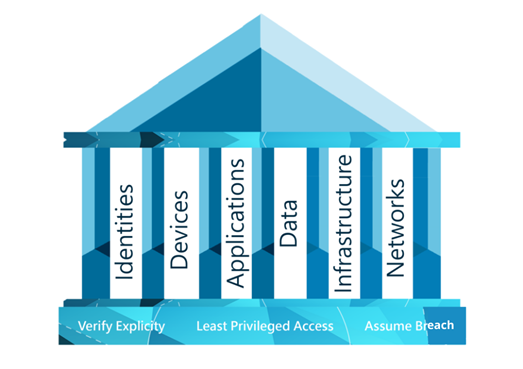
There are three principles that a Zero Trust strategy is built on; verify explicitly, use least privileged access, and assume breach. When you have a Zero Trust strategy in place, these three principles should be at the heart of your IT and at the forefront of your mind.

Verify explicitly
Always authenticate and authorise data points. This includes identity, location, device and workload.

Use least privileged access
Limit user access in order to protect your data.

Assume breach
Verify that all end points are encrypted end to end. Leverage analytics to get visibility, drive threat detection and improve defences.
Six elements to Zero Trust
The Zero Trust security methodology is made up of six core elements: identities, devices, apps, data, infrastructure and networks. Think of these six elements as the pillars to building a Zero Trust environment. They need to be defended in order for you to stay secure, and you can do this by assuming breach.
Why you should consider adopting Zero Trust
Adopting a Zero Trust strategy will benefit your business in other ways than just protecting your business. For starters, you’ll have a true sense of how secure you truly are and will be able to better manage your overall security posture.
You’ll also have the opportunity to scale back on any overlapping security spend. Businesses can often buy security products for tactical reasons that will often work in isolation to look after a single aspect of your security. Overtime there often becomes a pileup of products that aren’t delivering optimal coverage or value for money. Adopting a Zero Trust method will help you unify your security and ultimately help you save on costs as you streamline your technologies.
Finally, there is currently a huge skills gap when it comes to cyber security, and that gap is only going to grow. As more businesses identify they can no longer trust everything within their network, and realise they need to adopt a Zero Trust approach, this can often highlight a industry wide issue that businesses across the UK are currently facing a massive skills gap when it comes to Cyber Security. But Zero Trust can help this as the methodology will help give you a clear foundation to follow. Plus. if you don’t have the in house capabilities available, then you will have the option to draw upon the expertise from a company who specialises in security. Psst… we have a Zero Trust Assessment available, which brings us nicely onto wrapping up this blog post.
Looking to implement Zero Trust
The truth is, building Zero Trust within an organisation doesn’t happen overnight. There’s a lot of planning that’s involved. Microsoft suggests you start by evaluating your current environment, available resources and priorities. From there you can start pulling together a plan to implement a Zero Trust strategy that meets your business needs.
Implementing Zero Trust in your organisation can often seem overwhelming. The best first step is to ensure you have the right technology in place to help you enable Zero Trust. Microsoft Technologies have the security tools and features you need to implement Zero Trust – Enabling you to gain control over your organisation’s security. Head over to Microsoft’s website to find out how Bridgewater leveraged Microsoft 365 to deploy a Zero Trust security model.
As an Azure Expert MSP with several Microsoft Security specialisations, we’re in a unique position to help you adopt Zero Trust within your organisation. Not only could we help you deploy Microsoft technologies, but we’ll also help you implement the Zero Trust best practices and framework. Simply get in touch to find out more.
Whether it be banking, insurance, capital markets or investment management, these sectors all have one thing in common – they are data goldmines. These types of financial institutions generate massive amounts of data every day, from customer transactions and interactions to regulatory reports and analysis. While this data holds immense potential for driving innovation and crucial business decisions, it also presents significant challenges.
In this blog, we’ll explore the top data challenges faced by financial services organisations and how a unified modern data platform like Microsoft Fabric, can be a game changer for IT, Data and AI leaders in this sector.
What are the data challenges?
The financial services sector operates at the intersection of vast data volumes, high regulatory demands, and evolving customer expectations. However, unlocking the full potential of data comes with its fair share of hurdles. Let’s take a closer look at the key challenges :
Data Fragmentation: Many financial institutions might find that they often have data scattered across multiple systems like legacy platforms, CRM tools, trading systems, and more. Having your data in multiple silos can hinder collaboration and make it difficult to gain a holistic view of your customers or your operations.
Data Volume and Complexity: With the rise of digital banking, real-time payments, and customer analytics, data volumes are skyrocketing. Being able to process, analyse, and draw insights from this data at scale is a significant challenge in itself.
Data Security and Privacy: Growing cyber threats and the need to protect sensitive customer information are ongoing concerns across financial services. Making sure that data is stored securely is non-negotiable, but are you properly managing and maintaining your secure environment?
Real-Time Insights: Financial markets operate very quickly, and things can change suddenly. Gaining real-time insights from transactional data to drive decisions, detect fraud, or enhance customer experiences is critical, but it demands robust infrastructure and tooling – which some financial services organisations lack.
Regulatory Compliance: The financial sector in the UK is tightly regulated, with laws and standards demanding robust data governance from financial service institutions. Having the ability to meet these high standards while maintaining agility can be a daunting task.
These top data challenges are just the tip of the iceberg, with many more unique challenges facing financial services businesses across the UK. By addressing these challenges head-on, businesses can unlock significant value from their data while meeting regulatory and security requirements. But overcoming these hurdles requires the right tools, platforms and strategies – which is where Microsoft Fabric comes into play.
How can Microsoft Fabric help with data challenges?
Microsoft Fabric is an end-to-end analytics and data platform designed for businesses that require a unified data solution. The platform encompasses data movement, processing, ingestion, transformation, real-time analytics and report building. All in all, Fabric helps to simplify and unify the complexities of modern data management.
With its unified OneLake architecture, Fabric brings all your data – structured and unstructured – into one cohesive platform, making it easier for teams to collaborate and giving you a full 360-degree view of your operations and customers. No more frustrating silos! It also makes meeting regulatory requirements a breeze, thanks to built-in tools like Microsoft Purview that handle data lineage, auditing, and compliance tracking so you can stay agile while staying compliant.
When it comes to big data, Fabric has you covered with many powerful integrations. Allowing you to process large datasets effortlessly for tasks like risk modelling, fraud detection, and real-time analytics. Security is a top priority, with features like role-based access controls, encryption, and Azure Directory ensuring your sensitive data is protected while keeping access easy for your team. With Synapse Real-Time Analytics, you can tap into the insights from transactional data to detect fraud, optimise trading, and deliver exceptional customer experiences – all in the moment.
What’s next?
Navigating the data challenges of the financial services sector doesn’t have to be overwhelming. With Microsoft Fabric, organisations can unlock the full potential of their data while staying compliant, secure, and efficient.
There’s plenty more to learn about how you can solve common data problems at your financial services business. We didn’t want to spoil you with everything at once, so register to join our webinar, Overcoming Data Challenges in Financial Services on Thursday 12th December. Hear from data experts as they expand upon the data challenges you could face and the tools and strategies to overcome them.
As one of Microsoft’s most trusted UK partners, Cloud Direct is perfectly positioned to help your financial services business unlock data innovation. Supported by an extensive list of accreditations, including being one of the most established Azure Expert Managed Service Providers, our team of experts build the foundations that ambitious financial service organisations need to grow, innovate and succeed.
If you’d like to find out more about Microsoft Fabric for your business, get in touch today!
Starting as a new Chief Information Officer or Chief Technology Officer is an exciting and challenging role. You will be responsible for leading the technology strategy and initiatives for your organisation – bridging the gap between technology and business objectives.
Why the business needs a new technology leader
There are a few different reasons why businesses may appoint a new CIO or CTO. One common reason is that the organisation’s current IT systems or processes are not meeting their needs and are in need of modernisation. This might be because the systems are outdated, inefficient, or not well-suited to the needs of the business. In these cases, the CIO will be responsible for identifying the issues with the current systems, developing a plan to modernize them, and implementing those changes.
Another reason why businesses may appoint a new CIO is that they have recently received investment or are experiencing significant growth. In these cases, the organisation may need to scale up its IT infrastructure and capabilities in order to support that growth. The CIO will be responsible for developing a plan to expand and enhance the organisation’s IT capabilities and implementing those changes.
Regardless of the reason for appointing a new CIO, the role is typically focused on driving the organisation’s technology strategy and initiatives, and ensuring that the IT systems and processes are aligned with the overall goals and objectives of the business. The CIO will work closely with other executives, IT staff, and business leaders to identify opportunities for using technology to improve the organisation’s operations, and will be responsible for implementing those changes.
Considerations to succeed in your role
Understand the business goals and priorities: As the CIO, you will need to align your technology strategies with the overall goals and objectives of the organisation. Take the time to get to know the business and understand what the key priorities are. This will help you identify the areas where technology can add the most value.
Build relationships with key stakeholders: As the CIO, you will be working closely with a wide range of stakeholders, including executives, IT staff, and business leaders. Building strong relationships with these individuals will be critical to your success. Take the time to get to know them, understand their needs and concerns, and work collaboratively to find solutions.
Assess and optimize the current IT infrastructure: Before you can develop new strategies and initiatives, you will need to understand the current state of the organisation’s IT infrastructure. Take the time to assess the systems, processes, and technologies that are in place, and identify areas where improvements can be made. This will help you make informed decisions about where to invest your time and resources.
Typically we help CIOs and CTOs assess the following areas to help gain an understanding of the quick wins and strategic projects needed:
- Infrastructure and databases
- Data
- Security
- Applications
- Hybrid working arrangements
Develop a roadmap for the future: As the CIO, it will be your responsibility to develop a roadmap for the future of the organisation’s IT capabilities. This will involve identifying the key trends and technologies that will shape the industry, and developing a plan to take advantage of them. Keep in mind that this roadmap will need to be flexible and adaptable, as the IT landscape is constantly evolving.
Foster a culture of innovation: As the CIO, you will be responsible for driving innovation and change within the organisation. This will require you to create a culture that is open to new ideas and approaches, and that encourages experimentation and risk-taking. This will be especially important as you work to implement new technologies and strategies.
Access funding to support your assessments and strategic projects
To build out your plan you need to assess all elements of the business’s technology to know which areas to prioritise. Cloud Direct help businesses access funding from Microsoft to support the planning and implementation of cloud projects including assessments and discovery projects.
Microsoft Azure Migration and Modernisation funding is a program offered by Microsoft to help organisations migrate their workloads and modernize their applications using Azure cloud services. The funding is provided in the form of credits that can be used towards the cost of migrating and modernizing workloads on Azure.
One way to access Microsoft Azure Migration and Modernisation funding is through Cloud Direct, a Microsoft Cloud Solution Provider (CSP) that provides access to a range of Microsoft cloud services, including Azure. As a CSP, Cloud Direct can help organisations navigate the process of accessing and utilizing the Migration and Modernisation funding.
To access the funding through Cloud Direct, organisations will need to work with a Cloud Direct account manager to develop a plan for migrating and modernizing their workloads on Azure. The account manager will then help the organisation submit an application for funding through the Microsoft Partner Center.
Once the application has been approved, the organisation will receive credits that can be used towards the cost of migrating and modernizing their workloads on Azure. The credits can be used for various purposes, including the cost of Azure infrastructure, the cost of third-party tools and services, and the cost of professional services provided by Cloud Direct.
Overall, accessing Microsoft Azure Migration and Modernisation funding through Cloud Direct can be a valuable resource for organisations looking to migrate and modernize their workloads on Azure. By working with a CSP like Cloud Direct, organisations can benefit from expert guidance and support throughout the process, as well as access to a range of tools and services that can help them successfully migrate and modernize their workloads on Azure.
In this episode of the Security Lab, Leon explored the capabilities, benefits, and use cases of Microsoft’s market-leading SIEM solution Sentinel, with Microsoft’s Lina Kuzminskiene. Processing 78 trillion security signals and monitoring 1500 threat groups each and every day, Microsoft has positioned itself as an indisputable authority in the modern cyber security landscape – and here are the five key things we learned.
Unified security with Microsoft Sentinel
Microsoft Sentinel provides an integrated and scalable solution for organisations to monitor and protect their entire infrastructure. By consolidating data from various sources into a single dashboard, it reduces the complexity and operational overhead of managing siloed tools, enabling faster detection and response to threats.
Proactive threat detection with AI
Sentinel leverages AI and machine learning to enhance threat detection, conduct behavioural analysis, and reduce false positives. This proactive approach enables organisations to identify and mitigate advanced threats before they escalate, improving overall security posture.
Reducing costs through optimisation
Adopting Sentinel allows organisations to consolidate their security tools, reducing both operational costs and complexity. By prioritising critical data sources and fine-tuning detection rules, organisations can optimise log ingestion and manage costs effectively, especially under Sentinel’s consumption-based pricing model.
Addressing talent and resource gaps
The integration of AI-driven features like Microsoft Security Copilot addresses the growing talent gap in cybersecurity. It empowers analysts with natural language queries and automated insights, enabling even junior staff to perform complex threat hunting and analysis tasks efficiently.
Best practices for adoption
Successful Sentinel adoption involves careful planning, prioritising critical data sources, and leveraging Microsoft and partner support. Organisations should focus on implementing Zero Trust frameworks, enabling multi-factor authentication (MFA), and fostering a security-first culture to maximise Sentinel’s effectiveness.
Artificial Intelligence (AI) is more than just a buzzword – it’s an exciting way for charities to connect with supporters. From making work easier behind the scenes to helping charities keep their supporters in the loop, AI can start to make a world of difference. With the right AI tools, organisations can smooth processes, get to know their donors better, and build strong, lasting relationships.
But it’s no magic wand. It’s not one-size-fits-all, and it’s not here to replace the genuine human connections that keep charities running. Each nonprofit has unique needs, so it’s all about finding the right AI tools for the right tasks. By focusing on what matters most to your charity, AI can help you work more efficiently without wasting resources.
There are four key stages of the donor experience – Awareness, Support, Nurture, and Repeat – and each can be enhanced with Microsoft AI tools. With a strategy that speaks to each of these steps, AI can help your charity shine by attracting, engaging, and retaining supporters in new and meaningful ways.
Stage 1: Awareness – generating interest and engagement
Every donor journey starts with awareness. Whether it’s seeing a post on social media, finding a blog post through a search engine, or hearing about your nonprofit from a friend, the first interaction is crucial. This is the stage where charities can capture interest and give potential donors a reason to care.
How AI can help: AI can be a powerful ally here, helping you understand how people are discovering your charity and which content they connect with most. It can track where visitors come from, what they’re reading, and even predict which types of content might encourage someone to donate. Imagine knowing what barriers are stopping potential donors from giving, or having an AI chatbot ready to answer common questions. By learning more about your audience at this early stage, you can start building a supporter profile that will guide future interactions.
AI Tools to consider:
- Microsoft Power Automate: Great for pulling data from various sources, like social media or spreadsheets, to help you see where your traffic comes from and what content clicks with people.
- Microsoft Power Virtual Agents: This user-friendly, no-code tool lets you create interactive supporter journeys with chatbots that can engage visitors, answer questions, and share your charity’s story.
Stage 2: Support – turning interest into action
Once people know about your cause, the next step is encouraging them to get involved. Whether it’s signing up for a fundraising event, volunteering, or making a one-time donation, this stage is all about making it easy (and meaningful) for supporters to say “yes” to your cause.
How AI can help: AI can assist in creating personalised communications, sending messages that truly resonate with each donor. It can analyse things like age, location, and giving history to ensure that thank you messages, event invitations, and other updates match each donor’s unique interests. AI can also automate simple but important touchpoints, like sending a warm thank you email immediately after a donation. Personal touches like these make supporters feel valued and keep them connected to your mission.
AI tools to consider:
- Azure Machine Learning: This tool can help you group donors by their preferences, behaviours, and demographics, making it easy to tailor your messages to different types of supporters.
- Azure Cognitive Services – Text Analytics: This tool goes a step further by analysing feedback and online mentions to give you insight into what people are saying about your charity, helping you understand what resonates most with supporters.
Stage 3: Nurture – keeping donors connected and engaged
Nurturing your donors is all about building a relationship over time. Supporters want to know how their donation made a difference, and charities need to keep them engaged so they stay connected to the cause. This stage is about staying in touch with personalised updates that make them feel appreciated and in the loop.
How AI can help: AI can help you tailor your outreach based on donor behaviour, ensuring messages land at just the right time. For example, AI can predict when donors are most likely to open emails, based on their engagement patterns. It can even suggest specific content – such as project updates or impact stories – that individual donors are more likely to connect with. By using AI to automate part of this process, charities can nurture their relationships in a way that feels personalised and genuine to them.
AI tools to consider:
- Azure Synapse Analytics: This tool can analyse large sets of data to help charities spot trends in donor engagement, making it easier to send timely and relevant updates.
- Azure Machine Learning: This tool can automate segments and tasks, ensuring that communications are aligned with each donor’s preferences and are sent at optimal times.
Stage 4: Repeat – turning supporters into long-term allies
The final stage in the donor journey is ensuring that donors return. When people give again, it’s a sign that they trust your charity and feel good about their support. This stage is all about turning one-time donors into long-term allies and advocates, which can be especially valuable in tough economic times.
How can AI help: AI can help charities retain supporters by predicting when they might disengage. By analysing past donor activity, AI can identify the “churn risk” for each supporter and recommend ways to re-engage those who might be on the fence. For example, AI can automatically trigger a re-engagement email after a certain period of inactivity, or it can send impact stories and updates that keep donors informed of the great work being done thanks to their support.
AI tools to consider:
- Microsoft Power BI: This powerful tool allows charities to see data trends and visualise the donor journey in an easy-to-digest dashboard, making it easier to spot where donors might lose interest.
- Azure Synapse Analytics: By keeping track of donor engagement over time, this tool can help charities create targeted re-engagement campaigns that remind supporters of the impact they’re making.
Making AI Work for Your Charity
As we’ve shown, AI can do incredible things. We’ve only just scratched the surface, but it’s most effective when it’s used thoughtfully. For charities, the key to successfully adopting AI is to identify what specific challenges need addressing and to pick tools that fit those needs. AI can help you save time, engage supporters, and ultimately raise more funds, but it’s not a substitute for the heart and personal touch that defines your charity’s mission.
With the right approach, AI can be a game-changer for your charity, helping you make an even greater impact in the communities you serve.
If you’d like to find out more about how AI can support fundraising, we worked with Charity Digital to produce this whitepaper that outlines the steps your charity can take to adopt AI successfully.
Starting your AI journey
As one of Microsoft’s most trusted UK partners, Cloud Direct is perfectly positioned to help your charity unlock innovation. Supported by an extensive list of accreditations, including being one of the most established Azure Expert Managed Service Providers, our team of experts build the foundations that ambitious charities need to grow, innovate and succeed.
Our technical experts have been helping charities like Amnesty International, Charities Aid Foundation, British Red Cross, Confederation of British Industry and many more to innovate and grow with Microsoft Cloud.
To help you take your next step forward, we have created a suite of Data + AI Workshops and Assessments that will enable you to discover the art of the possible and enable you to apply Data and AI technologies to your specific use cases and give you an understanding of how AI can help you on your mission.
If you’d like to find out more about these workshops and assessments, fill out the form on this page. We look forward to hearing from you!
In the second episode of The Security Lab, we focused on the core components of the Microsoft Purview suite, including Data Governance, Risk Management, Information Protection, and Compliance Management. These tools are designed to provide a unified approach to managing and protecting your data, regardless of where it resides.
According to Microsoft’s 2023 Data Governance Report, more than 80% of organisations cite the ability to manage and protect data as a top business priority, yet more than half struggle to do so effectively. Purview provides the tools and capabilities needed to address these issues – and here are the five key learnings from our Security Lab special with Microsoft’s Karim Fayad.
Unified data governance across platforms
Microsoft Purview provides a centralised platform to manage, classify, and secure data, no matter where it resides. With features like data classification, labelling, and retention policies, organisations can ensure their data governance strategies are consistent and compliant with regulatory standards. Purview’s comprehensive approach simplifies managing sensitive data, enabling businesses to focus on mitigating risks while maintaining compliance.
Addressing the challenges of knowing your data
One of the biggest challenges organisations face is understanding where their data is stored and its sensitivity. Microsoft Purview tackles this by offering out-of-the-box templates and trainable classifiers to identify and label data based on pre-defined or custom sensitive information types. By creating a detailed data map, organisations can implement effective policies to protect and govern their most critical assets.
Compliance Manager simplifies regulatory adherence
Microsoft Purview Compliance Manager helps organisations assess their environments against over 380 regulatory standards, such as GDPR and Cyber Essentials. It provides actionable improvement plans, linking each task to specific Microsoft solutions. By offering compliance scores and prioritising tasks, organisations can systematically enhance their compliance posture while reducing the complexity of meeting industry and regional requirements.
Data Loss Prevention and Insider Risk Management
Purview’s Data Loss Prevention (DLP) and Insider Risk Management tools work in tandem to prevent unauthorised data sharing and address risky user behaviours. By leveraging adaptive protection policies, organisations can dynamically respond to activities like mass data downloads or unauthorised sharing. These tools are critical for safeguarding sensitive information, particularly during events like employee departures or breaches.
Purview as a foundation for AI readiness
Microsoft Purview ensures data readiness for AI initiatives by focusing on proper classification, labelling, and access control. Before organisations can leverage tools like Microsoft’s AI Copilot or AI Studio, they must ensure their data is clean, compliant, and secure. By adopting Purview, businesses can confidently unlock the transformative potential of AI while mitigating risks associated with data misuse or regulatory non-compliance.
In our first episode of the Security Lab, Leon chatted with Microsoft’s Aileen Finlay about the role of the Defender Suite in tackling today’s security challenges. Aileen’s an expert in the field, and together they shared insights on how businesses can stay ahead in a fast-changing landscape – here are the five key things we learned.
XDR Unifies Detection and Response
Microsoft Defender XDR consolidates security data across endpoints, email, and cloud into a unified platform, making threat detection and response more efficient. Its automation capabilities reduce Time to Resolution (TTR), preventing attackers from gaining a foothold or escalating attacks. The integration of multiple tools under a single pane of glass not only simplifies management but also reduces the complexity of responding to incidents. By streamlining security operations, XDR ensures faster identification, containment, and resolution of threats, significantly improving an organisation’s overall security posture.
The Crucial Role of Time to Resolution (TTR)
The speed at which an organisation can detect and respond to an attack often determines the level of damage. Faster TTR means attackers are stopped earlier, reducing the chances of data exfiltration or operational disruption. Automated playbooks in XDR isolate compromised devices, reset credentials, and contain threats in real time. As demonstrated, delays in responding allow attackers to progress along the attack chain, embedding themselves deeper into systems. XDR’s automated workflows drastically reduce TTR, enabling organisations to respond within minutes rather than hours or days.
Leveraging the MITRE ATT&CK Framework
The MITRE ATT&CK framework outlines the various stages of an attack, from reconnaissance to privilege escalation and lateral movement. XDR maps its responses to this framework, enabling organisations to identify and disrupt threats at every stage. As the webinar demonstrated, stopping an attack during its early phases, such as reconnaissance or initial compromise, is far less damaging than addressing it during data exfiltration. This framework provides a structured approach to understanding threats, helping organisations predict and prevent further malicious actions effectively.
Simplifying Security with Consolidation
XDR helps organisations streamline security by consolidating multiple point products into a single solution. This reduces costs, improves operational efficiency, and simplifies incident management. The webinar highlighted that many organisations rely on dozens of disconnected tools, which complicates visibility and delays response times. By integrating solutions like endpoint detection, email security, and threat intelligence, XDR creates a seamless ecosystem where all security signals converge. This not only makes responses faster but also reduces the total cost of ownership by eliminating redundancies.
AI for Smarter and Faster Security
Microsoft Defender XDR integrates AI-powered tools like Security Co-pilot to summarise incidents in natural language, making complex data accessible and actionable. This is particularly valuable given the shortage of skilled cybersecurity professionals. During the webinar, it was noted that Security Co-pilot assists with incident summaries, compliance reporting, and post-attack analysis, reducing manual effort and increasing accuracy. The AI capabilities in XDR also help detect advanced threats, such as those using AI for social engineering or automated attacks, ensuring defences remain one step ahead.
Clients trust law firms with their private information, so their cybersecurity is under scrutiny around the clock. Law firms hold a wealth of sensitive data, from personal client details to confidential case files, making them the perfect target for cybercriminals.
It can take years to build a law firm’s reputation, but it only needs one incident to tear it back down. A single breach can have catastrophic consequences, including loss of client trust, financial penalties, and legal repercussion for failing to protect client data.
In 2020, The Solicitors Regulation Authority (SRA) reported that 30 out of the 40 law firms they visited had been victims of a cyber-attacks, with £4 million in client money stolen. This highlights the severity of the current threat landscape in the sector.
In the age of artificial intelligence, cyber criminals are sharpening their skills and exploiting AI-powered fraud and deepfake videos to harvest customer data. Identity fraud is the most dominant case type, with more than 237,000 reports last year. Firms are most commonly attacked with sophisticated phishing scams via email, viruses, and malware, so how do you make sure both your client data, and your business, are secure? Where do you even begin?
Regulation and ethical obligations
A data controller is an individual within your firm who is accountable for data protection. They must be able to demonstrate compliance with GDPR and the DPA. Their roles and responsibilities include creating a contingency plan in case of a data breach, conducting risk assessments, and training staff about cybersecurity risks.
Regardless of your firm’s location within the UK, it is your responsibility to make sure you adhere to the data security laws – across teams, departments, and offices.
Best practice for protecting your law firm
To make sure your law firm is protected against attacks, think of creating a multi-layered security strategy approach. Concepts like Zero Trust should be implemented, and Microsoft’s has a whole suite of security tools to lock your data down.
Building your security policy
The majority of security issues in law firms are caused internally. Almost four in 10 internal issues have been caused by human error, this includes failure to redact information or use BCC in emails, sending to the wrong recipient and verbal disclosure. So, what can we do about these seemingly simple slip-ups?
- Strong passwords: Do you use the same password for every login? You’re putting yourself and your firm at risk of being targeted by cyber criminals. Create a complex password – not your birthday, please! To make your life just that bit easier, use a password management tool.
- Multi-Factor Authentication (MFA): This is a process where a user needs an additional form of identification when signing in, like entering a code that was sent to their mobile, or providing a fingerprint scan. Doubling up on your authentication upon logging in will significantly reduce the risk of hackers accessing and compromising your employees’ accounts.
- Role-Based Access Control (RBAC): All of your employees do not require the same level of access and control over resources. RBAC allows you to assign roles to control what access users have to different resources. It’s easy to assign and allocate roles with RBAC, as well as revoking them when necessary.
- Test and train: Just because you’ve shared the security plan with the rest of the business, that does not mean everyone’s read it. Ask your IT team to create a mock phishing email and send it to the whole company. By doing this, you’ll be able to educate your staff on security best practices and protocols. It’s also a fun exercise to see who’ll fall for it, with a salient message on the importance of cybersecurity awareness.
- Encryption: In its simplest form, encryption will transcribe your data and lock it with a secret code. Azure uses double encryption, which is when you have at least two layers of encryption to protect both your data at rest and data in transit. Using double encryption on your data will mean threats have to break through two barriers to access your information.
- Remote work: With more and more law firms comprising of hybrid workforces, virtual desktops is the answer to a safe and secure IT environment. Legacy applications can easily run on virtual desktops, and they can be installed on different devices. Virtual desktops create a standardised, secure environment to ensure all remote workers are complying with data security policies wherever they are.
Cyber security is a necessity for legal firms, vital to their operation and survival in the modern world. It safeguards the firm’s reputation, ensures compliance with regulations, and protects the very essence of what it means to be a trusted legal advisor.
As the threat landscape evolves, so must the defences of legal practices to ensure they remain protected from the constant threat of cyber-attacks. This commitment to cybersecurity is not just about risk management; it’s about upholding the professional and ethical standards that define the legal profession.
Security is a top IT priority for every law firm, but improving it doesn’t happen overnight. Register to our security workshop and reshape your security roadmap with your customers in mind.