


Over the past year cyber security has become an increasingly hot topic, and for good reason. A recent study by the UK government found that two in five businesses (39%) and one in four charities (26%) have reported having experienced cyber security breaches or attacks in the last 12 months. In this article, we’ll take a dive into Microsoft’s approach to integrated security and discuss the differences between some of the most common Microsoft 365 licence types.
Microsoft’s Integrated Approach to Security
With hundreds of security solutions out there, it can be hard to know where to start with securing your organisation. Microsoft’s Integrated Security takes a holistic approach to securing your organisation’s IT and data environment across 4 key vectors:

Identity & Access Management
Identity and access management (IAM) is the first line of defence and foundation of any secure digital working environment. It is a framework of policies, processes and technology that enables the management of user identities. It uses user credentials and other authentication methods like Multi-factor authentication (MFA) to determine whether the user using them is who they are claiming to be. Once their identity has been authenticated, the user is authorized to access the resources that they have been granted permission to.
Threat Protection
Threat Protection refers to a category of security solutions that defend against malware or hacking-based attacks that target sensitive data. It monitors activity across your entire digital estate and ensures that threats are rapidly identified and quarantined. Some of Microsoft’s most notable Threat Detection solutions include:
- Microsoft 365 Defender, which is a unified pre- and post-breach enterprise defence suite that natively coordinates detection, prevention, investigation, and response across endpoints, identities, email, and applications to provide integrated protection against sophisticated attacks.
- Defender for Endpoint, which is an enterprise endpoint security platform designed to help enterprise networks prevent, detect, investigate, and respond to advanced threats.
- Microsoft Cloud App Security, which is a cloud access security broker (CASB) that provides multifunction visibility, control over data travel, and sophisticated analytics.
Information Protection
Information Protection solutions help keep sensitive data secure irrespective of where it’s stored or where it travels. Microsoft’s Information Protection technologies allow you to set up and quickly configure data security policies with sensitivity labels. By creating sensitivity labels with pre-configured rules, you’re able to conveniently assign security policies to files that are applied regardless of where that file is stored.
Security Management
The Microsoft 365 security centre combines protection, detection, investigation, and response to email, collaboration, identity, and device threats, in a central portal. It has been designed to allow for quick access to critical security information, so you’re able to stay on top of your organisation’s security in real-time. The security centre includes:
- Microsoft Defender for Office 365, which helps organisations secure their enterprise with a set of prevention, detection, investigation and hunting features to protect email, and Office 365 resources.
- Microsoft Defender for Endpoint, which delivers preventative protection, post-breach detection, automated investigation, and response for devices in your organization.
- Microsoft 365 Defender, which is part of Microsoft’s Extended Detection and Response (XDR) solution that leverages the Microsoft 365 security portfolio to automatically analyse threat data across domains and build a picture of an attack on a single dashboard.
Comparing Common Microsoft 365 Licence Types
Each of the above mentioned vectors are protected by a variety of powerful security features that are deployed based on your Microsoft 365 or Office 365 licence type. These security features include:

With the above in mind, let’s take a look at how some of the common Microsoft 365 and Office 365 licence types are able to safeguard your organisation’s apps and data.
Microsoft 365 Business Standard s. Microsoft 365 Business Premium
Microsoft 365 Business Standard is a licence for businesses whvo need Microsoft Office applications across multiple devices as well as business email, cloud file storage and online meetings and chat. Microsoft 365 Business Premium includes everything Microsoft 365 Business Standard has to offer, with the addition of powerful security features to safeguard your business.
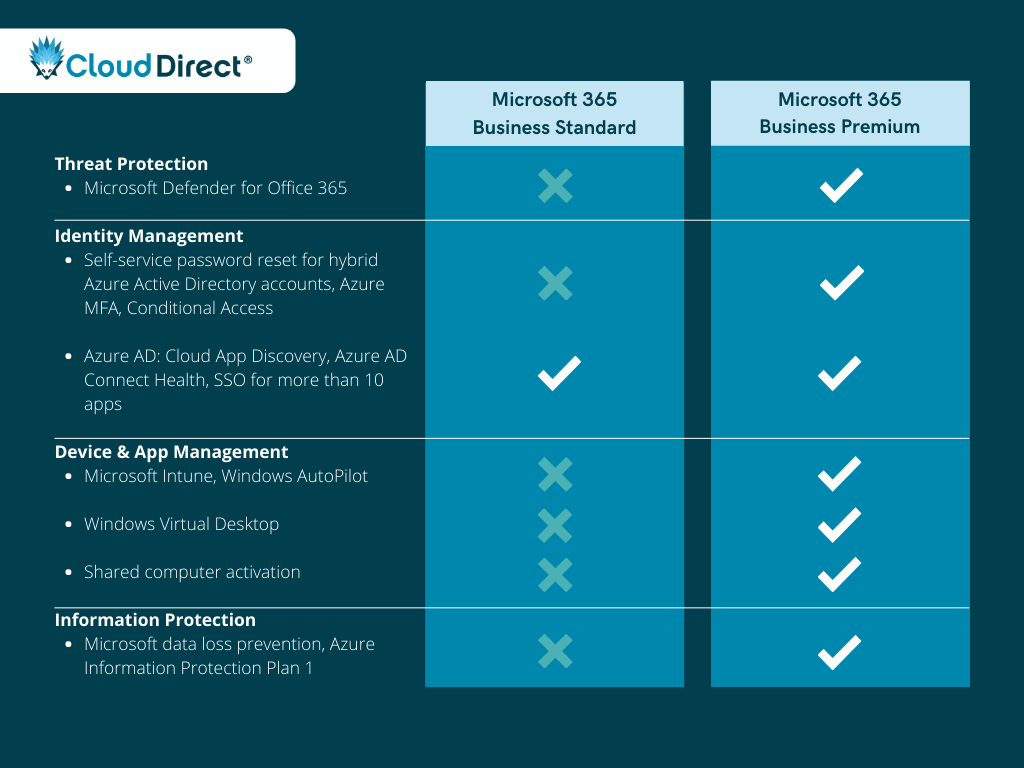
Why upgrade to Premium?
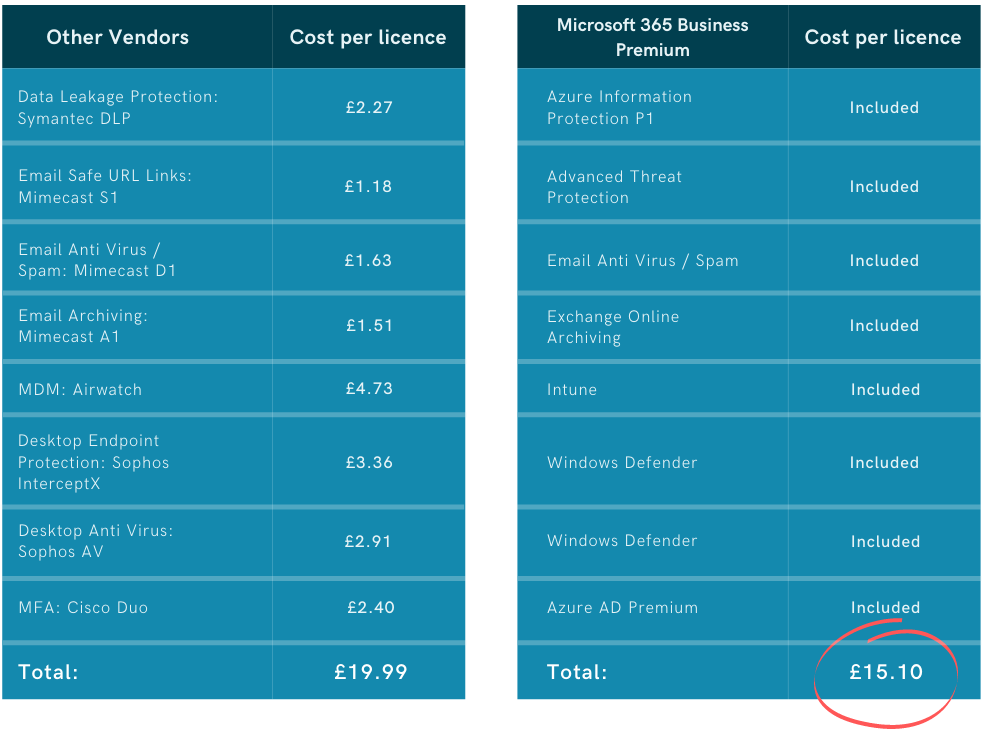
As is made clear by the above comparison, Microsoft 365 Business Premium is able to do a much better job of securing your organisation’s apps and data. While these additional security features do come with a bit of an extra cost, it’s a small price to pay for significantly reducing the risk of falling victim to cyber attacks. A 2018 study done by Kaspersky, found that the average cost of a SMB data breach is around £85,000. Additionally, when comparing the Microsoft 365 Business Premium licence fee to what it would cost to deploy these security features using third-party vendors, it’s clear that Business Premium offers excellent value for money:
Office 365 E3 vs. Microsoft 365 E3
The Microsoft 365 Enterprise plans effectively mirror the Office 365 Enterprise plans, with the addition of a Windows 10 Enterprise licence and Enterprise Mobility and Security (EMS) features. While Microsoft 365 Business Premium might be suitable for most businesses under 300 seats, it does have it’s limitations. This is where Microsoft 365 E3 comes into play. Microsoft 365 E3 can be seen as the minimum requirement for organisations that have complex or regulatory requirements around security and compliance.
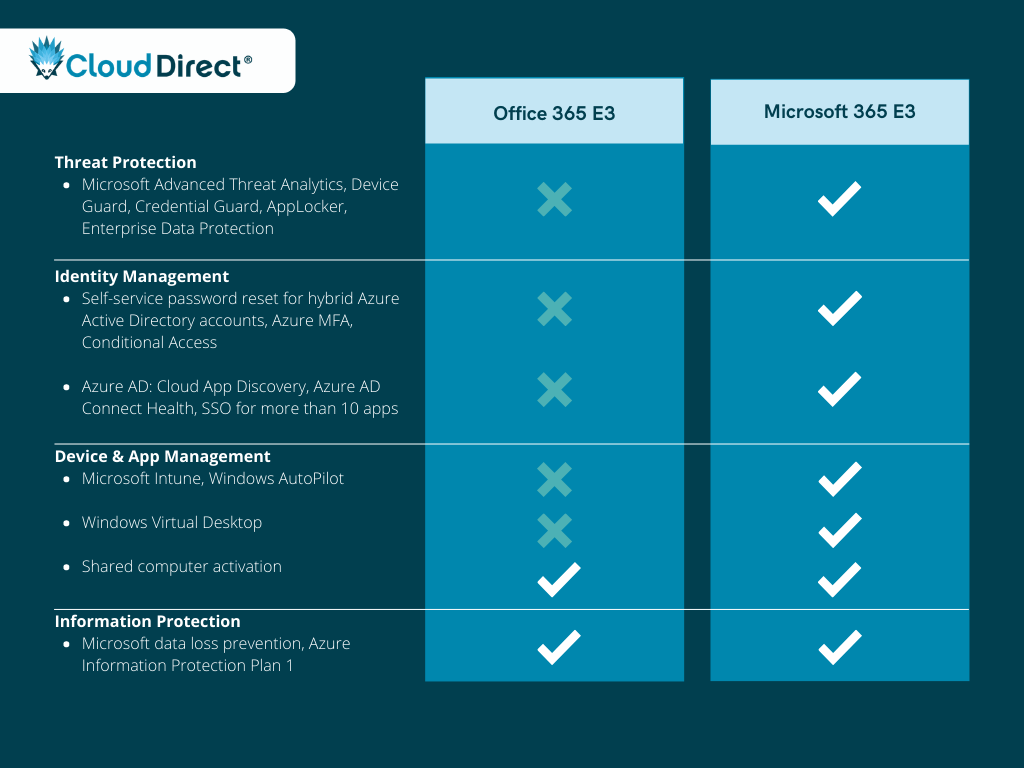
Why upgrade to Microsoft 365 E3?
As was the case with the previous comparison, Office 365 E3 will only provide you with the necessary tools to support your organisation’s productivity and collaboration, and won’t give you adequate protection against cyber attacks. Microsoft 365 E3 is built for businesses who want the best in productivity and collaboration while operating in a secure and compliant environment.
Microsoft 365 E3 vs. Microsoft 365 E5
Microsoft 365 E5 is Microsoft’s flagship licence and is the most complete productivity and security solution available. This licence is a significant step-up from Microsoft 365 E3, and includes many additional features, such as: Teams Voice capabilities, Power BI Pro licences and a variety of top-tier security technologies.

Why upgrade to Microsoft 365 E5?
As Microsoft’s ‘Hero’ licence type, Microsoft 365 E5 is built for organisations that want to have the best in productivity, security, and compliance. The additional security features allow you to have greater control and visibility over your Microsoft 365 environment. You’ll benefit from all of Microsoft’s best security features, including Microsoft 365 Defender for Endpoint, Office 365 and Identity, Azure Active Directory Premium Plan 2, and Cloud App Security. Additionally, The E5 licence gives you the ability to configure and automate security policies and regulations, which, in turn, leads to significantly less administrative overheads.
Conclusion
While there isn’t any one licence that is suitable for all organisations, we hope that you’ve gained a deeper understanding of Microsoft’s approach to security and how the various licences are able to safeguard your business. It’s important to understand that simply purchasing a high-end licence, such as Microsoft 365 E5, will not secure your working environment. These licences need to be properly configured and continuously monitored to protect your business.
Need help making sense of your organisation’s security? As an Azure Expert MSP and Gold Security Partner, our team of in-house security experts are well-equipped to help you understand which Microsoft 365 licence is best for you and how you’re able to leverage the power of Microsoft’s security solutions.

The retail and hospitality industry has completely transformed in the past decade thanks to the technology that’s become available. Businesses that are not keeping up with these changes are quickly falling behind.
Customers have more choice and convenience than ever thanks to the power of the internet, which is why high-quality service is one of the most valuable assets for retailers in 2020.
- 61% of retailers believe that efficient customer service is the most important factor in providing their customers with the best experience possible.
- Customers are willing to spend up to 16% more on products and services with companies that offer a better experience.
Microsoft has been building on the capabilities of Skype for Business within Microsoft Teams since September 2017. Now Teams has been developed into Microsoft’s one-stop-shop for chats, meetings, calling, collaboration, app integration and file storage. Your employees will have the ability to utilise these tools to provide the first-class customer service your customers deserve.
Here are three ways you can improve your customer service by using Microsoft Teams.
1. Provide staff with the tools they need to sell
It’s normal to see everyone equipped with a smart device, and this is starting to apply to employees on the shop floor too. It’s now becoming the norm for employees to have a mobile device with them whilst at work. Whether this is for taking orders, communicating with others or checking stock levels to avoid running back and forth to the stock room. Being mobile is the nature of the job within the retail sector – you need to share information with employees in different locations. Microsoft Teams allows employees to collaborate and communicate securely, from any location.
83% of the retail decision-makers and 74% of the store assistants surveyed agreed that shoppers will have a better experience when associates are equipped with technology.
And why’s that? Employees will have instant access to all the information they need, can pass on urgent information as a private or group message and communicate with the people they need in seconds. Microsoft Teams allows you to do all of this and more. It’s a centralised hub for you to store and share knowledge with other employees, whether they’re on the shop floor or head office.
79% of customers say being able to engage with knowledgeable store assistants is important.
Customers are now expecting staff to know the answers to all their questions when they are shopping. Microsoft Teams can be used to store and share all sorts of information on products and stock, employee training, in-store promotions and more.
2. Effective workforce management
Managing your team’s time can get complicated, and the challenge many managers face is staying on top of this. It’s important that you effectively manage and organise your team as it will allow you to save time and focus on what really matters. The first step to achieving this is having the right tools in place.
Organising your team’s time has never been easier with Microsoft Teams. A recently added feature in Teams is the schedule management tool, Shifts. It allows you to plan shifts that employees can review and make changes to within their mobile device, all in real-time.
Employees will have the ability to view their upcoming shifts, view who they will be working with, put in a request to swap or pick up extra shifts and request time off. They will be able to manage all of this within Microsoft Teams and managers will be able to add specific activities to a specific shift, allowing employees to ensure tasks get done.
Your team will be able to clock in and out of a shift with one tap on their mobile device, making it easier for both employees and managers to view timesheets at the end of the month.
The Microsoft Teams, Shifts feature provides managers with a holistic view of their team’s tasks and time. Allowing employees to be more efficient during their shifts.
3. Keep employees engaged and motivated
Shop floor workers play a key role in representing your brand. They’re the ones that interact with your customers daily, yet they typically have the highest turnover rate.
Microsoft Teams has a tool called Praise. Praise allows you to recognise your co-worker’s achievements and efforts and share them with the wider business. This feature will not only help motivate employees but keep them engaged when they’re on the shop floor interacting with your customer, helping strengthen and improve your brand.
Companies with highly engaged employees outperform their competitors by 147%.
Engaged employees are more likely to stay in the job for longer. By utilising this tool, you could see your high turnover decrease, giving you more time to train and invest in creating your next dream team.
Want to transform your customer service with Microsoft Teams?
If you’d like to find out more about how your retail or hospitality business can adopt Microsoft Teams, watch our webinar. Our Modern Workplace experts discuss the importance of customer service and how Teams can support this change.
54% of IT professionals believe that remote working is a greater risk to their business. But it doesn’t have to be when you have the right solution in place.
Azure Virtual Desktop (AVD) allows you to quickly deploy applications and desktops to enable secure remote working. But it does so much more than that. Azure Virtual Desktop offers:
- Simplified management
- Multi-session Windows 10
- Optimisations for Microsoft 365 applications
- Enterprise support for Remote Desktop Services (RDS) environments.
Deploying AVD is a key enabler to rolling out an effective remote working solution. Employees will have the ability to access any desktop and application from any device, in any location. But there’s more to Azure Virtual Desktop than creating a remote working environment. Lets dive into three of the key benefits of deploying AVD.
-
Reduce costs
Virtual Desktops can slash expenses from the get-go with minimal costs if the server is already up and running. You can also forget about any expensive hardware that requires the specific software and licences. But it doesn’t stop there. There’s additional savings to be made later down the line too. You’ll be able to streamline any upgrades, reducing the time IT spend repeating the same upgrade across different devices. Plus, you’ll have the ability to use existing Windows and Microsoft 365 licences to access Azure Virtual Desktop.
With the money saved from AVD, your business will be able to reinvest to enhance business operations and your future IT strategy.
-
Advanced Security
Moving your company’s data into a Azure Virtual Desktop will remove the risk of having any hardware tampered with, lost, or stolen.
AVD is built on the same security as Microsoft Azure. So, you’ll be able to reap all the benefits of identity management, backup, database security and more. Not to forget that Microsoft invests over $1 billion in security every year, has over 3,500 security experts dedicated to enhancing your security and Azure has more compliance certifications than any over cloud service provider. Meaning you have access to the latest and greatest security tools available.
-
Flexibility & Productivity
Increasing business productivity is an overarching objective of most businesses. Which brings us onto our last benefit of using Azure Virtual Desktop. Increased productivity.
AVD allows your IT to become more agile when desktops are hosted virtually. Employees will have the ability to access windows and applications from any device, regardless of their location. Allowing you to create a flexible and modern workplace. Azure Virtual Desktop seamlessly integrates with Microsoft 365 and Teams to enhance your employees productivity within the Microsoft Ecosystem.
In recent years, over 80% of businesses rely on employees to use personal devices for at least one app – hence the rise in the BYOD policy. A flexible workplace is a productive workplace.
Plus, it’s an added disaster recovery protocol. If a disaster ever hits, employees will be able to maintain productivity levels with the flexible workplace you’ve created.
But the benefits don’t stop there.
The benefits of deploying Azure Virtual Desktop are endless. Deploying AVD provides you with the flexibility you need to help grow your business in the cloud. Are you ready to take the plunge? Get in contact with our experts to discover more about the power of Azure Virtual Desktop.

Discover the best communication solution for On Direct Business Services Ltd Cloud Direct
Businesses across the Telecommunications industry have had to quickly rollout remote working solutions to ensure employees can work remotely when needed. There are plenty of platforms out there to provide your employees with the ability to seamlessly communicate and collaborate whilst working remotely. The top three solutions that have taken the market by storm are Zoom, Microsoft Teams and Google Hangouts. Whilst they all have similar features at a glance, there are some key differences that you should consider before investing. In this guide we compare the three solutions, so you can see which is best suited to support your business needs.
At a glance…
| Feature list | Microsoft Teams | Zoom | Google Hangouts |
|---|---|---|---|
| Starting price | $5.00 | £11.99 | Custom |
| Platforms supported | Web based, iPhone App, Android App, Windows App | Web based, iPhone App, Android App | Web based, iPhone App, Android App, Windows App |
| HD Audio and Video Conferencing | ✓ | ✓ | ✓ |
| Record any call | ✓ | ✓ | ✓ |
| Transcribe any call | ✓ | ✓ | ✓ |
| Screen share | ✓ | ✓ | ✓ |
| Instant messaging | ✓ | ✓ | ✓ |
| Take control of someones screen within a call | ✓ | ✓ | ✓ |
| Integrates with other apps and bots | ✓ | ✓ | ✓ |
| Blur background on video calls | ✓ | ||
| Comprehensive security controls | ✓ | ||
| Fully integrates with Office 365 | ✓ |
There are free versions available of all three platforms, but for this blog post, we are comparing the paid-for licenses.
You can see from the surface there isn’t much difference between the platforms. But once we dig deeper we will unveil the real differences between the products.
Microsoft Teams
Microsoft Teams is a unified communication and collaboration platform made up of an instant messenger, video conferencing, file storage and application integration. There are now 44 million daily Microsoft Teams users, making this Microsoft’s fastest-growing product. Microsoft Teams is more than just a communication tool – it empowers your employees to collaborate even whilst working remotely. Microsoft Teams will allow you to fully integrate with Office 365, meaning all calendar invites, files and chats will simultaneously sync with the rest of your modern office.
Communication
Some of the key communication features of Microsoft Teams include:
- Internal and external video conferencing with the ability to blur backgrounds – minimising any distractions.
- Audio conferencing with the ability to enable in-line transcriptions of your calls.
- A seamless file and screen sharing experience which others can take control of.
- Instant messaging between other employees. Either one-to-one or in groups.
- The ability to record any video or audio call – allowing you to share it or relate to it later.
Collaboration
But it doesn’t stop there. Microsoft Teams is not just a powerful communication platform, but also a place for employees to collaborate effectively. Some of the key Teams collaboration features are:
- Share any files with teams or individuals and edit them in real-time.
- Access Microsoft Teams from any device – allowing employees to work from any location, anytime.
- There are endless bots and integrations to improve
- Seamlessly integrate with your email, allowing you to access contacts, emails and shared calendars.
Security
Microsoft invests over $1 billion every year to improve the security of their products. Microsoft Teams is built on the security and compliance capabilities of Office 365 – so you can be reassured your business will stay protected whilst communicating through Teams. You’ll reap all the security benefits of Office 365, such as advanced threat protection and data loss prevention. But it doesn’t stop there. Microsoft Teams meets the compliance obligations of over 42 national, regional and industry-specific regulations.
And if that doesn’t demonstrate how secure Microsoft Teams is, internationally renowned computer security expert Professor Alan Woodward from the University of Surrey, recently said that “where I have taken part in government briefings where it is for the participants’ ears only we have used Microsoft Teams”.
Did you know, Microsoft has created a Zoom for Teams add-on, allowing you to join external Zoom calls within Microsoft Teams.
Zoom
Zoom is a cloud-based audio and video communication platform, allowing people to communicate across different devices. If you’re looking for a platform where you can confidently communicate with others, then Zoom may be right up your street. In 2020, Zoom has received 2.22 million new users, most of which are people wanting to stay in contact with their friends and family during COVID-19.
Communication
Some of the key communication features are as follows:
- Full HD video and audio.
- Ability to record and transcribe any session.
- Share your screen with other participants.
- Can support up to 1,000 participants.
- The option to upload images as backgrounds.
Collaboration
- Integrates with Outlook and Gmail.
- Screen sharing and co-annotation.
- Chat within a group you’re in.
- Have the ability to share any files with other participants.
Security
Zoom prides itself on its end-to-end encryption. However, Patrick Wardle, a former NSA hacker and now principal security researcher at Jamf, has recently identified two bugs within Zoom that he shared with TechCrunch. One of the bugs allows an attacker to take control of someone’s computer, allowing them to install malware or spyware. The second bug exploits a flaw in how Zoom handles the webcam and microphone on Macs. Zoom, like any app that needs the webcam and microphone, first requires consent from the user.
Google Hangouts
Hangouts is Google’s communication platform. It started as part of Google+ before becoming its standalone product in 2013. It’s safe to say it sits between Zoom and Microsoft Teams in terms of functionality. Again, Google Hangouts has become increasingly popular amongst friends and families to communicate during COVID-19. But here’s how it could support your business:
Communication
Google Hangouts provides employees with the basics when it comes to a communication platform.
- You’ll have an instant messaging feature at your disposal.
- All audio and video calls will be in HD.
- Have the ability to use Hangouts across multiple devices.
Collaboration
Similar to Microsoft Teams, Hangouts will integrate with the rest of your G-Suite products. But how good is Hangouts for collaboration?
- Share your screen with other participants.
- Have full integration with your G-Suite.
Google also pride themselves with end-to-end encryption within Hangouts. Meaning if you did want to use it as your business communication tool, you could.
What’s the right communication platform for On Direct Business Services Ltd Cloud Direct?
So, there we have it. If at this point, you’re still unsure on what platform to use, fear not. If you’re just looking for a simple audio and video conferencing tool, then Zoom or Google Hangouts might be the platforms for you… depending on how security conscious your business is of course. But if you’re looking more comprehensive collaboration tool, Microsoft Teams is your answer. Unified communication and collaboration platform which seamlessly integrates with your existing Microsoft applications to empower your employees.
For us, there’s a clear winner. And that’s Microsoft Teams. But it’s not just us who thinks that. 91% of the Fortune 500 already use it.
Deciding on the right office suite for your business can be challenging. There are ultimately two key players to choose between – Microsoft 365 and Google Workspace.
From the early 2000s, Microsoft dominated the world of productivity, until 2006 when Google came along and launched their suite of products. Since then Microsoft and Google have been the biggest rivals in the productivity space.
To help you decide which of these two office suite giants is best suited to your business, we put Microsoft 365 and Google Workspace side-by-side to see how they compare. Whilst on the surface they seem to be very similar in terms of functionality, once you scratch the surface there are some very different features that could sway your decision.
At a glance…
| Microsoft 365 | Google Workspace | |
|---|---|---|
| Deployment | Cloud and hybrid | Cloud |
| Offline access | Yes | Limited to certain applications |
| Real time collaboration | Yes | Yes |
| Desktop application access | Most plans | No |
| Online application access | Yes | Yes |
| Storage | From 50GB email and 1TB of drive storage per user | From 30GB combined email and drive storage per user |
At a glance, the two products look similar, don’t they? But let’s take a deeper dive into the key differences between the solutions.
Microsoft 365
Microsoft 365 was launched in 2011 to help “bring together” Microsoft’s existing productivity tools such as Word, PowerPoint, and Outlook into an “always up-to-date cloud service”. Recently, Microsoft announced new licence changes, making Microsoft 365 the new Office 365, which now has over 200 million monthly active users world-wide.
Cloud storage
Migrating to Microsoft 365 takes your business into the cloud. And when moving into the cloud you want to ensure you have enough space to store all your businesses data. All Microsoft 365 business plans come with 1TB of OneDrive storage and 50GB of email storage per user, with the ability to buy more if needed.
Alongside their cloud storage, Microsoft offers hybrid solutions.
Applications
Microsoft 365 is an application powerhouse with some of the leading productivity tools to help your business achieve fearless growth.
Office applications:
- Word: Take your writing to the next level with the ability to collaborate with anyone from anywhere in real-time.
- Excel: Gain control of your data. You can view and edit a spreadsheet in real-time from any location, providing you with a better picture of your data.
- PowerPoint: Bring your A-game to your next presentation with PowerPoint. Have the ability to co-author with other presenters to present with confidence.
- SharePoint: Simply share and manage your organisation’s content in one place for seamless collaboration.
- OneDrive: Take your files with you. OneDrive allows you to save your files in the cloud so you can share and collaborate with employees from any device.
Communication tools:
- Outlook: Have a centralised application with a unified view of your email, calendar, contacts, and files. Keeping you more organised than ever before.
- Teams: Teams allows you to chat, meet, call, and collaborate in a centralised and secure system. On any device. No matter where you are.
- Yammer: Improve and enhance employee engagement on a professional social media platform. Start keeping your employees informed, aligned, and moving forward.
Security
Microsoft invests over $1 billion into their products’ security every year. Security is at the forefront of Microsoft’s mind, to ensure that your business is secure when using their products.
Some of the security features you can take advantage of are:
- Advanced Threat Protection (ATP): Guard your employees from any attack designed to compromise your business information. ATP will provide you with; attachment scanning, AI analysis to identify and remove threatening messages and automatic link scanning on any emails to ensure it’s not part of a phishing attack.
- Data Loss Prevention (DLP): DLP will automatically identify any sensitive information (for example credit card details, security numbers and passport number) to prevent sharing this information with anyone outside your organisation.
- Multi Factor Authentication (MFA): Enabling MFA requires employees to provide multiple forms of certification to prove their identity when signing into their account. MFA means your employees accounts are 9% less likely to be compromised.
- Microsoft 365 security centre: The security centre enables you to monitor and manage all identities, data, devices, apps and infrastructure all in one place.
- Intune: Manage your devices and applications with ease with an integrated endpoint management platform. With Intune you can automate deployment, provisioning, policy management, app delivery and updates.
- Secure Score: Microsoft’s Secure Score allows you to improve your businesses security posture through intelligent insights and guidance. Read our Beginners Guide to Microsoft’s Secure Score here.
Price
When creating the Microsoft 365 solutions, Microsoft created subscriptions that would be suitable for everyone. In this they considered the cost when creating pricing to ensure they were affordable. Meaning you’ll get more bang for your buck.
| Plan | Cost per user per month |
|---|---|
| Microsoft 365 Business Basic | £3.80 |
| Microsoft 365 Business Standard | £9.40 |
| Microsoft 365 Business Premium | £15.10 |
| Microsoft 365 F3 | £7.50 |
| Microsoft 365 E3 | £28.10 |
| Microsoft 365 E5 | £48.10 |
Google Workspace
Google Workspace has now passed 2 billion users, but only 5 million of those are reaping the benefits of the paid platform.
Cloud storage
Googles cloud storage starts off much lower on their Starter plan at 30GB but dramatically jumps up to unlimited on the Enterprise plan – as does Microsoft 365 with their enterprise plans). So, it depends on the sort of storage your business needs.
Applications
The applications Google have included in Google Workspace are very similar to the ones Microsoft include in their subscriptions.
Connect
Google Workspace allows you to connect with other employees with ease. Within the solution you’ll have access to:
- Gmail: Gmail is a secure and smart inbox, allowing you to do more with your inbox.
- Calendar: Better manage your time and plan with the calendar function
- Google Hangouts: Google Hangouts is a platform that allows you to seamlessly video call and message with other employees. Find out how Google Hangouts compares to Microsoft Teams.
- Google Drive: Store all of your Google Docs, Sheets and Slides all in one place that allows you to easily share them with your wider team.
Create
Google Workspace prides itself on allowing businesses to create whatever you need to get the job done. You’ll have access to three key solutions to help you be productive:
- Docs: Google Docs is a cloud-native word processing application that allows you to collaborate with other employees in real time.
- Sheets: This is Googles version of Microsoft Excel and allows you to manage and organise all your data in an online spreadsheet.
- Slides: Google Slides enables you to create slide decks in the cloud.
Security
Security is at the heart of any decision when looking into new software. And Google have the basics in place across all pricing plans with two-step verification, Group-based policy controls, Advanced and Protection Programme and Endpoint management. All of this will provide you with the basic security features you need to start keeping your business secure – but many businesses want something more than that. And the higher Google Workspace plan you’re on, the more security features you’ll have access to – for example Vault and Data Loss Protection.
Price
Google has created four clear pricing plans to make it easy for businesses to select the one right for them. Whilst there is a clear difference between the plans the key difference is the amount of storage you have and the features you have access to.
| Plans | Cost per user per month |
|---|---|
| Business Starter | £4.60 |
| Business Standard | £9.20 |
| Business Plus | £13.80 |
| Enterprise | No standard pricing |
What’s the right office solution for me?
For us there’s a clear winner. And that’s Microsoft 365 – thanks to its security capabilities and variety of plans to suite any business of any size.
Cloud storage: This is the bread and butter of a cloud productivity suite. You need to have enough storage in order for your data to be securely saved. Microsoft offers a generous amount of storage with the ability to add more if and when needed, but Google allows you to go that extra mile and will allow you to have unlimited storage if needed.
Security: No one gets security like Microsoft does. With their huge yearly investment into security, its safe to say they’re in the best position to keep you secure. Whilst Google has fantastic security tools available, some of which are very similar to the ones in Microsoft 365, Microsoft storms ahead with their comprehensive security solutions.
Price: Microsoft have created a variety of pricing plans to help suite every business. Whilst Google have created four strong pricing plans, Microsoft wins us over with their vast range of plans suited for everyone.
Office applications: In terms of features, applications and tools, there’s not much in it. From the surface they come with variations of the same tools, but within the tools the functionality is quite different. Did you know, if you’re using Google Workspace you need basic office applications, such as Excel and Word, in order to collaborate with third-parties – meaning you could be paying twice if you go for Google over Microsoft.
Flexible and remote working in the UK is a growing concept that is having a huge impact on the economy. The Centre for Economics and Business Research (Cebr) revealed that a ‘work from anywhere’ culture could add an extra £11.5bn per year to the UK.
More than two-thirds of those currently unemployed or unable to work in an office would be happy to start working if given the opportunity to work flexibly. As a result, this could boost the economy by up to £78.5bn or 4.7% of the total UK GDP.
Since 2014, every employee in the UK has the legal right to request flexible working, provided they have worked for their employer for at least 26 weeks. According to the Department for Business, Energy & Industrial Strategy (DBEIS), ‘family-friendly policies and economic growth can go hand-in-hand. Flexible working really can help employers boost productivity and profits.’
There’s huge potential for the economy and for businesses that implement a flexible working approach. But how do you make flexible working work for your organisation?
The difference between flexible and remote working
Escaping the 9-to-5, a culture of closed doors, hours of meetings and stifling office hierarchies, is a dream many people crave. An estimated 14.1million workers want more flexibility in their work, according to The Guardian. But what do we mean when we say ‘flexible working’?
What is flexible working and what are the benefits?
Flexible working simply means any schedule that is outside of a traditional working pattern. It’s an approach to working that suits both the businesses needs as well as the employee. Think of it as an umbrella term for all the different types of work options now available to us, such as:
- Compressed hours, where you fit a week’s worth of hours into fewer, longer days.
- Flexitime, where you work a set amount of ‘core hours’ and are flexible with the hours you work before and after these set hours.
- Annualised hours, where your number of hours for the year are set but when you choose to work is up to you.
Is flexible working the same as remote working?
Put simply, no. Remote working is often an enabler of flexible working. It removes the commute to an office, which tends to eat up a big portion of any worker’s day. For some, remote working can be a couple of days a week, but for others it can be full time. In fact, some remote workers don’t even ‘meet’ their employers. Instead, they connect digitally from anywhere around the world.
Flexible working can include everything from remote working to flexible hours and alternating work schedules. Ultimately, it’s about moving away from the outdated 9-5 routine to give your employees more freedom to work when and where they are at their best.
Making flexible working work for your organisation
While there are practicalities to address when adopting flexible working, the key challenge is culture. For your employees, this level of freedom brings with it great responsibility. You need to trust that they won’t abuse the privilege or get lax on security. Just because they can work from home every now and then doesn’t mean they don’t need to follow company procedures.
To ensure that your employees embrace flexible working in a business-like manner, involve them in the decision-making process. Get their feedback and suggestions because they’re the ones on the front line – no one else will understand the day-to-day running quite like they do.
At Cloud Direct we run stakeholder workshops across your organisation to ensure that all employees are on board with the new way of working and that everyone’s needs, and concerns are addressed. Doing this at the beginning of the process generally avoids most of the usual teething problems further down the line.
Tools and storage to enable flexibility
Different business solutions have different strengths and weaknesses, and some will be more appropriate for certain business circumstances than others. You need to investigate the capabilities of any solution in detail to make sure it best matches the needs of your organisation.
Utilising Virtual Desktop Infrastructure (VDI)
Working remotely means that employees need access to the same systems, tools and applications used on a day-to-day basis in your business. Fortunately, staying connected while working remotely is not only possible, it’s easy to do and gives employees a much-needed work-life balance.
This is where VDI can really support your flexible working needs. The Citrix VDI programme combines Citrix and Microsoft Azure to bring cloud users access to their desktops remotely from anywhere, on any device. This means employees will have access to the same software subscriptions and applications that they’re used to and it will look exactly the same as their normal desktop.
What tools do you need to maximise flexible collaboration?
It really comes down to listening to employees’ needs and ensuring that all tools are simple to use and easy to manage. There are a huge range of tools available but some of the key resources are:
- Office 365 – Your ‘office in the cloud’, providing a suite of professional tools enabling your team to get the work done, anywhere, anytime. Having access to the same tools as an in-house team means seamless work flow between employees and no down-time for new tool adoption and training.
- Microsoft 365 – Wherever your employees are based, they can stay connected with the rest of the organisation and with your external contacts. It also means that whenever they’re working, they can stay updated with all the business movements so you don’t have to spend additional time and resources keeping them in the loop.
- Dynamics 365 – Give your entire organisation a clearer view of how customers are interacting with your business so you can react with powerful analytics tools. All of this is accessible from any device, anywhere, so your remote employees don’t miss a thing.
- Hosted Telephony – Moving your communication system to the cloud means a professional and well-connected team. It also means you don’t compromise on the quality of your calls internally or externally. After all, keeping your employees connected is the lynch pin of making remote and flexible working work.
Cloud, hybrid or on premise?
It’s not a new conversation, but it is a hotly discussed one: the cloud and how you can utilise the many opportunities it provides a flexible business. 88% of organisations in the UK have already begun moving at least part of their infrastructure to the cloud. It’s quite common to use email, apps and some data storage in the cloud, but more sensitive data might still be kept on premise.
Price, flexibility and ease of management are still the three main considerations when comparing cloud-based solutions. There are several considerations when choosing how much of your business you will be moving to the cloud so don’t hesitate to discuss your business needs with one of Cloud Direct’s technical support staff.
Doing BYOD right
You’ve probably already got a Bring Your Own Device policy, so we won’t bore you explaining why it’s ideal. (Just in case you haven’t, see our eleven best practice tips for creating a BYOD policy). But are you doing BYOD right? Are you sure you haven’t just implemented a policy and then let your employees run wild?
When it comes to BYOD, you need to be rigorous. You need technology in place to ensure your business stays compliant. You need Enterprise Mobility + Security (EMS). With Microsoft’s EMS, you can:
- Control identity and access so only approved users can access data.
- Manage all mobile devices from one central hub.
- Protect your sensitive data from vulnerabilities.
- Virtualise your desktops to deliver the same experience across mobile devices.
- Remote wipe devices in case of loss or theft.
With the right technology and process in place, you can ensure that your company data stays within the company network. That means your employees really can work from anywhere on any device and you can rest easy knowing your data is safe.
What’s next for your business?
The decision to implement a flexible working approach in your organisation isn’t a fast or easy one to make. There’s a lot to consider with regards to culture, systems, processes and tools. Taking the time to discuss this internally can help you reach the right conclusion.
But remember that you don’t need to make this decision alone. As with any big project, it’s about change management, and we can help you get it right. By working with our consultants, we’ll ensure your people, processes and technology are aligned for success.
For support and guidance on this transition, book a call with one of our experts to discuss your company’s needs and what it would take for you to adopt a flexible working approach.
91% of the Fortune 100 use Microsoft Teams to get more done during the 9 to 5. We decided to look at the top reasons why!
But first a quick introduction for those of you who aren’t familiar with Teams. It’s Microsoft’s ‘one-stop-shop’ for your business’ communication and collaboration needs. It’s a unified communications (UC) platform that efficiently combines your workplace chat, video meetings, file storage and application integration.
1. Organise your team
Every project and sub-groups can instantly breed another email chain, call notes and host of meetings, which can get messy fast. When files, emails and calls are all happening on different platforms and being saved in different places, things can quickly become unmanageable.
Microsoft Teams can be used as a centralised hub for all project information. You can simply incorporate creating a Microsoft Teams channel as part of the project kick-off, allowing your team to have the latest updates, messages, files, calls and tasks on one centralised location.
2. Access whenever, wherever
As flexible and remote working becomes the new norm, 87% of businesses are dependent on their employees’ ability to access mobile business apps from their smartphone. Whether you’re working from the office, at home or even your local coffee shop, you’ll need the ability to access your business-critical applications.
Microsoft Teams has a mobile app that will keep you connected from anywhere. You’ll have the ability to communicate, share and collaborate on files and join conference calls. All from your smartphone. No matter where you are. Helping you stay connected with your team on the go.
3. Stay in the know
Gone are the days where you sat next to the same people 9 to 5, 7 days a week. With 50% of the UK workforce to be working remotely in 2020, it can be challenging for employees to still communicate effectively.
But Teams can help you keep communication and collaboration channels clear. Whether you’re wanting to call someone, set up a video conference with your team or send a quick instant message, you’ll have clear visibility to see who’s online and available for a chat. Microsoft Teams provides you with the communication tools you need all in one place.
4. Vital information recall
It can be difficult to recall what you discussed in a meeting a few days ago – let alone weeks ago. As a project progresses, you’ll have more files, conversations and meetings building up in your Teams channel. Making it difficult for you to find the information you need from last month’s call. But fear not. Teams allows you to not only store all your data but also search for it with ease. Meaning no more scrolling through email chains to find a conversation you had 7 weeks ago.
5. Collaborate in real-time
Thanks to cloud technology, the days of sending document edits back and forth over email are gone. Microsoft Teams provides your business with the opportunity to share your documents and collaborate live with colleagues. Allowing you to edit, review and comment any document in real-time. Anyone that has access to the document will be able to watch you make changes as you work together. Meaning you’ll be able to collaborate in real-time. No matter where you are.
6. Focus on what matters
If you’re creating a channel for every project you’re working on, then Teams can get busy quite quickly. Which is why it’s important you can focus on what truly matters.
Not every message or file that gets sent in your channel will be relevant for you. And Microsoft Teams allows you to filter out that noise. You can simply filter by personal mentions or responses to your message in the activity feed.

Talk to an expert
Whether you’re looking to find out more about Teams or are ready to start a full Teams migration, our Modern Workplace experts are here to help. So, what are you waiting for? Get in contact to discover how you can harness the power of Microsoft Teams.
The number of remote workers and those seeking to work flexibly continues to rise. With 3.7 million employees now working remotely, it’s clear the working environment is changing. Are you worried about getting left behind without a modern workplace? We know a thing or two about managing remote workers. So, let us tell you our secret to successfully managing remote workers – Microsoft 365.
Think of Microsoft 365 as your one-stop-shop for creating a modern workplace – allowing employees to work from any location, worry-free from any threats. So, here’s a breakdown of our five top tips to managing remote workers with Microsoft 365.
1. Around the clock accessibility
The first step to successfully implementing remote working is giving employees the access they need to work as normal.
With Microsoft 365 in place, accessing vital documents has never been easier. Your employees will have access to OneDrive – an online storage platform allowing you to save files and then access them anywhere on any device. Simple.
But what about shared company files? That’s what SharePoint’s for. It’s a web-based collaborative platform that’s a part of Microsoft 365. SharePoint allows employees to:
- Share and manage content, knowledge and applications
- Quickly find information
- Seamlessly collaborate across the organisation
2. Work together when everyone’s apart
You don’t have to be sat next to someone to work with them anymore. One of the perks of Microsoft 365 is having access to all Office 365 products and their benefits – including Word, PowerPoint, Excel plus many more! You’ll have the ability to share and collaborate with co-workers on documents in real time. Whether you’re putting together a proposal, presentation or project plan, you’ll be able to work on it together. These products allow employees to collaborate on work together, even if they’re halfway around the world.
3. A secure workplace is a happy workplace
To make remote working work, it must be safe and flexible. Organisations need to have the correct software and security in place to keep employees and company data protected. The threat landscape’s evolving and staying protected from threats can be challenging – especially when half of your workforce work remotely.
But don’t worry. Microsoft 365 has got you covered. When you purchase Microsoft 365, you’ll have instant access to a range of security features you can enable, including:
- Advanced Threat Protection: keep your files, emails and Office 365 products protected against attacks.
- Windows Defender: keep your Windows computer protected against adware, spyware and viruses.
- Mobile device management: securely manage employee’s mobile devices. You can manage security policies, wipe a device and view device reports.
- Secure Score: you can find out how secure your organisation truly is in Office 365. View recommendations based on your activities and security settings.
4. Communication is key
Communication is key. And remote working shouldn’t affect this. Many businesses worry about a lack of communication once they allow employees to work remotely. But, let us put your worries to rest.
Microsoft 365 opens your business up to different communication channels, including; Skype, Teams and Yammer. These three tools will allow you to carry on with regular communications. Have your morning catch-ups with a video conference on Skype, keep your team aligned with a group chat in Teams and pass on those vital company announcements through Yammer. Make employees feel like they’ve never left the office.
5. Break your bad habits
When 5 O’clock hits, do you often sit and wonder what you did today? With MyAnalytics, employees can see a summary of how they’ve spent their time, giving them an insight to:
- Meeting hours
- Time spent on emails
- How many focus hours you had
- Time spent on chats and calls
- The documents worked on
- After hours work
From this information, MyAnalytics will provide employees with suggestions on how they can improve their working habits at home – whether it’s reducing unproductive meetings or getting a better work/life balance. Work smarter, not harder and start building better work habits with MyAnalytics.
So, there you have it. Our five tips for successfully managing remote workers. If you’re thinking of implementing remote working or wanting to adopt the latest technologies, then we highly recommend rolling out Microsoft 365.
Introducing a new technology to the IT mix isn’t easy. To ensure a smooth Microsoft 365 rollout you need to engage your employees long before the launch date.
People don’t like change. You need your users to embrace new technology, otherwise they will resist it. We’re hardwired to hate uncertainty.
“Most people choose to be unhappy rather than uncertain” – Tim Ferris, Author of the 4 hour work week
So, here are our four strategies to dispel uncertainty, maximise usage and ensure a smooth Microsoft 365 rollout.
1. Turn your launch into an event
Time to team up with marketing. Create a noise and a buzz around Microsoft 365 adoption by turning the launch into an event.
Invite leaders of the company to share how taking your workplace to the cloud will improve the lives of everyone working in different departments. For example, you could invite HR to present how they can implement that flexible or remote working policy they have been speaking about for ages. Or operations could comment on how improved collaboration will empower Firstline Workers.
Giving case studies about accounts of workplace modernisation improving the lives of employees within other businesses will also help to eliminate the uncertainty.
2. Eat, sleep, Microsoft 365, repeat
Get your employees familiar, even before adoption. Keep them updated about the launch progress and the exciting benefits. You could put up posters around the office. Or create a discussion board on your intranet. Let your employees contribute and suggest how the new technology will have an impact on them.
An open culture will allow you to banish any qualms and means that employees are involved in the launch process. Reassurance is essential.
3. Winner, winner, chicken dinner
There’s nothing like a bit of friendly competition to drive Microsoft 365 adoption levels. As part of the launch, promote high adoption levels with desirable incentives. Finance might not be keen on forking out, but just present them with the facts. A successful Microsoft 365 adoption can give you an ROI of 162% within three years.
You could implement a wall-of-fame for those who utilise the most Microsoft 365 applications. Everyone who appears on the wall-of-fame gets a prize. Simple, but motivational, inclusive and effective.
4. Training is key
Our ethos is teach, don’t sell. We’ve teamed up with the Mandarine Academy to offer 12 months FREE training to any business that rolls out Microsoft 365 with us when they also take out our support.
The training is specifically designed to ensure that your users fully adopt Microsoft 365 ensuring:
- Every area of the business is covered, with suggested courses filtered by job role.
- Training is intuitive and allows your employees to go at their own pace.
- Gamification creates a competitive buzz around the training initiative and makes learning fun.
Users can very quickly get up to speed with the capabilities of Microsoft 365. What’s more, your training will never be outdated. Updates are in sync with Microsoft 365, so the content is evergreen.
The importance of Microsoft 365 adoption
Full Microsoft 365 adoption can give you an ROI of 162% within three years. With many organisations having several enterprise solutions in place, there can often be a split between what’s possible and what actually happens. Which is why Microsoft 365 adoption has never been more important. Having an Microsoft 365 rollout provides you with the tools to achieve fearless growth, but Microsoft 365 adoption is when you really start to achieve that growth. Once employees have fully adopted Microsoft 365, you will see an increase in productivity and ROI.
According to a recent study the Government’s Department for Digital, Culture, Media and Sport has run, two in five businesses reported having cybersecurity breaches or attacks in the last 12 months. Of these, one in five respectively ended up losing money, data or other assets. The most common attacks were phishing emails, followed by instances of others impersonating their organisation online, viruses or malware including ransomware.
With security breaches happening more frequently, it’s increasingly important that your business stays resilient. This doesn’t mean looking at short term security solutions – instead, you should be looking at creating a secure foundation for your business that helps you stay resilient. Thousands of businesses across the world, such as AI corporation, First Great Western and Mishcon De Reya are using Microsoft Azure to mitigate security threats. Microsoft has built Azure to provide a secure foundation, it comes with built-in security controls to help you quickly configure security, and has unique intelligence at cloud scale to help you safeguard data and respond to threats in real-time.
Here are four ways you can leverage Azure to transform security:
1. Azure protects your most valuable asset – data
We all know that data is most companies’ most valuable asset in 2021, making it vital you keep it secure. Azure can help you with this. Microsoft has created several tools that help you stop external sources accessing your information and data, such as; double encryption, Azure Firewall and Azure Information Protection (AIP). Let us explore how these three tools will enable you to protect your data.
Azure uses double encryption, which is when you have at least two layers of encryption to protect both your data at rest and data in transit. Using double encryption on your data will mean threats have to break through two barriers to access your information.
Then there’s Azure Firewall, a cloud-native network security to help protect your Azure Virtual Network resources. You’ll have intelligent filtering for your firewall, which in sort will deny traffic from any malicious IP address and domain sourced from the Microsoft Threat Intelligence feed. Azure Firewall will help you ensure that only the people you trust get access to your resources.
Finally, there’s Azure Information Protection (AIP) which enables you to better protect your sensitive information. AIP will help you better control and secure any emails, documents or other sensitive data that’s shared outside your organisation through classification labels and permissions.
2. Get your user and identity management on track
One of the easiest ways to maintain high levels of security within your organisation is to start with your employees. Make sure their accounts are protected to avoid hackers gaining access and ensure they only have access to what they need to avoid any accidental data theft or breaches. Using Azure will enable your business to gain better user and identity management with Role-Based Access Control (RBAC) and Multi-Factor Authentication (MFA).
Role-Based Access Control (RBAC) is when you assign Azure roles to control what access users have to different resources. Azure already comes with several built-in roles, but you’ll also have the ability to create your roles based on your organisation’s requirements – plus it will help you ensure employees only have access to the data they need. Once you’ve identified your roles, you then need to set out the Scope, which is essentially the resources that the role will have access to. You can add as many or as few resources as you’d like. Once you’ve mapped all of this out, you’ll have a list of roles with resources they can access, for example, the Virtual Machine Contributor role allows a user to create and manage virtual machines.
We then have Multi-Factor Authentication (MFA), which is a process where a user needs an additional form of identification when signing in, e.g. enter a code that was sent to their mobile or provide a fingerprint scan. Gone are the days when users would only use passwords to log in – it leaves you vulnerable for an attack if employees use a weak password. Doubling up on your authentication upon logging in will significantly reduce the risk of hackers accessing and compromising your employee’s accounts.
Enabling RBAC and MFA are quick wins to help you gain greater control of your users and what they can do.
3. Intelligent security monitoring
Fewer businesses (35%) are using security monitoring tools to identify abnormal activity which could indicate a breach, suggesting firms are less aware than before of the risks. This was 40% last year.
Microsoft has created their very own cloud-native Security Information and Events Management (SIEM), Azure Sentinel, that leverages Artificial Intelligence (AI) to proactively monitor and stop any threats before they harm your business. The SIEM will identify legitimate security threats with its built-on machine learning and knowledge. Meaning, you don’t have to spend hours reviewing which security threats are legitimate and not and instead can focus on doing what you do best.
One of the true benefits of Sentinel is that it’s continuously collecting data. Not just the odd bit here and there, but sheer amounts of data at scale across users, devices, applications and infrastructure. It’ll then use that data to detect threats and false threats using the data it’s collected, plus the threat intelligence Microsoft has.
Often, by the time you’ve identified a threat, it could be too late to respond. Not with Sentinel. Microsoft will allow you to rapidly respond to any threats with built-in automation of common task. For example, you could stop compromised users from moving around your network and stealing information through an automated, multifaceted response to incidents generated by rules that detect compromised users.
We’re hosting a webinar, Making Sense of Sentinel, that runs through all of the data Sentinel provides, and how you can start making sense of it.
Sign up to discover how to leverage Sentinel’s data.
4. Make continuous improvements
Security threats don’t take breaks – they’re constantly evolving as hackers and technology are getting smarter. You must be actively improving your security to protect your business from these attacks. Trying to identify these improvements has been proven to be quite a challenge if you’re manually trying to identify them. If you’re looking for someone to help improve your security then look no further.
Microsoft is constantly looking out for your business by proactively identifying security improvements and recommendations with their Secure Score. The Secure Score will show your overall security posture as a percentage value, and to increase it you’ll be presented with a list of recommended actions to help raise your score. Each of the recommendations presented to you will include clear instructions for you to improve your security and the points your score will increase by.
As your Secure Score is displayed as a percentage, it’s easy to make this a regular KPI for you to improve – pushing your team to regularly review and implement the improvements suggested.
You can find out more about the tool in our Beginners Guide to Microsoft’s Secure Score.

We all know a castle and moat security approach just doesn’t cut it anymore. That’s why you’re here, right? You’re ready to have a security strategy in place that’s aligned with the modern, hybrid work environment.
Zero Trust is an end-to-end security strategy that’s based on ‘never trust, always verify’, and has been adopted by millions of organisations across the world to protect their technology ecosystem. If you’d like to find out more about what Zero Trust is and why you should look at adopting it within your organisation then check out our Beginner’s Guide to Zero Trust.
In this blog, we’ll be running through the Microsoft technologies available to help you implement a Zero Trust security strategy. We’ll dive into the specific technologies you can use to start defending the six elements of Zero Trust; identities, devices, applications, data, infrastructure, and networks.
Identities
Identities representing people, services or IoT devices, are the common dominator across network, endpoint and applications. In a Zero Trust strategy, identities function as a powerful and flexible way to control access to data. Microsoft suggests that before an identity attempts to access a resource, you should:
- Verify the identity with strong authentication
- Ensure access is compliant and typical for that identity
- Follow least privilege access principles
There are a few tools available from Microsoft to help ensure you’re following these guidelines:
Azure Active Directory (AD) enables strong authentication, a point of integration for endpoint security, and the core of your user-centric policies to guarantee least-privileged access.
Multi-Factor Authentication (MFA) is an additional step built into your employee’s sign-in process. It’ll help protect your organisation against breaches due to lost or stolen credentials with strong authentication.
Conditional Access can be used to help evaluate the user trying to log in, the device they’re using, where they’re located and their behaviour.
Finally, there’s Privileged Identity Management (PIM) which can be used to ensure users are using minimal access rights by default and only have privileges for the tasks they need.
Devices
With the sharp rise of remote and hybrid working over the past 2 years, devices are now one of the biggest security risks to many organisations with employees using their personal devices. The Zero Trust strategy encourages the same security policies to be applied across all devices, whether they are corporate or personal devices through Bring Your Own Device (BYOD0).
What technologies are available to help you adopt Zero Trust? Microsoft has Endpoint Manager, which will provide you with the tools you need to manage and monitor mobile devices, desktops, virtual machines, embedded devices, and services. Allowing you to keep your data secure across all of these devices, whether they’re in the cloud or on-premises. Endpoint Manager combines popular Microsoft services such as Intune, Configuration Manager, Desktop Analytics and more.
Application
As more businesses adopt a Hybrid Working approach, critical business applications are moving into the cloud so employees can access them whether they’re at home or in the office. To get the full benefit of cloud applications and services, you must be able to provide access whilst maintaining control to protect critical data accessed via applications and APIs. Now that your employees can access your resources and apps from outside your corporate network, it’s no longer enough to have rules and policies on your firewalls. You should instead start focusing on identifying app usage patterns, assessing risk levels and business readiness of apps, preventing data leaks to non-compliant apps, and limiting access to regulated data.
Microsoft has suggested enabling Cloud Discovery and integrating Defender for Endpoint so that you can start collecting data from Windows 10 devices on and off your network. You can then create policies that will allow you to detect, and be alerted of, any risky behaviour or suspicious activity in your cloud environment.
But that’s not all you can be doing to protect your applications. Most cloud applications provide an API for consuming tenant information and receiving corresponding governance actions. Microsoft recommends you use these integrations to monitor and alert when threats and anomalies occur in your environment. You can adopt Microsoft Cloud App Security, which works with services to optimize visibility, governance actions, and usage.
Data
Data is one of your most valuable assets, and you must protect it at all costs. This is why it’s time you moved from perimeter-based data protection to data-driven protection. To help you implement effective information protection, we recommend you follow the below process, leveraging certain Microsoft technologies:
- Knowing your data – Understand your data landscape and identify important information across your cloud and on-premises environment.
- Protecting your data – Protect your sensitive data throughout its lifecycle by applying Microsoft sensitivity labels linked to protection actions like encryption, access restrictions, visual markings, and more. You can use the following tools to help protect your data; Sensitivity labels, Azure Information Protection, Cloud App Security, Double Key Encryption, Office 365 Message Encryption (OME) and SharePoint Information Rights Management (IRM).
- Prevent Data loss – Apply a consistent set of data loss prevention policies across the cloud, on-premises environments, and endpoints to monitor, prevent, and remediate risky activities with sensitive data. Leverage the following Microsoft technologies to help prevent data loss within your organisation; Data Loss Prevention Policy, Endpoint Data Loss Prevention and Microsoft Compliance Extension.
- Govern your data – Manage information lifecycle and records intelligently with in-place management, automated policies, defensible disposal, and pre-built data connectors.
Infrastructure
Your Infrastructure, whether on-premises servers or cloud-based VMs, can open you up to threats. This is why it’s important you assess for version, configuration and Just-In-Time access to strengthen your defence. Start by detecting any attacks on your infrastructure and automatically block any risky behaviour to prevent any issues.
Microsoft suggested setting the Tenant Baseline, which is a way for you to set a baseline for how your Infrastructure is meant to be running. Leveraging Azure provides you with the ability to manage all your VMs in one place using Azure Arc. Using Azure Arc, you can extend your Security Baselines from Azure Policy, your Azure Security Center (ASC) policies, and Secure Score evaluations, as well as logging and monitoring all your resources in one place.
Network
We all know the castle and moat approach isn’t enough anymore. Adopting a Zero Trust strategy means that you assume that nothing behind your corporate firewall is safe.
This has drastically changed. Now there isn’t necessarily a contained/defined network to secure as people are working from home off various devices. Instead, there is a vast portfolio of devices and networks, all linked by the cloud. It’s important that you verify each request as if it originates from an uncontrolled network. There are a few Microsoft tools available to support you in protecting your network, such as; Azure Web Applications Firewall (WAF), Azure Firewall, Azure Front Door, Azure VPN Gateway and Azure Bastian.
Those were just a few of the technologies available to support you in adopting Zero Trust. But as one of Microsoft’s closest partners, we understand that enabling these aren’t always as easy as they seem. Which is why we’re here to help.
Talk to the experts
Are you wanting to find out more about the Microsoft security technologies available and how you can adopt them to implement a Zero Trust strategy? We’re one of Microsoft’s closest partners and an Azure Expert MSP. Meaning we have the knowledge and expertise to help you transform your security. We have a Zero Trust Health Check available to help you understand what your next steps should be. Simply get in touch to talk with one of our experts.

“Azure gives us much more flexibility all round, with access in a secure cloud environment.” – Stewart Martin, partner, Edmund Carr
Join the world’s leading public cloud provider. You’ll be in good company – over 90% of Fortune 500 companies are already using the Microsoft Cloud environment.
Data centre modernisation will transform the way you work. But choosing the right cloud provider and delivery partner is equally as important as making the decision to transform in the first place. So why is Microsoft so far ahead of its competitors when it comes to public cloud?
In short its trust. Yes Microsoft has raised its game in the services available but it ultimately comes down to a proven track record of helping businesses truly transform.
Here are just a few of the reasons businesses are using Azure for their data centre modernisation.
Improve ROI
Microsoft commissioned Forrester Consulting to analyse the economic impact of Azure on its customers. They developed a representative business model which reported a 466% ROI, achieved through a combination of:
- Drastically reduced data centre costs – through consolidation and footprint reduction.
- Reduced IT outsourcing costs – efficiency driven services drive down costs
- Process re-engineering – save time better spent on strategic planning
- Increased sales and profits – achieve new and larger customer sales
“Without Azure, we would need to build out dozens of data centres to provide the same service and meet client requirements that we can with Azure.” – VP of product development, US services and hosting firm
Achieve truly agile infrastructure
Increase your data centres agility with on demand, near limitless cloud scalability with Azure. Reach new markets using Microsoft’s global hyper-scale infrastructure of more than 100 data centres across 36 regions worldwide. Twice those of AWS and 6 times Google’s data centre regions.
“Azure makes it a lot easier for us to deliver on our vision without getting stuck on the individual IT components. We can focus on our end solution and delivering real value to customers rather than on managing the infrastructure.” – Richard Beesley, Rolls-Royce
Future proof your business
In the future business landscape every company will be a software company. Industry disruptors such as Airbnb, Uber and Netflix have already proved that businesses need to rapidly innovate and remain flexible to compete in the future marketplace. Modernising your data centre with Azure allows you to achieve new levels of agility. Be proactive in the face of disruptive competitors.
“(With Azure) It’s all about making sure we’re ready for the future.” – Stephen Court, IT supervisor, Crondall Energy
When migrating to the cloud it can be easy to jump in headfirst. But you must take a step back and review things before you start your cloud journey. Migrating to the cloud provides you with the chance to think ahead and create an environment that allows you to scale and innovate with ease.
Whilst some workloads can be easily migrated to Azure with little adaption – these are the ones we target in our first phase migration – many will need to be re-configured for performance and cost optimisation.
To realise the true potential of Azure and build a scalable base, you should start with Azure Landing Zone. They are the fundamental structures that put security and optimal performance at the core of your cloud environment.
What is an Azure Landing Zone?
A Landing Zone is a key concept of Microsoft’s Cloud Adoption Framework that allows you to build a secure foundation to scale and innovate with ease. Not familiar with the Cloud Adoption Framework? Fear not as we have a beginner’s guide that covers everything you need to know. Microsoft has created the Landing Zone based on best practices and cloud services for you to leverage as part of your migration, mitigating any complexities you may face.
A Landing Zone can be deployed at any stage – whether you’re in the process of deploying your first production application in Azure or operating a complex portfolio of tech platforms and workloads. Landing Zones have been created to be both scalable and modular – you’ll have repeatable environments with the same configuration and controls allowing you to scale but also have a modular environment thanks to its common set of design areas that can be extended to support specific technologies.
Why you should deploy a Landing Zone
It should be clear by now that to ensure a safe take-off in Azure you need a Landing Zone in place, enabling you to have a faster, more secure and efficient migration. Which is ultimately what you’re trying to achieve, right? Having a Landing Zone in place before you start migrating your infrastructure provides you with a solid foundation for you to future-proof your IT. Plus you’ll have access to Microsoft cloud services and best practices that set you up for success. But that’s not all. You’ll also be able to benefit from:
Increased speed: Landing Zones have the tools and capabilities you need to migrate to the cloud and deploy new workloads quickly.
Increased scalability: You can build repeatable environments with the same configuration and controls, enabling you to scale with ease.
Best security and performance: Deploying a landing zone enables you to leverage Microsoft’s security and performance tools.
Five principles for deploying a landing zone
Microsoft has put together five key principles that you should be leveraging when deploying a Landing Zone.
Utilise Networking Services – Add or remove workloads without disrupting the rest of your environment and leverage connectivity to bring your applications together.
Identity Management – Within a Landing Zone, you’ll be able to set identity rules so only certain employees will be able to access data – providing you with better user management. You’ll be able to leverage Single Sign-On, Role-Based Access Control and Authentication to enable effective identity management.
Once you have the first two principles in place, you’ll be able to start migrating low-risk workloads. When you’ve migrated any low-risk workloads, you’ll then be in a place to start looking at the next three principles.
Governing your environment – Microsoft will enable you to govern your environment with compliance policies to ensure you’re meeting industry regulations.
Leverage Microsoft security – You’ll be able to leverage Microsoft security controls to protect both data at rest and in transit, allowing you to detect threats before it’s too late.
Manage your environment – Once you have your Landing Zone in place you’ll not only have a secure space for your environment but also the tools in place to effectively monitor performance.
When you’ve got all of these three principles in place, you’ll be able to accelerate your migration and now have a secure foundation to move any business-critical workloads into Azure.
Ready to deploy a Landing Zone?
As an accredited Microsoft Azure Expert MSP and Cloud Adoption Framework ready partner, we’re able to help you deploy a landing zone.

The Cloud Adoption Framework (CAF Framework) is a collection of documentation, implementation guidance, best practices, and tools that are proven guidance from Microsoft designed to accelerate your cloud adoption journey. There are six stages to the CAF framework, and each stage has been crafted to help you accelerate your cloud adoption journey. Think of the CAF framework as your guide to making the most of your Azure investment.
It’s important to note that the CAF framework isn’t just for businesses that are new to the cloud, it can be used by businesses at any stage of their cloud journey. And we’re here to help you understand how you can start using it.
What are the six stages of the Cloud Adoption Framework?
Strategy
Start by understanding your business objectives to identify how Azure can support them. Microsoft has created a Cloud Journey Tracker to help identify the adoption path suited for your business.
Plan
Start aligning your people, processes, and technology to map out your cloud adoption plan. This is where you rationalize your current estate using the 5 R’s of application modernisation.
Ready
This is where you prepare your environment using the Azure Setup Guide created by Microsoft. Once you’re all prepared it’s time to deploy your landing zone – a basic building block of any migration.
Adopt
The adopt stage is split out into two parts – migrate and innovate. You can simply migrate your on-premises environment to the cloud. This is used when your workloads don’t warrant investment. Or you can innovate where you take advantage of cloud-native technologies to modernise your digital state using DevOps.
Govern
Create benchmarks and implement a governance minimum variable product to stay on track. Working with an Azure Expert MSP can help you govern your environment, helping you maintain your progress.
Manage
Monitor your environment through data collection and alerts. Manage it to ensure your following best practices to track your performance. And make sure you’ve created a resilient platform that can recover from any issues.
Want to find out how you can start leveraging the Cloud Adoption Framework?
Our Azure Experts are here to help. As a Microsoft Cloud Adoption Framework certified partner, we can help you ensure you follow best practices to help kickstart your migration, no matter where you’re at. Simply get in touch to find out more. Or why not sign up for our Infrastructure Migration in-a-morning?
Microsoft Azure, is a cloud computing platform that runs your applications at scale on the internet. Azure lets you store your data securely and gives you the business intelligence tools to explore it. It helps you build applications, test them in a safe environment and launch them, knowing that performance won’t be an issue even if they are being accessed from the other side of the world. It will also help you build on your existing IT infrastructure, creating hybrid solutions that simplify your IT and reduce costs.
Microsoft Azure is essentially a growing collection of integrated services – analytics, computing, database, mobile, networking, storage and web – that are flexible enough for you to use as and how your business needs them. With Microsoft Azure, you’ll move faster, achieve more and save money.
A place to build, test and deploy applications
Any developer or IT professional can be productive with Azure. Azure’s integrated tools, pre-built templates and managed services make it easier to build and manage enterprise, mobile, web and Internet of Things (IoT) apps faster.
An open platform
Microsoft Azure is a flexible and open platform that supports a broad range of operating systems, programming languages, frameworks, tools, databases and devices. You can run Linux and Docker containers; build apps with JavaScript, Python, .NET, PHP, Java and Node.js; build back-ends for iOS, Android and Windows devices. Azure supports the same technologies that millions of developers and IT professionals already rely on and trust.
An extension of your existing IT
Azure easily integrates with your existing IT environment through the largest network of secure private connections, hybrid database and storage solutions, and data residency and encryption features – so your assets stay right where you need them. You can even run Azure in your own data centre with Azure Stack. Azure’s hybrid cloud solutions give you the best of both worlds: more IT options, less complexity and cost.
A safe place for your data
Microsoft has made an industry-leading commitment to the protection and privacy of your data. It is the first cloud provider recognised by the European Union’s data protection authorities for its commitment to rigorous EU privacy laws. Microsoft was also the first major cloud provider to adopt the new international cloud privacy standard, ISO 27018.
A global network
Azure runs on a worldwide network of Microsoft-managed data centres across 19 regions. This fast-growing global footprint gives you more options for running applications and ensuring great customer performance.
An economical and scalable solution
Azure’s ‘pay as you go’ services can quickly scale up or down to match demand, so you only pay for what you use in one simple monthly bill. Per-minute billing and a commitment to match competitor prices for popular infrastructure services such as compute, storage and bandwidth means you’re always getting an unbeatable price for performance.
A source of insight
Azure’s predictive analytics services such as Machine Learning, Power BI and Stream Analytics are redefining business intelligence. Make smarter decisions, improve customer service and uncover new business possibilities from your structured, unstructured and streaming Internet of Things data.