Written by Jonathan Moore, Azure Architect at Cloud Direct.
In our previous post, we explored why modern businesses are moving away from the “complexity tax” of legacy VDI providers. Once you understand the cost and performance benefits of a cloud-native stack, the next logical question is: how do you actually get there without disrupting your daily operations?
Transitioning from Citrix or Omnissa Horizon to Azure Virtual Desktop (AVD) is not a simple lift-and-shift migration. Instead, it is a service replacement. This means we aren’t just moving old problems to a new cloud; we are replacing a legacy way of working with a modern, high-performance platform. This shift serves as the critical bridge to becoming an Agent Ready Enterprise, where your infrastructure is primed to support the next generation of AI-driven automation.
What does a full production rollout of Azure Virtual Desktop look like?
A successful move to AVD requires a structured approach that prioritises user experience and data integrity. By following a proven framework, you can decommission your legacy hardware with total confidence.
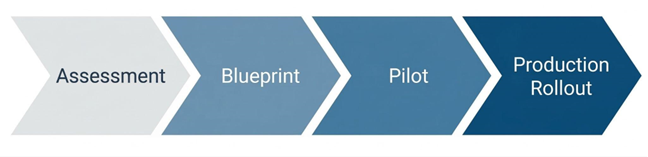
- Environment Assessment: Before a single file is moved, we conduct a comprehensive audit of your existing Citrix or Horizon setup. This identifies which applications are being used, how much processing power your users actually need, and where your data currently lives.
- The Blueprint Phase: Cloud Direct Architects will design your Azure Landing Zone. This is the foundation of your new environment, ensuring that networking, security, and identity management (via Microsoft Entra ID) are configured to enterprise standards from the start.
- Pilot Validation: We don’t move everyone at once. We start with a Pilot group—a subset of users who test the new environment. This allows us to ensure application parity, meaning your team can do everything they did before, only faster and more securely.
- Full Production Rollout: Once validated, we execute a structured replacement. Users are transitioned to the AVD platform in phases, ensuring that support teams are available to help with any day-one questions, resulting in minimal friction for the workforce.
How does Cloud Direct guide the rollout process?
Moving your entire desktop infrastructure can feel like a daunting technical hurdle. Cloud Direct acts as your strategic partner, translating complex Azure requirements into clear business outcomes.
What is a Service Replacement Strategy?
Rather than treating this as a one-off IT project, Cloud Direct manages the transition as a professional service. We focus on mitigating risk by ensuring your legacy environment and your new AVD environment can coexist during the transition. This ‘parallel running’ ensures that if any issues arise, your team remains productive on the old system while we fine-tune the new one.
How do you handle Application Modernisation?
One of the biggest hurdles in any VDI move is legacy software. Our experts advise on whether to virtualise these apps using modern tools like App Attach or transition them to cloud-native, SaaS alternatives. This ensures your new environment isn’t cluttered with outdated delivery methods.
Is there funding available for this transition?
As an Azure Expert MSP, Cloud Direct can help you navigate various Microsoft investment programmes. These initiatives are often available to help offset the initial costs of assessment and migration, making the move to AVD even more financially attractive for your business.
How does Nerdio simplify the rollout and management?
If Azure is the engine, Nerdio is the sophisticated dashboard that allows us to drive it efficiently. Cloud Direct leverages Nerdio Manager to automate the technical heavy lifting that usually makes VDI migrations slow and expensive.
- Rapid Image Management: In legacy systems, updating a Golden Image (the template for your desktops) could take hours. With Nerdio, Cloud Direct can create, test, and deploy updated desktop templates across your entire company with just a few clicks.
- User Profile Resilience: We use Nerdio to manage FSLogix, the technology that handles user profiles. This ensures that when a user logs in, their files, settings, and Outlook signatures are there instantly, regardless of which virtual machine they are assigned to.
- Direct Automated Deployment: Instead of building your environment piece by piece, Cloud Direct uses Nerdio to deploy fully functional host pools and session hosts directly into your Azure subscription. This automation eliminates human error and ensures your infrastructure is ready in days, not months.[H2] How does Nerdio enhance operational efficiency?
Once the rollout is complete, the focus shifts from getting it live to keeping it perfect. Nerdio provides Self-Healing capabilities that proactively maintain the health of your virtual desktop environment.
Can the system fix itself?
Nerdio’s automated troubleshooting can detect common session errors—like a hung desktop or a connectivity glitch—and resolve them automatically without a human ever needing to raise a support ticket. This Self-Healing approach drastically reduces downtime.
How do we monitor performance?
Through the Nerdio interface, Cloud Direct gains real-time insights into the actual user experience. We can see if a specific department is experiencing lag or if an application is consuming too many resources, allowing us to proactively tune the environment before your employees even notice a problem.
| Feature | Legacy VDI (Citrix/Horizon) | AVD with Nerdio & Cloud Direct |
| Updates | Manual, time-consuming patching | Native automated image updates or through integration with Intune image management |
| Scaling | Rigid; hardware must be always-on | Intelligent Auto-scaling (Pay-as-you-use) |
| Support | Reactive; wait for things to break | Proactive; Self-Healing & 24/7 Monitoring |
| Onboarding | Can take days for new hardware | Near-instant virtual provisioning |
How does Cloud Direct ensure long-term success?
The launch date is just the beginning of our partnership. Cloud Direct provides a continuous optimisation service to ensure your investment stays secure and performant as your business evolves.
Why is 24/7 Managed Excellence important?
Technology doesn’t sleep, and neither does our support. Cloud Direct can provide 24/7 managed support to ensure business continuity. Whether it’s a security patch that needs applying at 2 AM or a scaling adjustment for a new global team, our experts are always on hand.
What is a Strategic IT Roadmap?
The cloud moves fast. We don’t just set and forget your AVD environment. We meet with you regularly to discuss how new Azure features—particularly those involving AI and automation—can be integrated into your workspace. Then, we ensure your IT environment isn’t just a cost centre, but a platform for future growth.
What’s Next
Find out more about how you could transition to AVD and if it’s the right decision for you by signing up to our upcoming webinar “Modernising VDI: The Practical Path to AVD With Nerdio & Cloud Direct” at 10:00 am on the 29th of April 2026.